DC5 User’s Manual
Software 6-14
6.3.1.4 Printer preferences
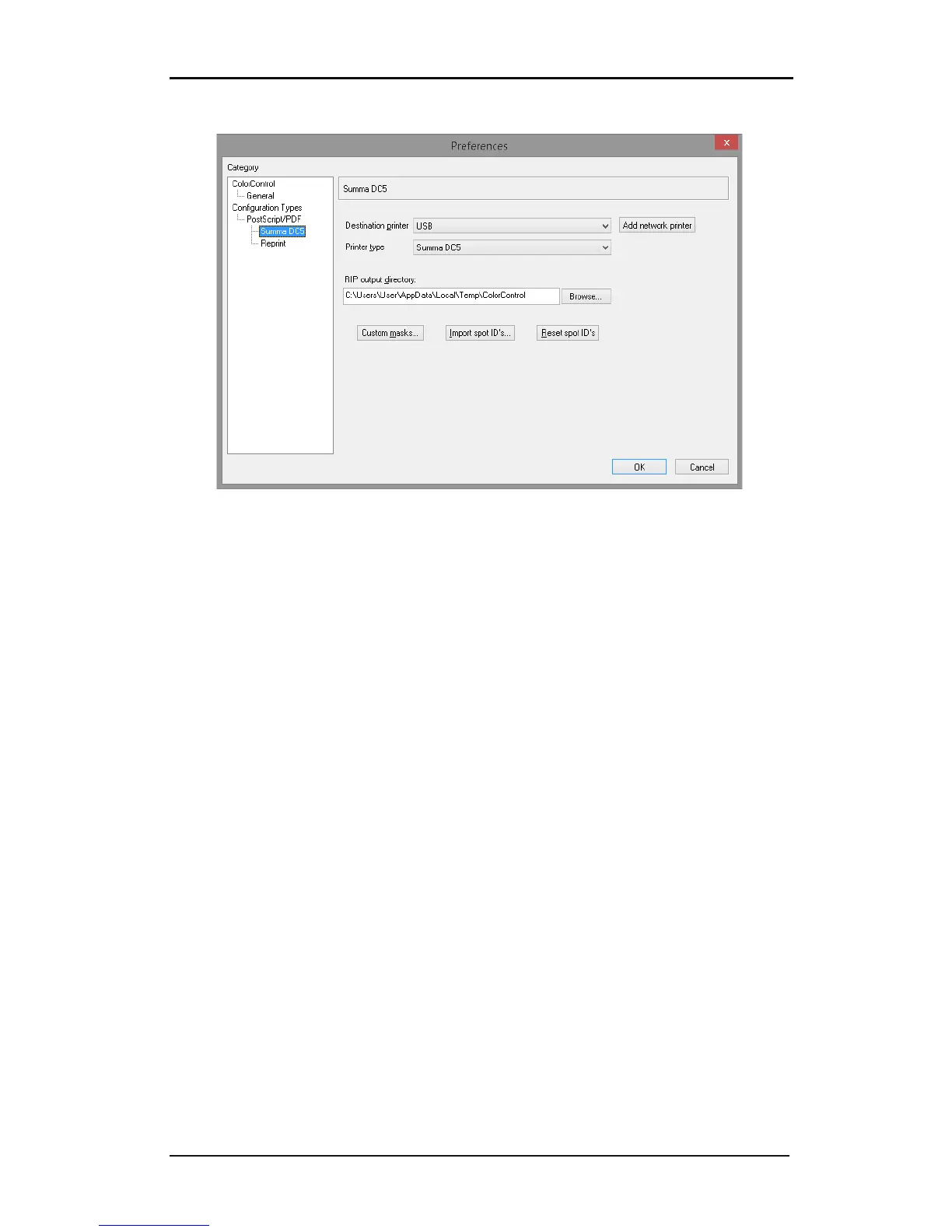
FIG 6-17
6-17 PRINTER PREFERENCES
1. Destination printer: Select the default interface port. If the DC5 is connected via
Ethernet, then add the IP address here. The interface port can be changed afterwards in
the printer dialogue window.
2. Printer Type: Select printer type (DC5or DC5sx).
3. RIP output directory: specify the directory where ripped files will be stored. Be careful
and watch this directory as large ripped files can accumulate and fill your computer’s
hard disk quickly.
4. Custom masks: import custom-made masks for the Vision Print feature. Bitmaps must be
black/white only. It is recommended to use bitmaps with a height that is a multiple of
16 pixels.
5. Import Spot ID’s: allows new spot color ID’s to be created and imported when a new spot
color is released. This can be used if the design program has no special palette for the
DC. To import spot ID’s create a text file with the info. The correct syntax is one
spotcolor name per line with the ‘equal’ sign and the desired number of spot colors:
The “spot color name = n” : the spot color name is the name of the spot color used in
the design software and n is the number of the spot color ribbon in the DC5(sx).
6. Reset Spot ID’s: resets spot ID’s to factory default.



 To Next Page