DC5 User’s Manual
Software 6-25
5. Use High resolution mode is an option to print in high resolution. When this mode is
used, then the DC5(sx) prints with a resolution of 304x608 dpi which results in higher
color contrast and sharper images.
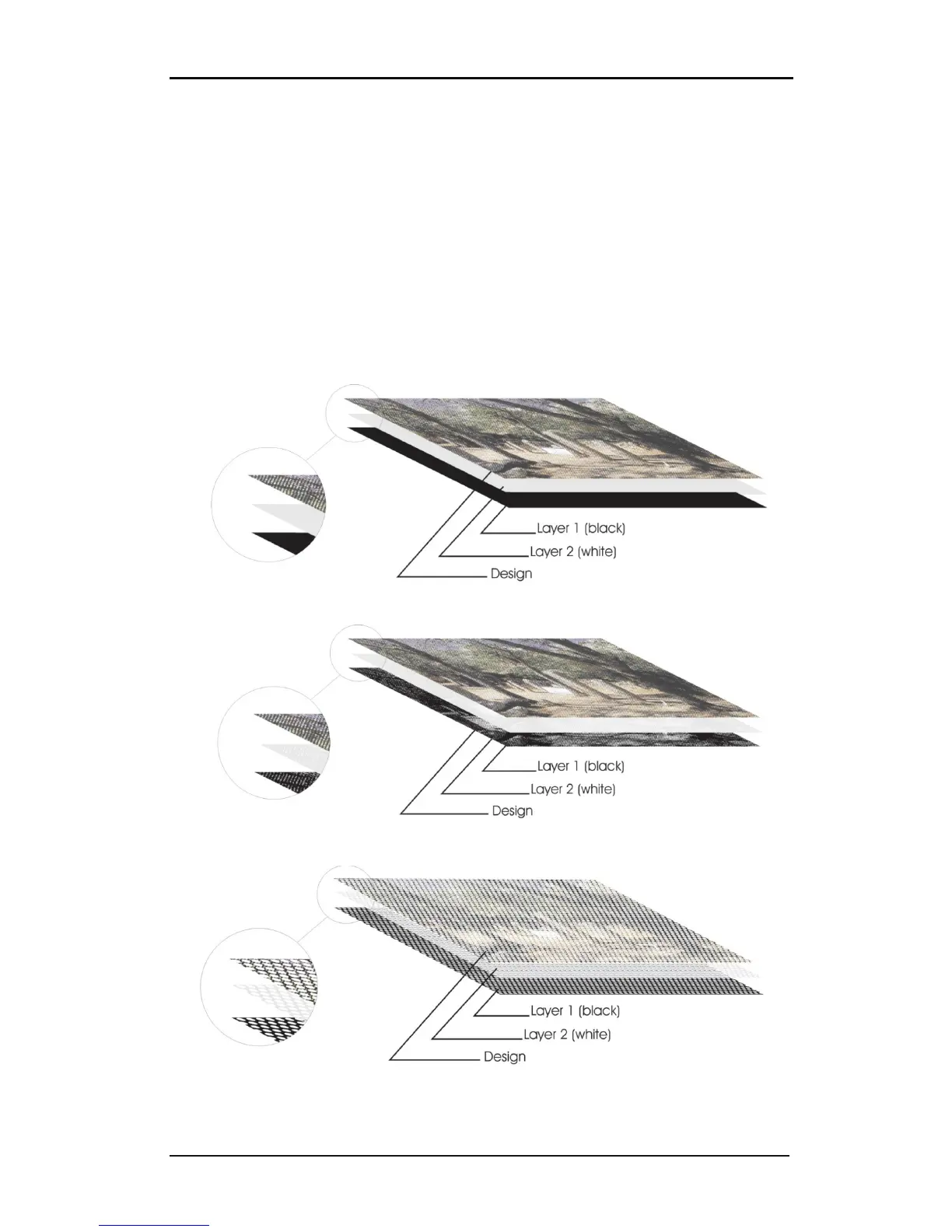
6. Masking: is an option to print color layers underneath other colors. Commonly used for
printing on clear vinyl. Choose between ColorMask (complete coverage), Primer dot
(printed dot on dot, or pixel on pixel) and VisionPrint (perforated hole patterns). The
patterns in VisionPrint can be chosen with the ‘Mask name’. The size of the pattern can
be changed with the ‘Mask size’ and the ‘Shape size’. The small window next to the
shape option displays the pattern that will be printed out. The black area indicates the
area to be printed and the white area indicates what will not be printed. You can choose
one, two or three masking layers. Fill in the cassette numbers for selected layers as
needed. Click on the Check cartridge button to check if the ribbons for masking are
loaded in the printer.
FIG 6-26
6-26 MASKING
FIG 6-27
6-27 PRIMER DOT
FIG 6-28
6-28 VISION PRINT



 To Next Page