DC5 User’s Manual
Software 6-18
6.3.3.1 General tab
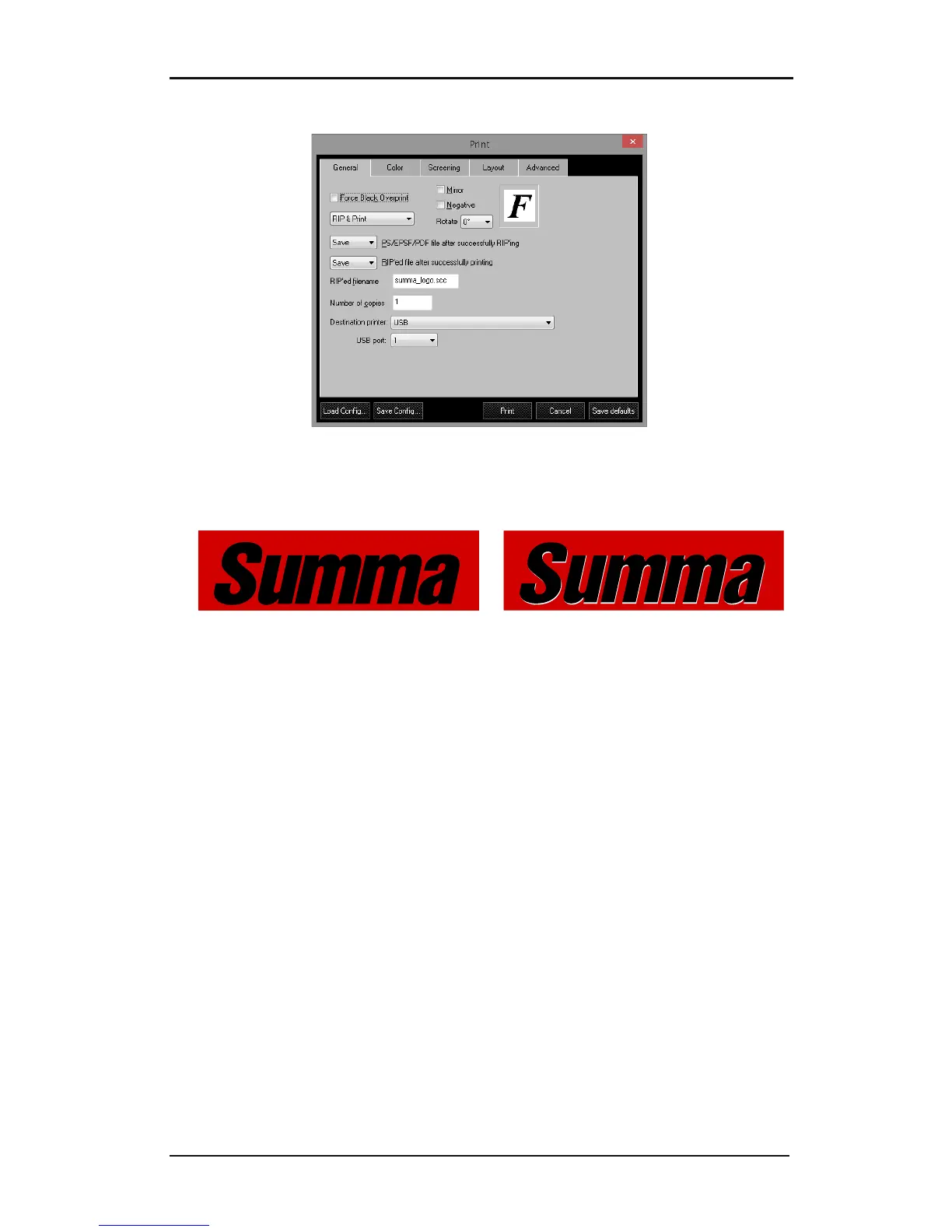
FIG 6-19
6-19 GENERAL TAB
1. Force Black Overprint: overprints all black elements, which help to prevent small black
text from dropping out the background color.
FORCE BLACK OVERPRINT ON FORCE BLACK OVERPRINT OFF
2. Mirror: reverses the image, which is useful for some backlit and window graphic
applications.
3. Negative: creates a negative image, which is useful for screen-printing applications.
4. RIP & Print: There are three options to choose from: just RIP or RIP and preview or RIP
and print.
5. Rotate: rotates an image 90°, 180° or 270°. The letter F next to it shows the chosen
rotation.
6. Ripped filename: This is the name that will be used to the temporarily files that the
program will make.
7. Save: PS/EPS/PDF file after successfully ripping: Select whether to save or delete the file
that has just been ripped.
8. Save: Ripped file after printing: Select whether to save or delete the ripped file after
printing. The location of the ripped files can be set in the preference menu.
9. Number of copies: specify the number of copies to print, this option only works when the
printer has a hard disk.
10. Destination printer: If the printer is not connected to the default printer connector, you
can change to the correct connection with this option.
11. USB: Up to 4 printers can be connected to one computer. You can choose the correct
USB class (the number must be the same as on the printer) with this option.



 To Next Page