DC5 User’s Manual
Maintenance 5-3
5.1.4 Cleaning the printhead
The printhead accumulates dust, debris and resin residue, which can degrade the print
quality. The printer will automatically self-clean the printhead (see section 0). While this
procedure removes much of the residue and debris, the printhead will sometimes require
manual cleaning, particularly after a ribbon breakage because large pieces of ribbon
material might be caught underneath the carriage.
Do not clean the printhead just after printing. The printhead is still hot after printing.
Touching it too soon after printing may cause injuries.
Do not clean the printhead above the printing surface.
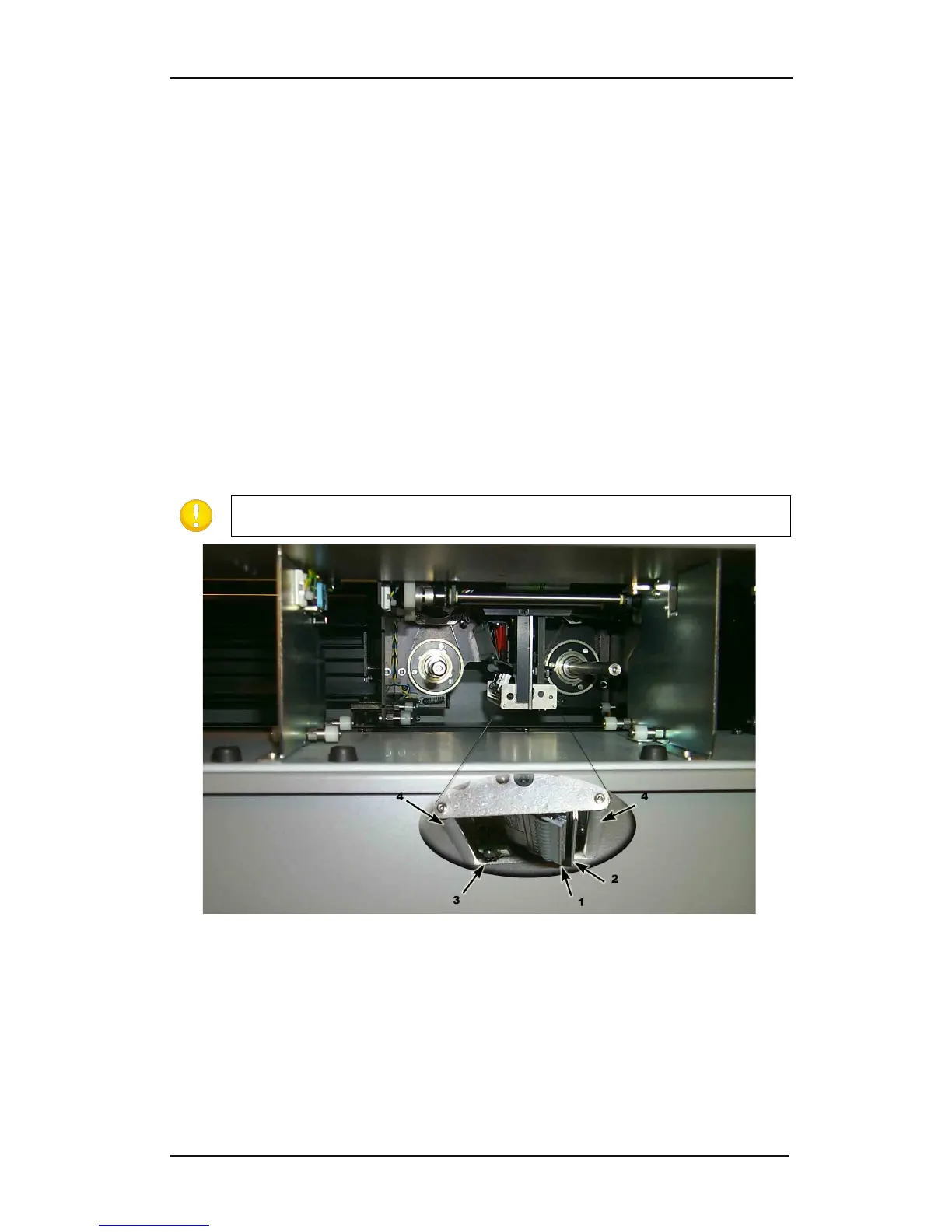
To clean the printhead, proceed as follows:
1. Power off the DC5(sx). Open up the rear cover and take out the cassette.
2. Use a lint free cloth or gauze, moistened with isopropyl alcohol.
3. Gently wipe the printhead (1), the release plate (2) and the rollers (4).
4. Note the position of the ribbon end sensor (3).
FIG 5-4
5-4 CLEANING THE PRINTHEAD
5.1.5 OptiPrint™ cleaning system
The maintenance of the system is described in the installation guide, which was packed
separately in the accessory box.



 To Next Page