DC5 User’s Manual
Software 6-19
6.3.3.2 Color Tab
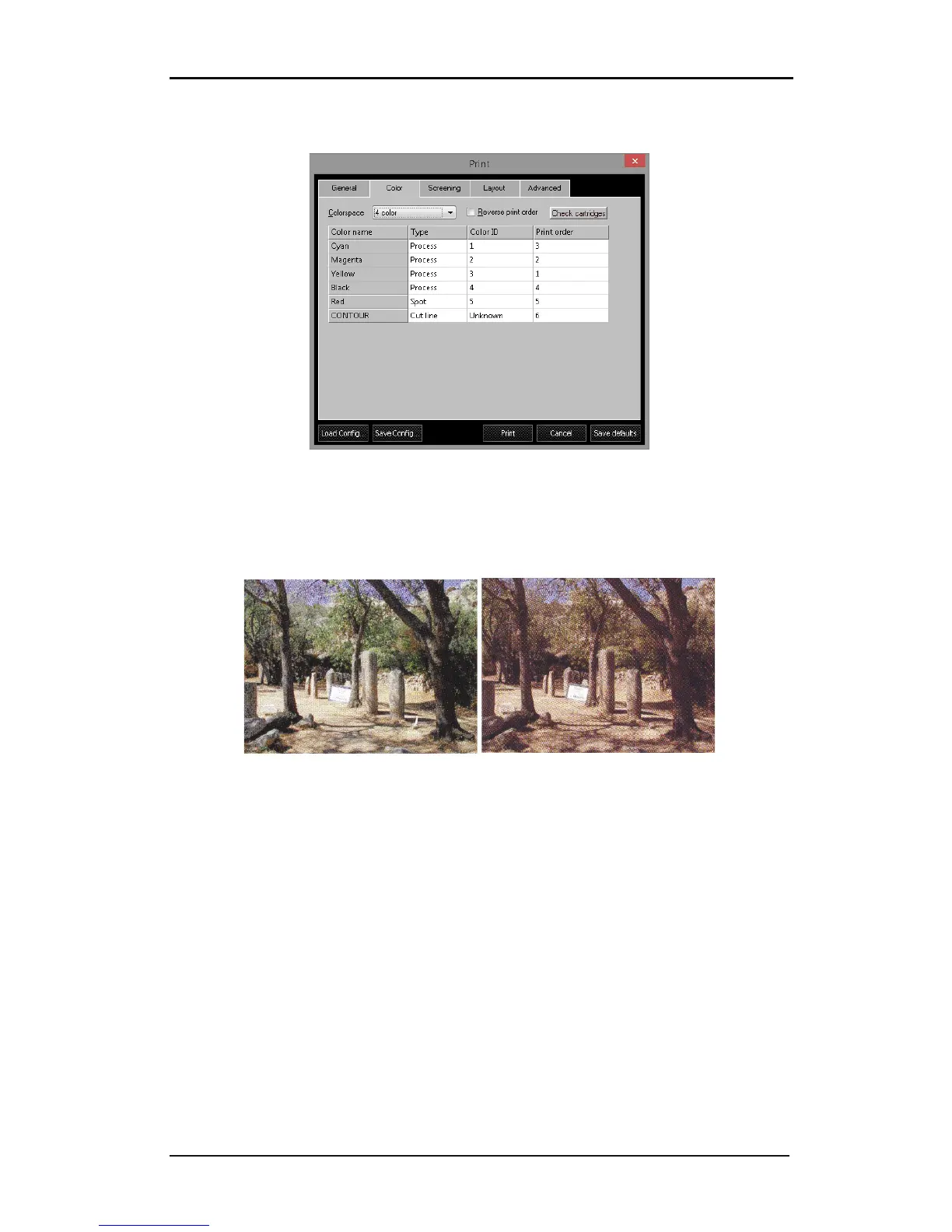
FIG 6-20
6-20 COLOR TAB
1. Colorspace: select 3 color (CMY), 4 color (CMYK), Monochrome (Grey scale) or spot color
only. Printing in 4 colors is chosen to deepen shadows and to provide a true black.
Printing in 3 colors reduces the cost of the output. (See fig below – only visible in color)
PRINTED CMYK PRINTED CMY
2. Reverse print order: reverses the print order. Choosing this option will result in the
masking colors being printed last. The best print order is always YMCK.
3. Check cartridges: Click this button to check whether all cartridges, needed for the job,
are available in the printer.
4. Type: CMYK information in the file will default to “Process”. If the spot color information
is assigned in the design software, they will appear as “Spot” here. The spot colors can
be changed to “As process” if the spot color ribbons are not available. The spot color
“CONTOUR” and “FLEXCUT” are exceptions. SCC will cut out any data in spot color
“CONTOUR”, the data in “FLEXCUT” will be cut through (see section 3.2). There can only
be one ‘contour color’ and one ‘FlexCut Color’.
5. Cassette Number: refers to the ribbon ID number. Numbers are assigned automatically if
SCC recognizes the color name.
6. Print order: specifies the order in which the color planes will be printed. Ideally, always
print process colors in YMCK order; the lightest color first.



 To Next Page