DC5 User’s Manual
Basic Operation 2-12
2.5 How to calibrate print and Cut
The print head and the cutting head each have their own origin point. Perform the
following test to align both origins so that the contour cuts are not offset.
NOTE: Each time the knife is replaced or the media type is changed, the print and
cut calibration has to be done.
Only do a print and cut calibration if the media tracking and knife parameters are
set correctly (see section 2.3 and 2.4).
Print and cut calibration:
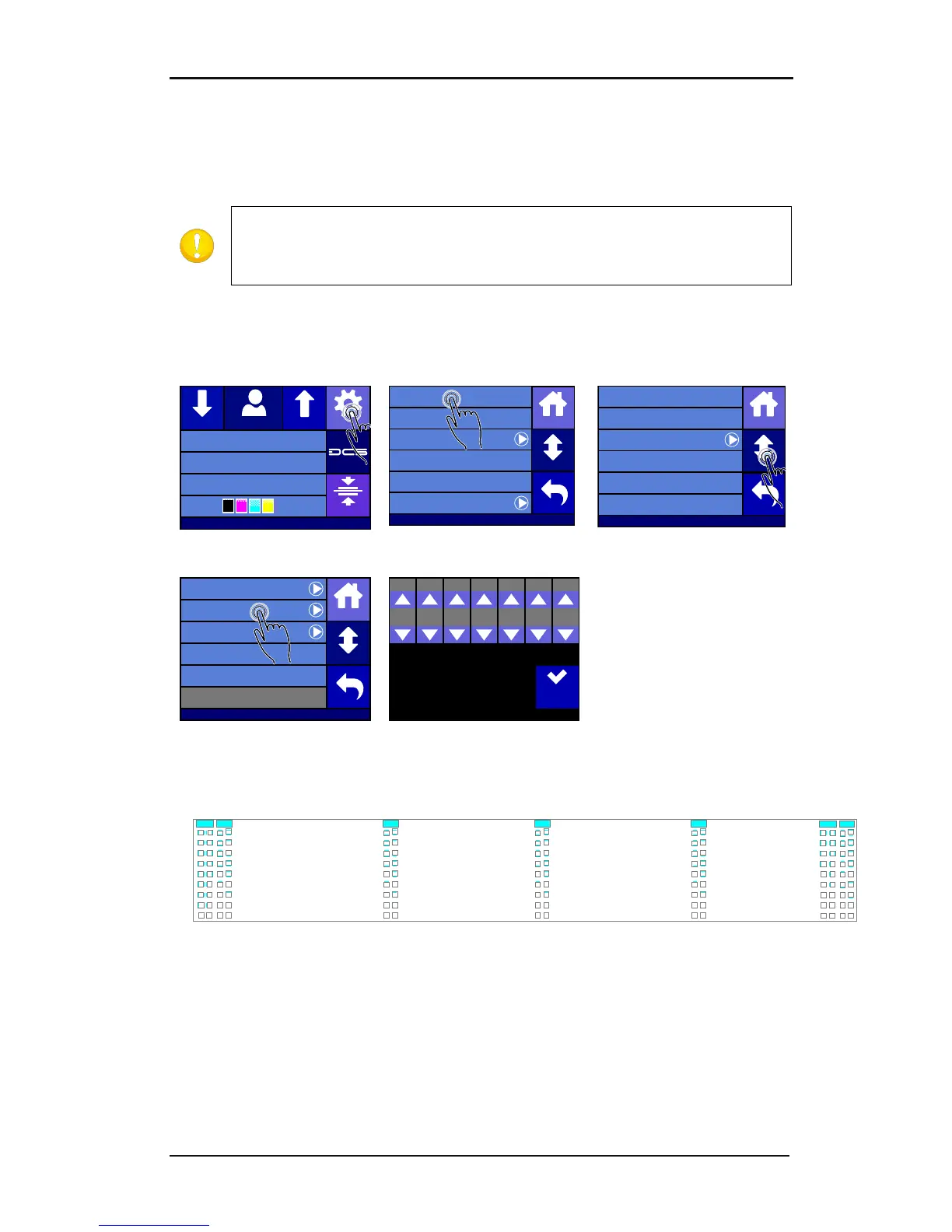
1. Power on the printer and load the media (see section 1.6.1).
Press Calibrate Print&Cut.
The DC5(sx) first prints and cuts out a test pattern similar to the one below.
SET 6 SET 7
0
-1
-2
-3
-4
-5
-6
-7
-8
0
+1
+2
+3
+4
+5
+6
+7
+8
0
-1
-2
-3
-4
-5
-6
-7
-8
0
+1
+2
+3
+4
+5
+6
+7
+8
SET 3
0
-1
-2
-3
-4
-5
-6
-7
-8
0
+1
+2
+3
+4
+5
+6
+7
+8
SET 1 SET 2
0
-1
-2
-3
-4
-5
-6
-7
-8
0
+1
+2
+3
+4
+5
+6
+7
+8
0
-1
-2
-3
-4
-5
-6
-7
-8
0
+1
+2
+3
+4
+5
+6
+7
+8
SET 4
0
-1
-2
-3
-4
-5
-6
-7
-8
0
+1
+2
+3
+4
+5
+6
+7
+8
SET 5
0
-1
-2
-3
-4
-5
-6
-7
-8
0
+1
+2
+3
+4
+5
+6
+7
+8
FIG 2-12
2-12 PRINT AND CUT TEST PATTERN
Check for the squares where the cut line is situated just above the printed line. Use those
values to insert via the control panel. If the values were too far off, then redo the test.
Summa USB port
Density 12000
Knife pressure 75gr
Media width 672mm
Clamp
Settings
Feed
Configuration 1Feed
Settings
Shut down
Communication ...
System menu ...
Reprint job
Cutter menu ...
Printer menu ...
Back
Home
More
Settings | Printer menu
Op tiTr ac Automatic
OptiTrac color Cyan
Scratchguard Off
Calibrate Linefeed
Double Density Off
Density 12000
Back
Home
More
Settings | Printer menu
Color Offset Standard
Dot Overlap On
Clean Printhead
Back
Home
More
Calibrate Print&Cut
Head Alignment
Apply
SET 7SET 6SET 5SET 4SET 3SET 2SET 1
0000000



 To Next Page