DC5 User’s Manual
Setup 1-15
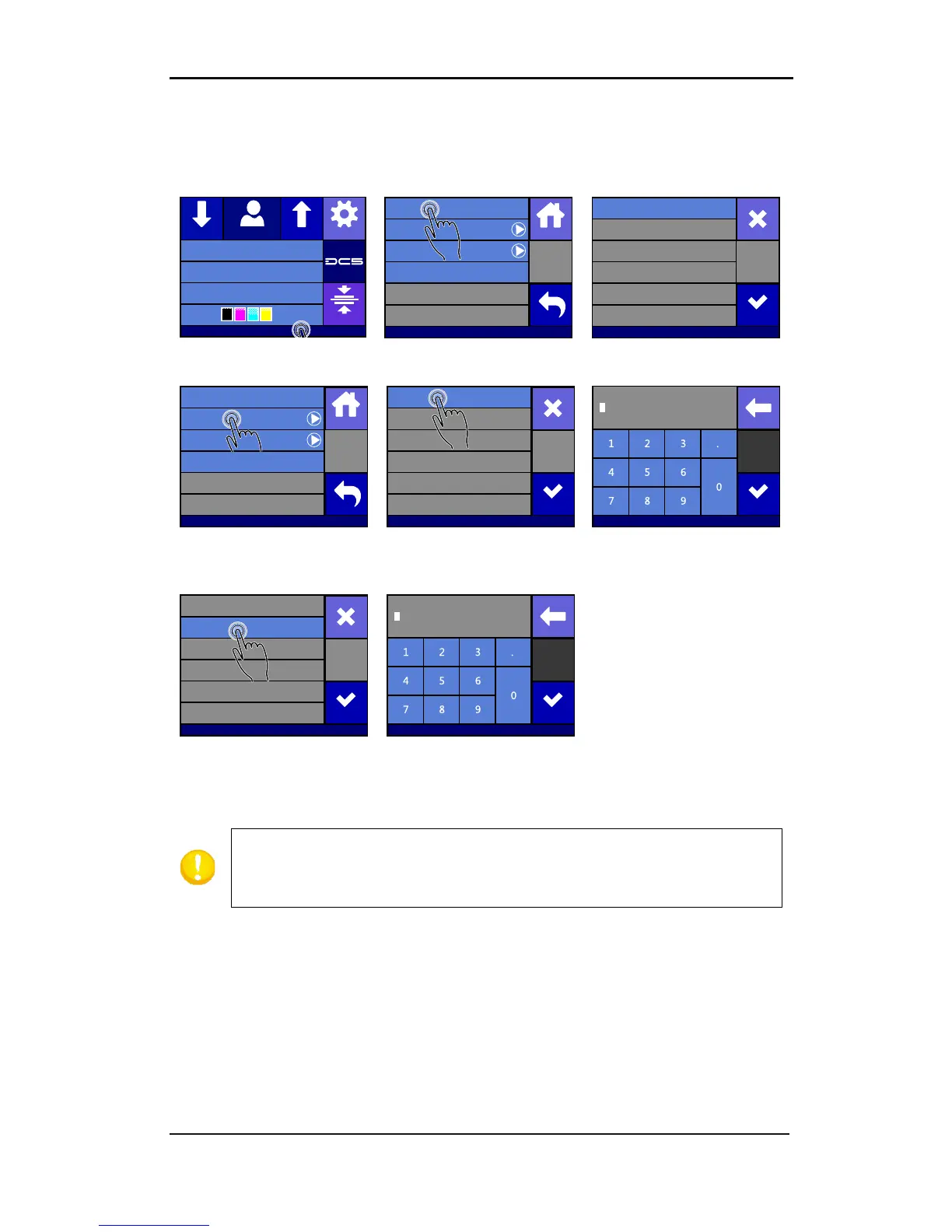
In case everything is set manually:
1. Power on the printer (see section 1.4) and connect the Ethernet cable.
4. Press off and then Apply
6. Press the parameter that
7. Set the address correctly
Press the parameter that
has to be changed
Set the address correctly
and press apply
Summa USB port 1
Density 12000
Knife pressure 75gr
Media width 672mm
Clamp
SettingsFeedConfiguration 1Feed
Communication
Status
Configure
DHCP On
Back
Home
USB Class Summa USB port 1
Communication
On
Off
Cancel
Apply
Communication
Status
Configure
DHCP On
Back
Home
USB Class Summa USB port 1
DNS 2 0.0.0.0
DNS 1 0.0.0.0
Subnet 255.255.255.0
IP 192.168.1.1
Cancel
Communication
Gateway 0.0.0.0
Apply
Apply
Communication
1 92.168.001.001
DNS 2 0.0.0.0
DNS 1 0.0.0.0
Subnet 255.255.255.0
IP 192.168.1.1
Cancel
Communication
Gateway 0.0.0.0
Apply
Apply
Communication
2 55.255.255.0
NOTE: The port the DC5 uses is 9203. This is already set correct in Printer
Control and Color Control. In case another program/driver is used to
communicate with the printer, then this port has to be set in this



 To Next Page