S Class 3 User’s Manual
Basic operation 2-13
(Length Calibration)
The S Class 3 cutters are friction-feed machines, so the cutting length depends on the thickness of
the material.
The cutters have been calibrated in the factory for standard 2-mil cast or 3-mil calendared vinyl. Each
user (the S Class 3 has a total of 8) can hold a different calibration factor. This is very helpful for
multi-coloured signs: it ensures that the parts in different colours match up, even if different types of
vinyl media are used.
ATTENTION: For standard use, it is not necessary to calibrate the machine. With
standard vinyl, the accuracy is within 0.2%. However, if high accuracy is required,
calibration is necessary.
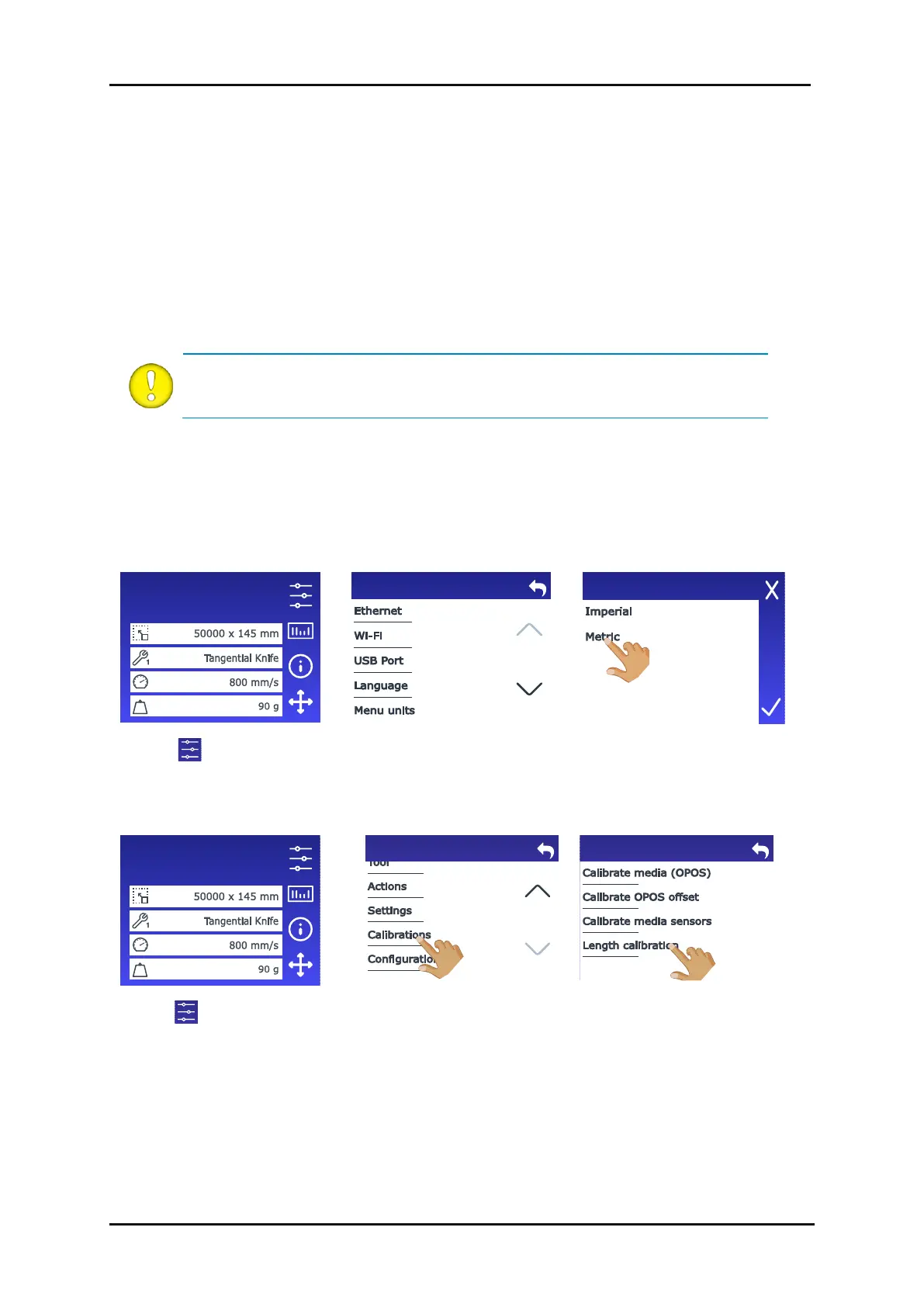
Calibrating the media (Length calibration):
1. Power on the cutter.
2. If the menu units are already being displayed metrically, continue with step 6. If the menu units
are not displayed metrically, perform steps 3 to 5.
4. Scroll down with the arrow
and tap Menu units.
6. Load the media (see section 1.5).
8. Scroll down with the arrow
and tap Calibrations.
9. Tap Length calibration.
Configuration 1
LAN 192.168.10.2
Configuration 1
LAN 192.168.10.2
2.6 How to Make Sure the Sign Has the Correct Size









 To Next Page