EasyManua.ls Logo

Summa S3 Series - Processing Long Jobs

Summa S3 Series
111 pages
Print Icon
To Next Page IconTo Next Page
To Previous Page IconTo Previous Page
Loading...
S Class 3 User’s Manual
OPOS 3-4
The OPOS sensor normally registers all the marks before cutting starts. However, in long jobs
that can lead to extensive back-and-forth shifting of the media, which could lead to poor
tracking. To avoid this, the parameter Panelling can be set in the cutter, dividing the job into
panels.
NOTE: Activate the panelling function in the software OR in the cutter (not both).
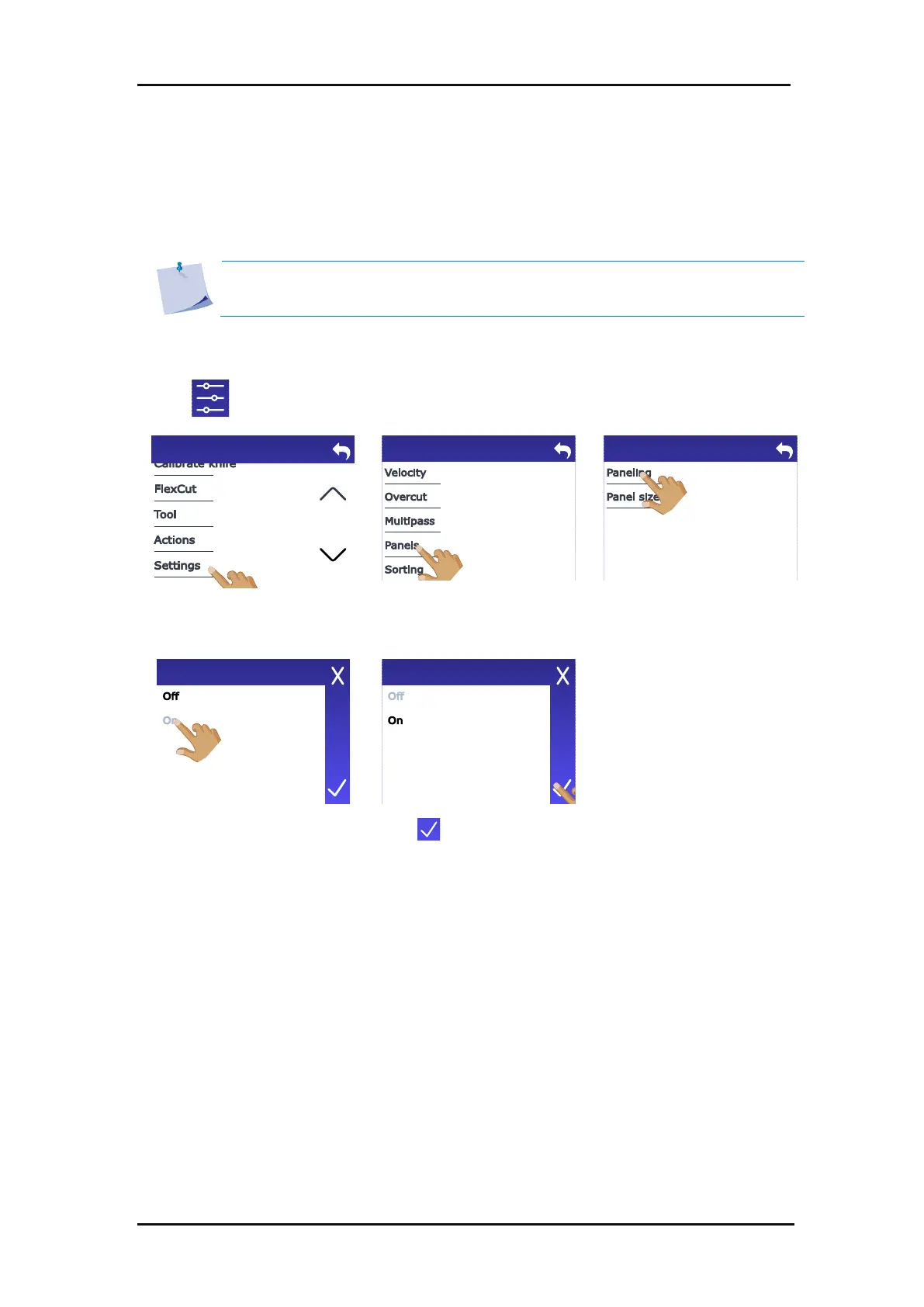
Activating panelling:
1. Tap .
2. Scroll down with the arrow
and tap Settings.
3. Tap Panels.
4. Tap Panelling.
5. Tap On.
6. Tap to confirm.
Menu
Settings
Panels
Paneling
Paneling
3.2.3 Processing long jobs

Table of Contents

Related product manuals