EasyManua.ls Logo

Summa S3 Series - Use DHCP Server

Summa S3 Series
111 pages
Print Icon
To Next Page IconTo Next Page
To Previous Page IconTo Previous Page
Loading...
S Class 3 User’s Manual
Setup 1-15
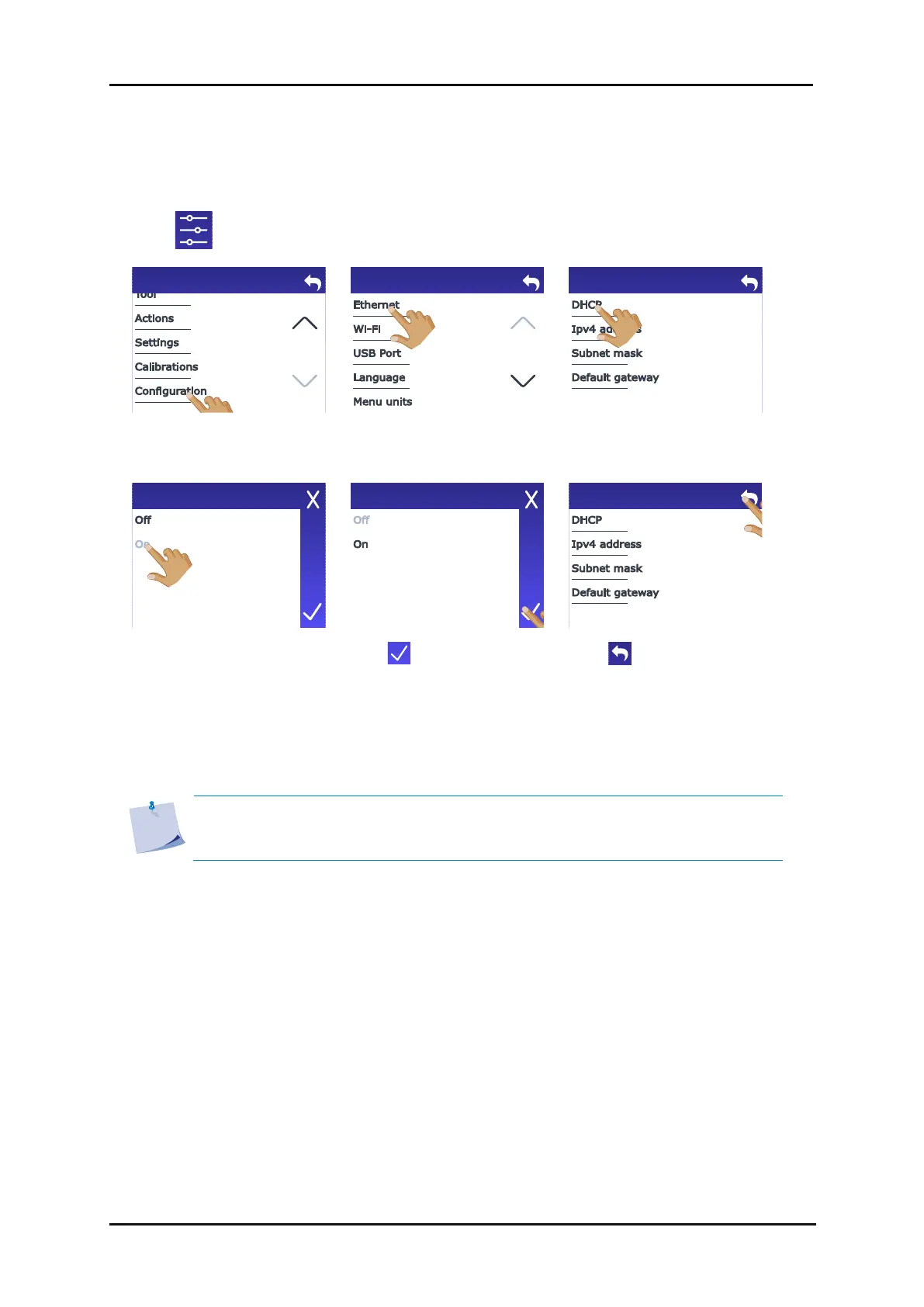
1. Connect the Ethernet cable and power on the cutter (see section 1.3).
2. Tap .
3. Scroll down with the arrow
and tap Configuration.
4. Tap Ethernet.
5. Tap DHCP.
6. Tap On.
7. Tap to confirm.
8. Tap to leave.
9. Reboot the cutter.
The assigned IP address should now be visible in the status and can be used in the cutting software.
NOTE: If the DCHP server is used, then the IP address that is assigned to it can be
changed if the cutter is not used for a time longer than the lease time set in the
DHCP server (check with your IT admin for details).
Menu
Configuration
Ethernet
DHCP
DHCP
Ethernet
1.4.2.2 Use DHCP server

Table of Contents