S Class 3 User’s Manual
Setup 1-13
➢ Mac OSX
Most recent cutting software do not need a driver installation when a computer is connected to the
cutter. The software that controls the driver is built into the cutting software.
ATTENTION: The Ethernet cable should be a shielded CAT6 Ethernet cable.
A couple of parameters need to be set when connecting a cutter to the Ethernet. It is best to ask the
network administrator whether a static address is needed or if a DHCP server is used. If a static
address is used ask for the address and the subnet mask.
The static address that you received will be used in the software to drive the cutter. It has also to be
set in the cutter itself.
NOTE: It is recommended to use a static IP address.
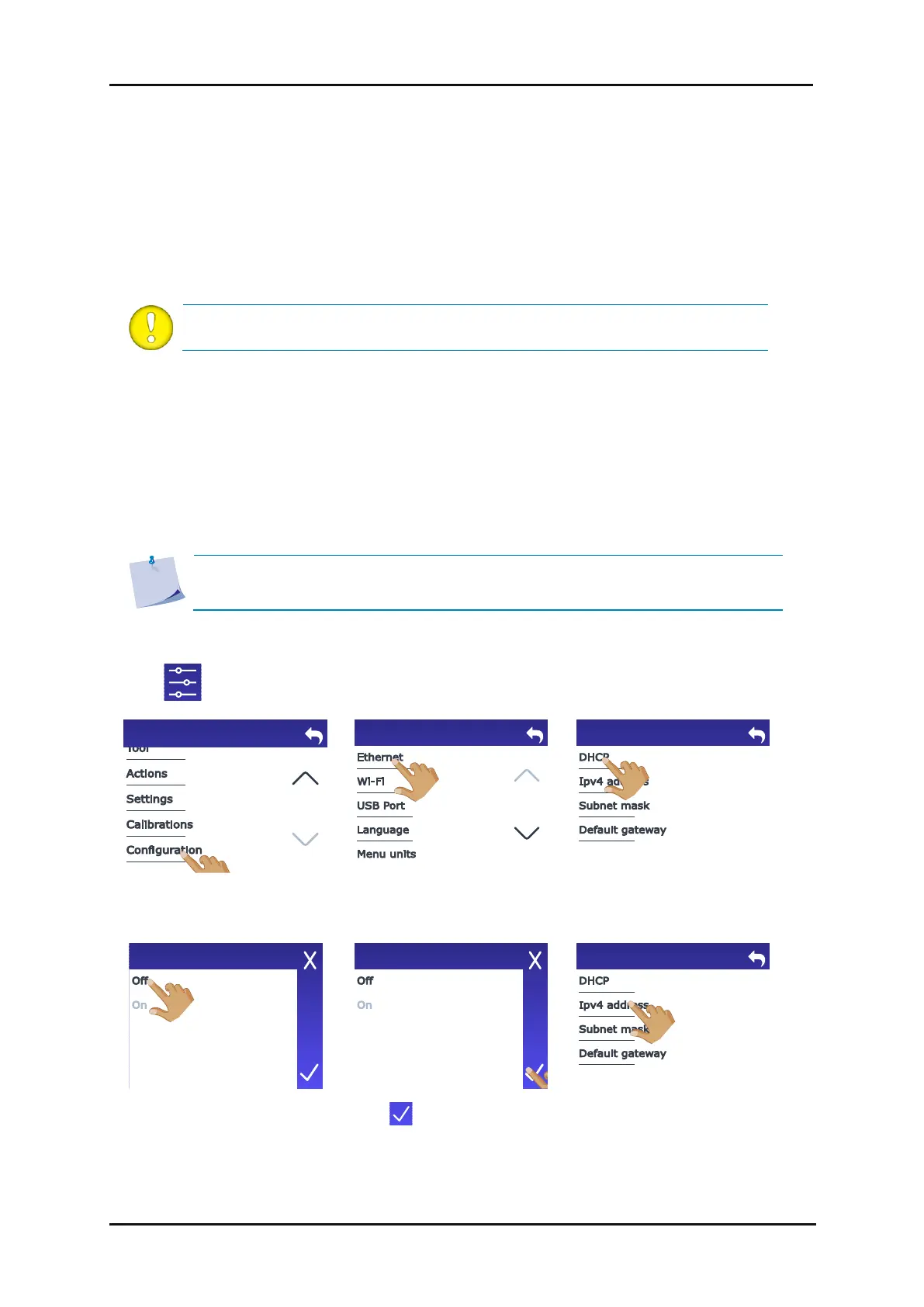
1. Connect the Ethernet cable and power on the cutter (see section 1.3).
2. Tap .
3. Scroll down with the arrow
and tap Configuration.
1.4.1.2 Connecting the S Class 3 cutter to a Mac, using a USB cable
1.4.2 Wired Ethernet connection
1.4.2.1 Use static address









 To Next Page