S Class 3 User’s Manual
OPOS 3-13
Media calibration ensures that the OPOS sensor can recognize the marks. The OPOS sensor is
factory calibrated to work with a wide range of materials. However, certain materials, such as
those with a high gloss, may not work with the default settings. Before working with such
materials, perform a media calibration test. This test will alter OPOS’ sensitivity so that it will
read the marks with greater reliability. Print a square of at least 4x4 cm on the media that will
be used for the actual job, using the same ink as for printing the registration marks.
NOTE: If the media calibration is completed and the results have not improved,
reset the media calibration value to the default value.
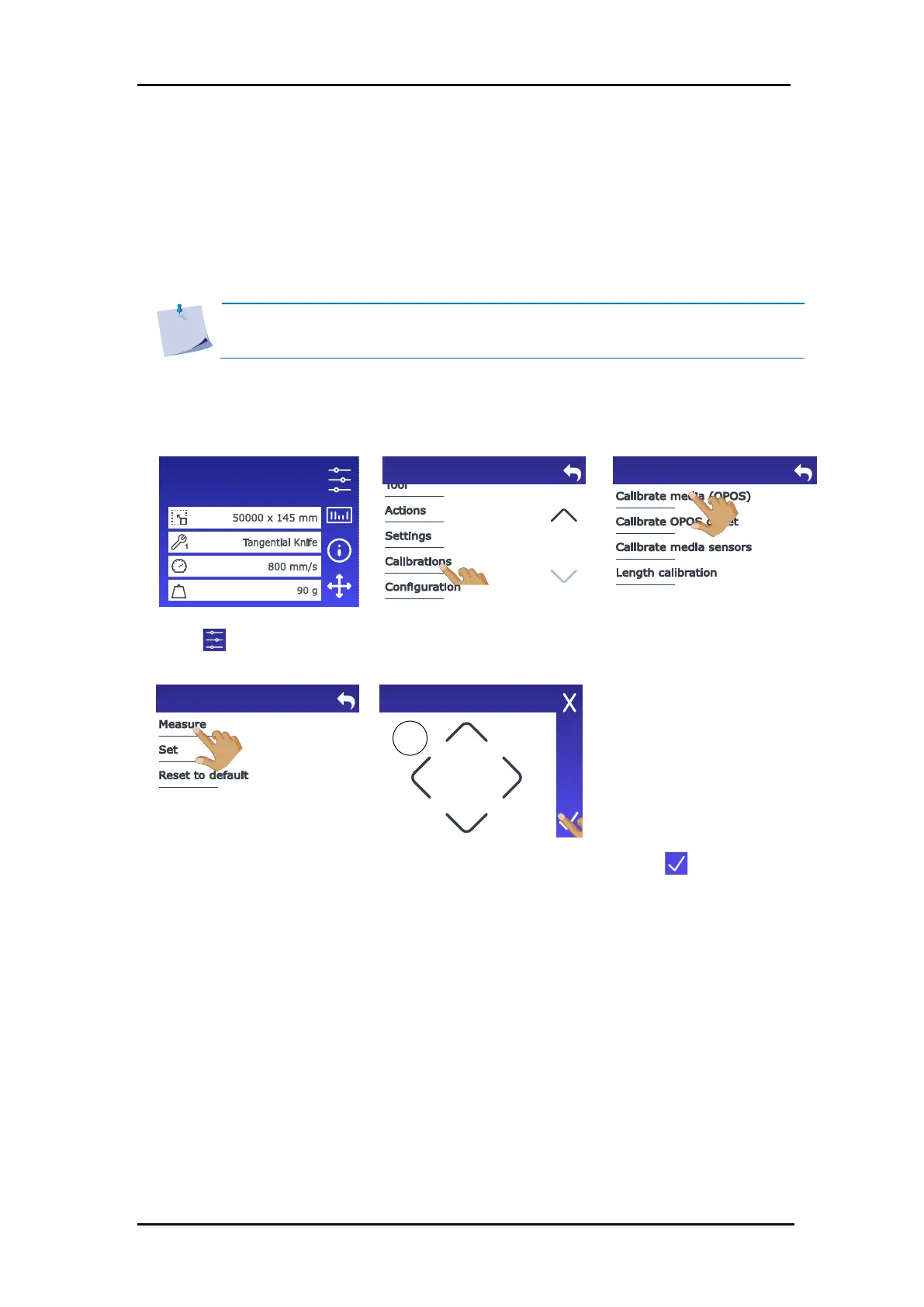
Perform the media calibration:
1. Switch on the cutter and load the vinyl with the printed square (see section 1.5).
3. Scroll down with the arrow
and tap Calibrations.
4. Tap Calibrate media
(OPOS).
The small circle in the upper
left corner shows what the
OPOS sensor actually sees
(white media in this case).
6. Use the arrows to position
the OPOS sensor above an
unprinted area.
Configuration 1
LAN 192.168.10.2
Calibrate media (OPOS)
Position
OPOS sensor
above
unprinted
media.
3.4.2 Calibrate media (OPOS)









 To Next Page