EasyManua.ls Logo

Summa S3 Series - Cutting Multiple Copies of a Graphic on the same Roll

Summa S3 Series
111 pages
Print Icon
To Next Page IconTo Next Page
To Previous Page IconTo Previous Page
Loading...
S Class 3 User’s Manual
OPOS 3-6
If the same graphic design has been printed on a roll with equal distance between these
graphics, this feature can be used.
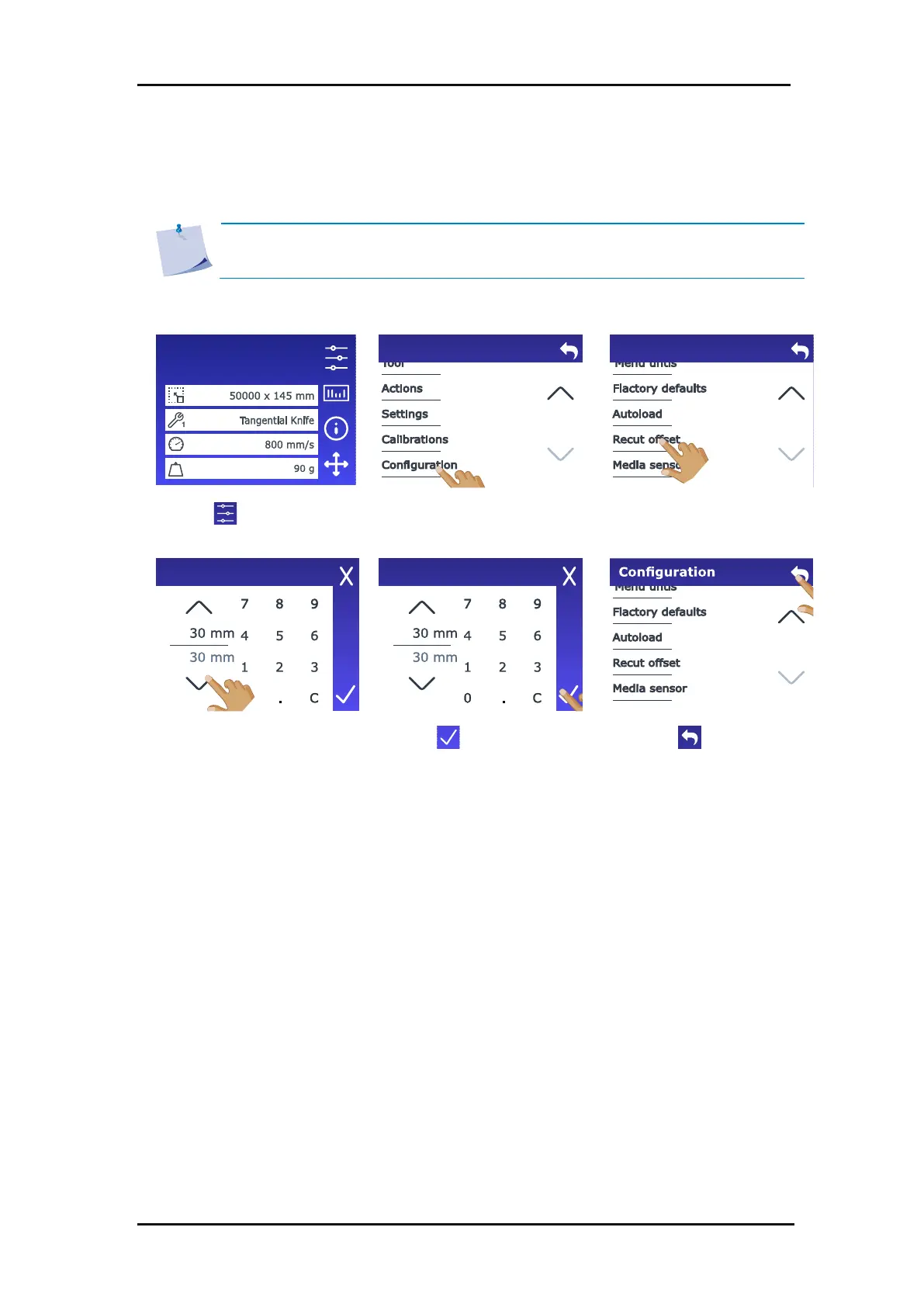
1. Power on the cutter and load the media (see section 1.5).
2. Tap .
3. Scroll down with the arrow
and tap Configuration.
4. Scroll down with the arrow
and tap Recut offset.
5. Use the arrows to change
the value or enter the
value.
6. Tap to confirm.
7. Tap to get online
again.
8. Make the first copy as you would perform a normal OPOS job.
The cutter will stop after the first contour has been cut and will go online again.
Configuration 1
LAN 192.168.10.2
Menu
Configuration
Recut offset
Recut offset
3.3.1 Cutting multiple copies of a graphic on the same roll
NOTE: The distance between the multiple copies should be at least 30 mm.

Table of Contents

Related product manuals