CHAPTER 9 Cleaning and Maintenance
9-16 Sysmex XE-5000 Instructions for Use
Revised April 2007
7. Close the detector cover. Then close the Main Unit front
cover and front right cover.
8. Turn ON the power of the Main Unit.
9. Background check starts automatically. Make sure that all
background values are within acceptable.
Cleaning the top part of aperture
When clogs are not removed after cleaning the bottom of
aperture, clean the upper of aperture by the following
procedure.
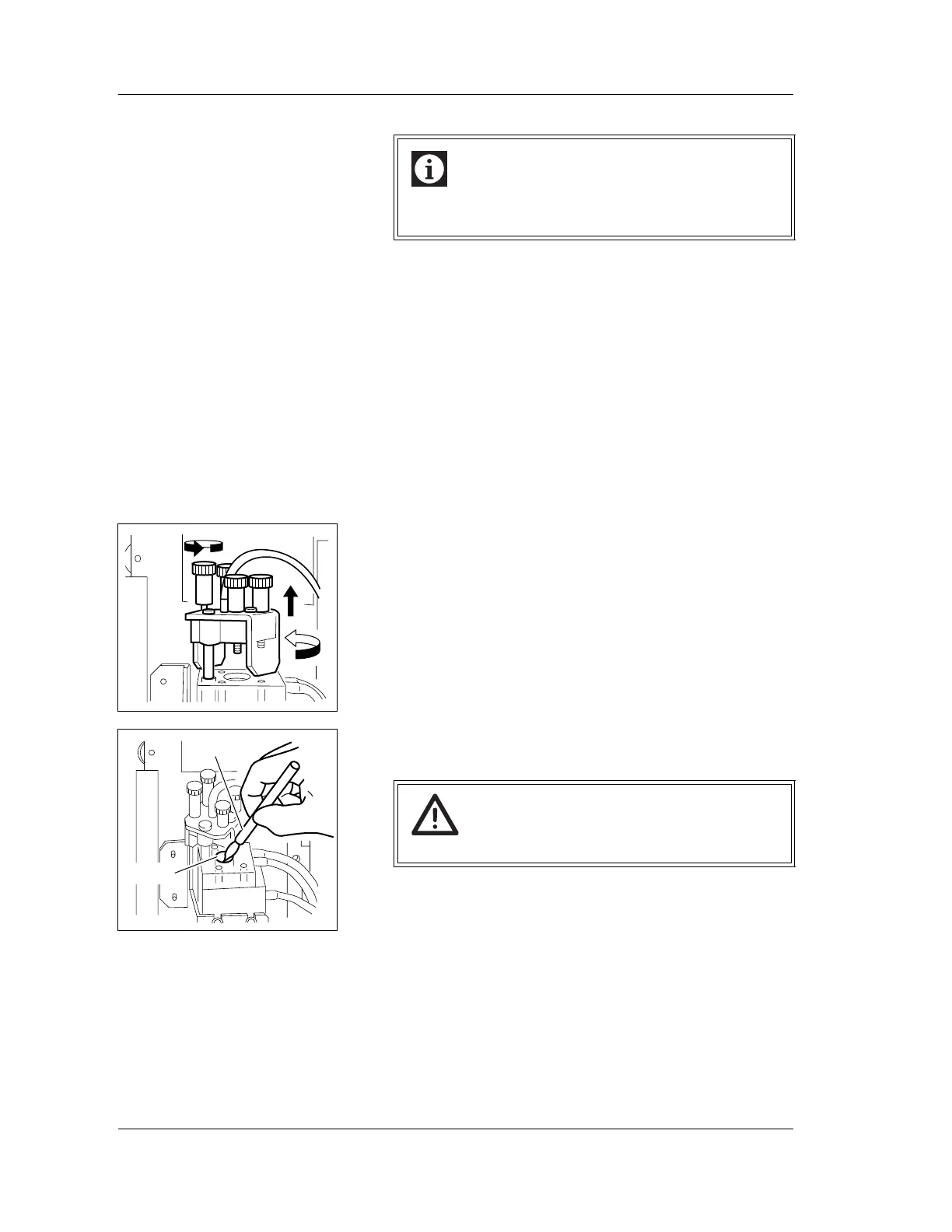
1. Loosen the four fixing screws.
2. Pull up the cap on the detector chamber, and move it in
the direction as shown in the figure.
3. Apply CELLCLEAN on the brush provided, and dab by
lightly prodding the brush against the aperture.
4. Return the cap to the original position on the detector
chamber.
5. Close the detector cover. Then close the Main Unit front
cover and front right cover.
6. Turn ON the power of the Main Unit.
7. Background check starts automatically. Make sure that all
background values are within acceptable.
Information
Tighten the fixing screw of the sheath nozzle
alternately and evenly.
Caution!
Be sure to use CELLCLEAN only.
Aperture
Brush



 To Next Page