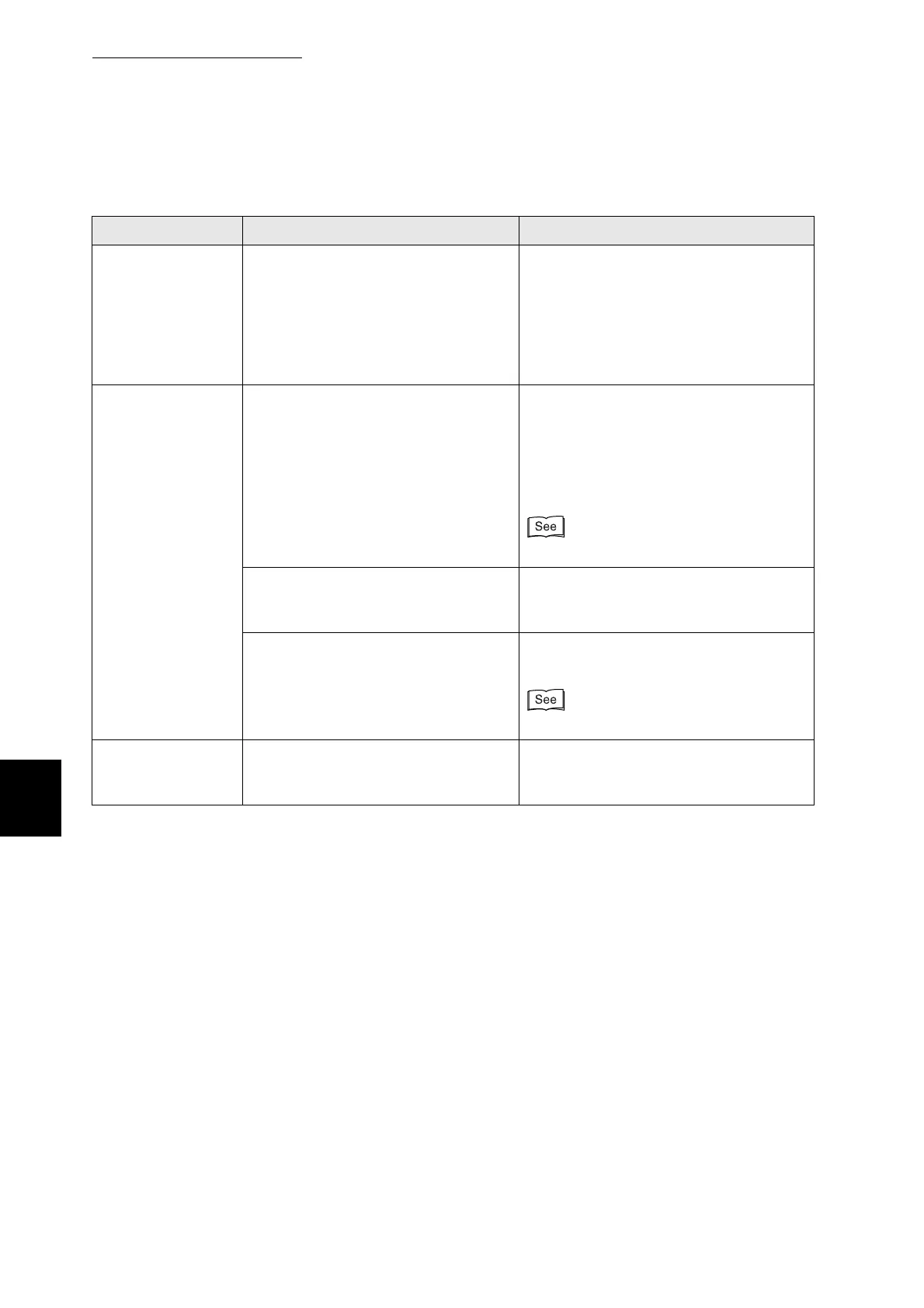
6.3 The Printer Does not Print
138
6
Troubleshooting
Condition Verification Solution
(Continued from
previous page)
Cannot print in an
SMB environment
(When a network
expansion card is
installed)
Does the message Write Error appear
on the computer screen?
This message appears when the
maximum number of permissible
connections on the Windows network is
exceeded.
Before sending a print job, open the
printer window and check that the queue
is empty.
Cannot print in a
NetWare
environment
(When a network
expansion card
installed)
Do hubs or other network equipment
support automatic frame type setting?
Check that the data link indicator of the
printer connection port on the network
equipment is on.
If the indicator is off, set the same frame
type on the control panel as the one
used by the NetWare file server.
"5.3 List of Menu Items"
Is the NetWare file server or print
server running? (In remote printer
mode.)
Start the NetWare file server or print
server. (In remote printer mode.)
Is the NetWare file server correctly
configured for a NetWare
environment?
Use Network Utilities and check the
network configuration.
Network User Guide
An error message
appears on the
computer screen
A printer error has occurred. Check the message and rectify the error
accordingly.



 To Next Page