2.4 Installing the Printer Driver
46
Installing the Printer Driver
2
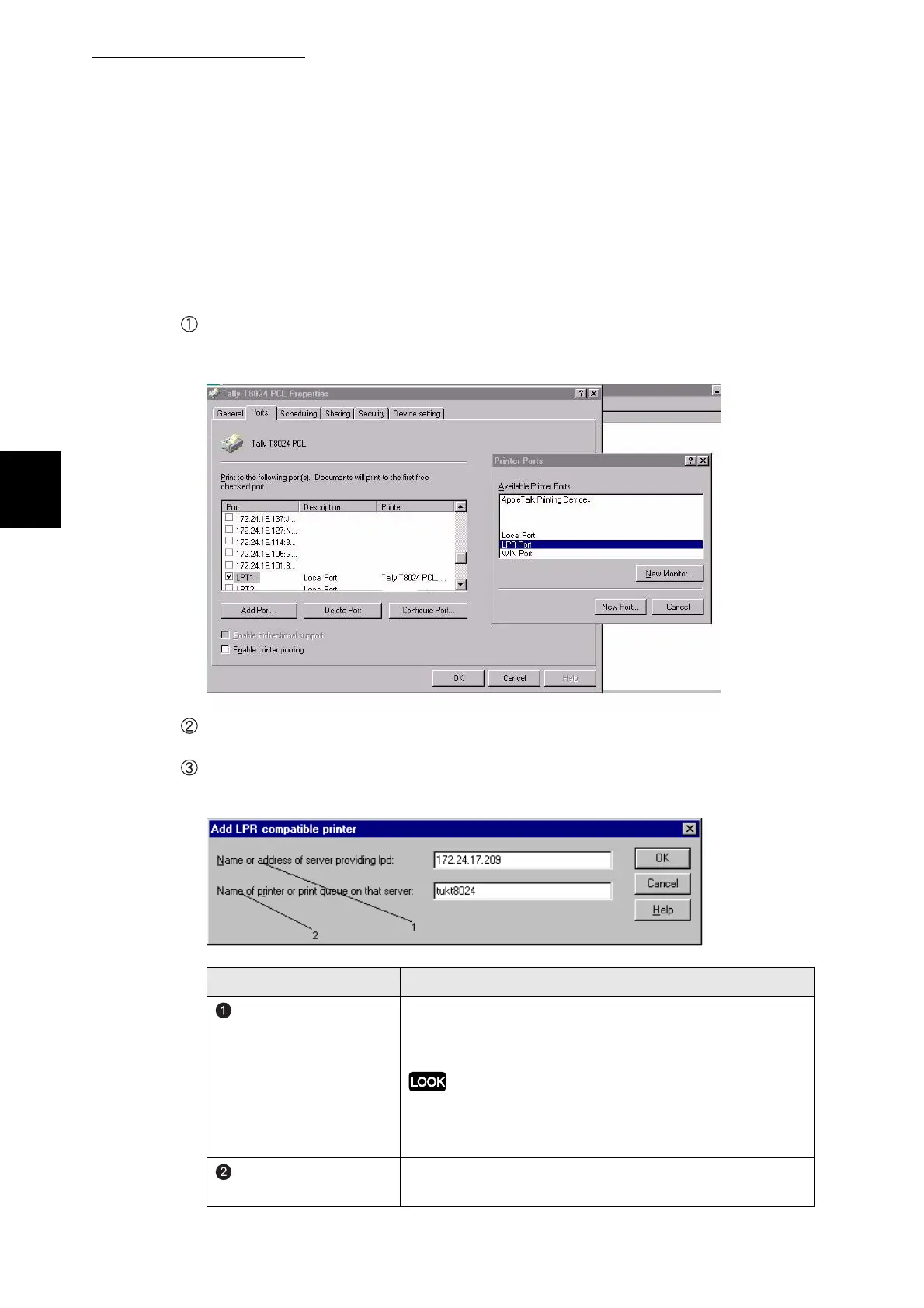
For connections using TCP\IP ports on windows NT4\2000\XP the auto run CD
driver can be loaded and then port changed from lpt1 to a selection as shown
below.
For TCP/IP environment (Windows NT 4.0)
Select Others and click LPR Port from Available ports. If this option is not available, look
at the windows NT help for Microsoft TCP\IP printing service for instructions on adding
this service.
Click OK.
The Add LPR compatible printer dialog box is displayed.
Enter the items in each text box.
Example: For Name or address of server providing lpd, "172.24.17.209", and the Name
of printer or print queue on that server, "TUKT8024".
Item Remarks
Name or address of
server providing lpd
Enter the IP address of the printer. You can enter the
registered printer name when it is possible to use name
solving services like WINS.
When the IP address has numbers with less than three digits, do
not enter "0" before these numbers, e.g.
"XXX.XXX.00X.0XX". It will not work properly.
Name of printer or print
queue on that server
Enter any name for the T8024.



 To Next Page