EasyManua.ls Logo

Valleylab CUSA EXcel-8 - Page 121

Valleylab CUSA EXcel-8
239 pages
Print Icon
To Next Page IconTo Next Page
To Previous Page IconTo Previous Page
Loading...
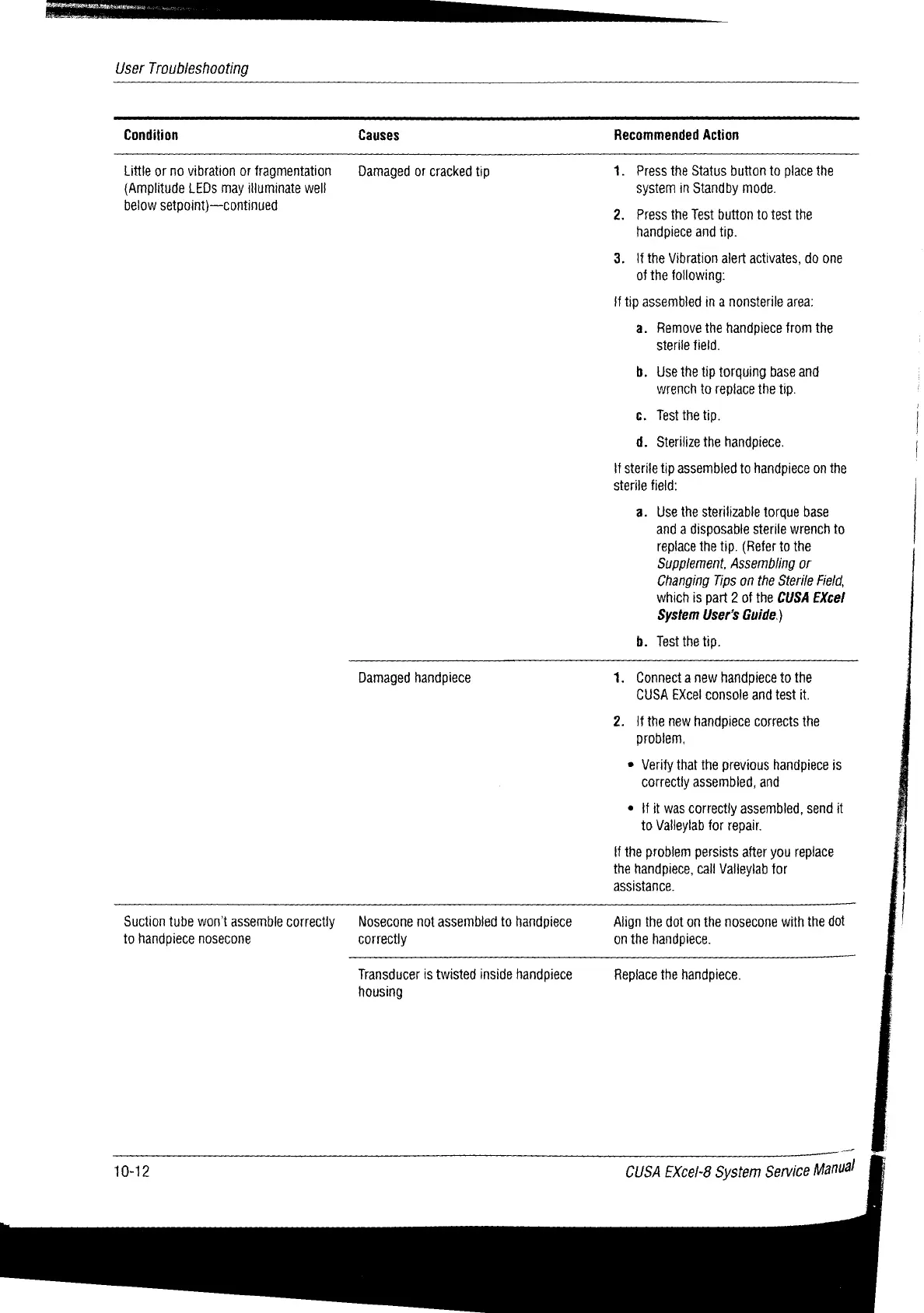
User
Troubleshooting
Condition
Causes
Recommended
Action
Little
or
no
vibration
or
fragmentation
Damaged
or
cracked
tip
1.
Press
the
Status button
to
place
the
(Amplitude
LEDs
may
illuminate
well
system
in
Standby
mode.
below
setpoint)—continued
2.
Press
the
Test
button
to
test
the
handpiece
and
tip.
3.
{f
the
Vibration
alert
activates,
do
one
of
the
following:
İf
tip
assembled
in
a
nonsterile
area:
a.
Remove
the
handpiece
from
the
Sterile
field.
b.
Use
the
tip
torquing
base
and
wrench
to
replace
the
tip.
c.
Test
the
tip.
|
d.
Sterilize
the
handpiece.
|
If
sterile
tip
assembled
to
handpiece
on
the
sterile
field:
a.
Use
the
sterilizable
torque
base
and
a
disposable
sterile
wrench
to
replace
the
tip.
(Refer
to
the
Supplement,
Assembling
or
Changing
Tips
on
the
Sterile
Field,
which
is
part
2
of
the
CUSA
EXcel
System
User's
Guide.)
b.
Test
the
tip.
Damaged
handpiece
1.
Connect
a
new
handpiece
to
the
CUSA
Excel
console
and
test
it.
2.
if
the
new
handpiece
corrects
the
problem,
®
Verify
that
the
previous
handpiece
is
correctly
assembied,
and
®
{fit
was
correctly
assembled,
send
it
to
Valleylab
for
repair.
if
the
problem
persists
after
you
replace
the
handpiece,
call
Vatleylab
for
assistance.
Suction
tube
won't
assemble
correctly
§
Nosecone
not
assembled
to
handpiece
Align
the
dot
on
the
nosecone
with
the
dot
to
handpiece
nosecone
correctly
on
the
handpiece.
Transducer
is
twisted
inside
handpiece
Replace
the
handpiece.
housing
10-12
CUSA
EXcel-8
System
Service
Manuál

Table of Contents

Related product manuals