EasyManua.ls Logo

Valleylab CUSA EXcel-8 - Page 195

Valleylab CUSA EXcel-8
239 pages
Print Icon
To Next Page IconTo Next Page
To Previous Page IconTo Previous Page
Loading...
Return
Equipment
for
Service
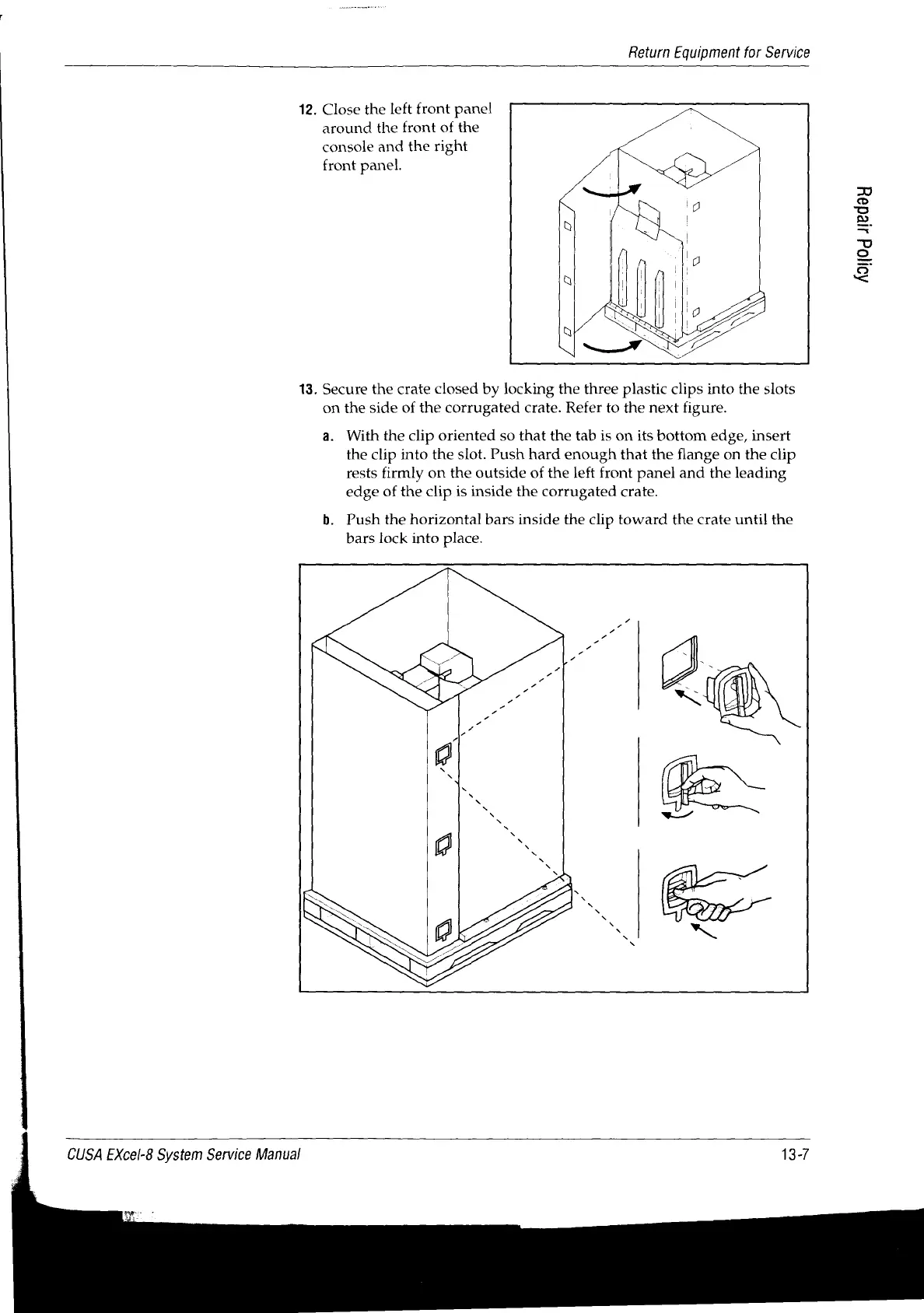
12.
Close
the
left
front
panel
around
the
front
of
the
console
and
the
right
front
panel.
Aaijog
areday
13.
Secure
the
crate
closed
by
locking
the
three
plastic
clips
into
the
slots
on
the
side
of
the
corrugated
crate.
Refer
to
the
next
figure.
a.
With
the
clip
oriented
so
that
the
tab
is
on
its
bottom
edge,
insert
the
clip
into
the
slot.
Push
hard
enough
that
the
flange
on the
clip
rests
firmly
on
the
outside
of
the
left
front
panel
and
the
leading
edge
of
the
clip
is
inside
the
corrugated
crate.
b.
Push
the
horizontal
bars
inside
the
clip
toward
the
crate
until
the
bars
lock
into
place.
CUSA
EXcel-8
System
Service
Manual
13-7

Table of Contents

Related product manuals