• Verify modem connections between the remote computer and the Liebert AC8. The
remote computer should have connectivity through a telephone line, high-speed cable
or an Ethernet. The Liebert AC8 must have a telephone line connected to its RJ11 port
(for location, see Phone Line Connector on page28).
2. Start the HyperTerminal program—click on the Start button, then on Programs, then
Accessories, then Communications, and finally HyperTerminal.
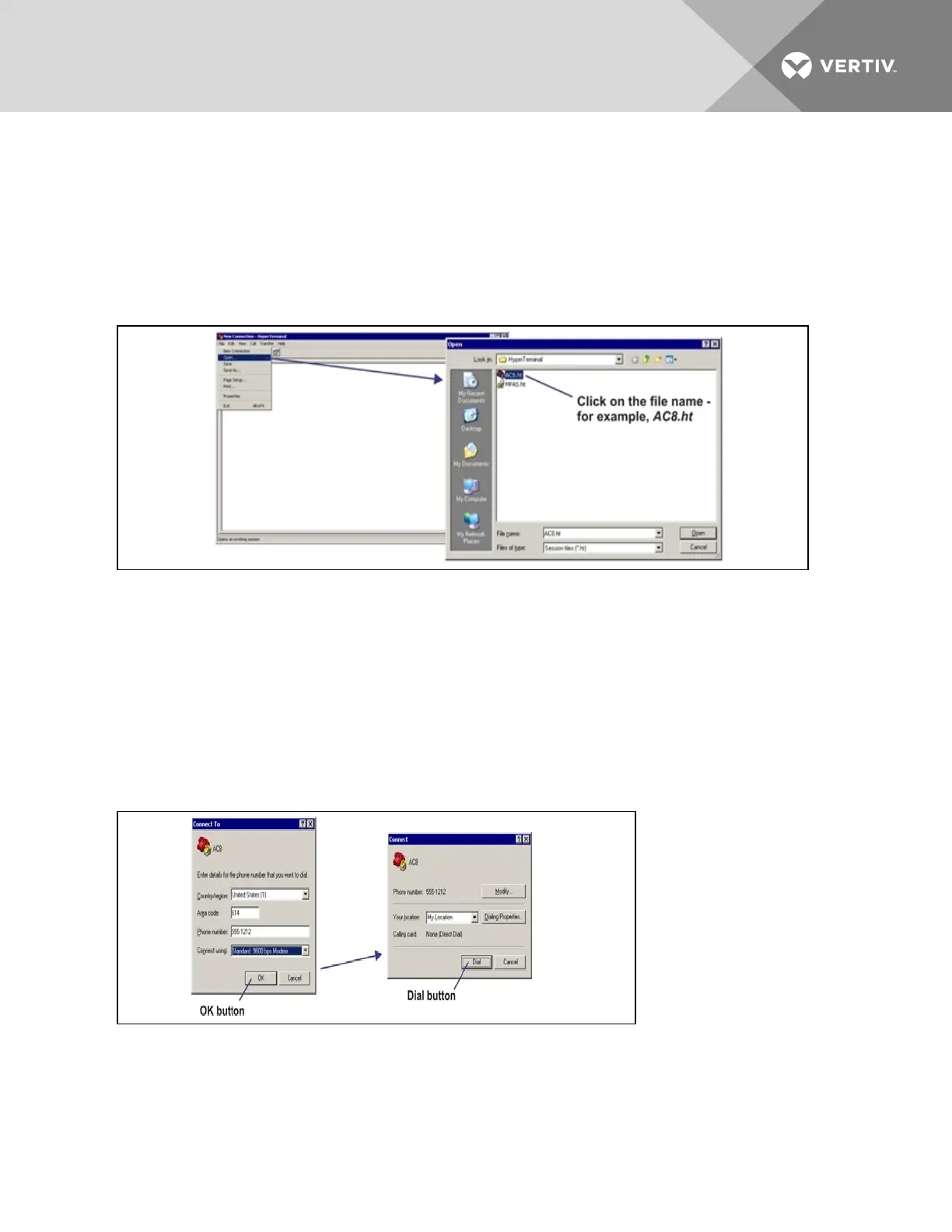
3. Open the Liebert AC8 connection created in Create a Connection on page112. To do this, click
on File, then on Open, as shown below.
4. In the Open window, shown above right, select the file name—Liebert AC8.ht in this example—
and then click on the Open button.
5. Follow the steps below to display the Main Menu of the Service Terminal Interface:
a. For direct connection (via RS232 port):
• Press Enter (or Escape) to initiate communication and bring up the Main Menu.
b. For remote connection (via modem):
• The Connect window opens, as shown below left. Click the OK button.
• In the Connect window, below right, click Dial.
• If the dialing attempt is successful, the Main Menu appears.
For more information on the Liebert AC8’s options:
• See Overview of Menus on the facing page for examples of the Service Terminal Interface
screens.
• See Table A.1 on page109 to locate step-by-step instructions for each Liebert AC8 function.
Vertiv | Liebert® AC8 User Manual | 116



 To Next Page