• Remote—Use a remote computer’s modem to dial the telephone number of the phone line
connected to the Liebert AC8.
Both methods require a communications program, such as HyperTerminal, to connect to the Service
Terminal Interface.
Refer to Table A.2 below for step-by-step instructions to set up each type of connection. Note that the
remote connection does not require setting up the COM1 port.
Direct Remote
Create a Connection below x x
Set Up the COM1 Port - Direct Connection Only on the facing page x N/A
Set Up the Connection’s Properties x x
Connect to the Service Terminal Interface x x
Table A.2
Steps to set up a direct or remote connection
The instructions in this section refer to the HyperTerminal program—they may vary for other
communications programs.
Create a Connection
Before connecting to the Service Terminal Interface, you must create a connection and specify the
method to be used for connection, as described in the following steps.
1. Start the HyperTerminal program—to do this, click on the Start button, then on Programs,
then Accessories, then Communications, and finally HyperTerminal.
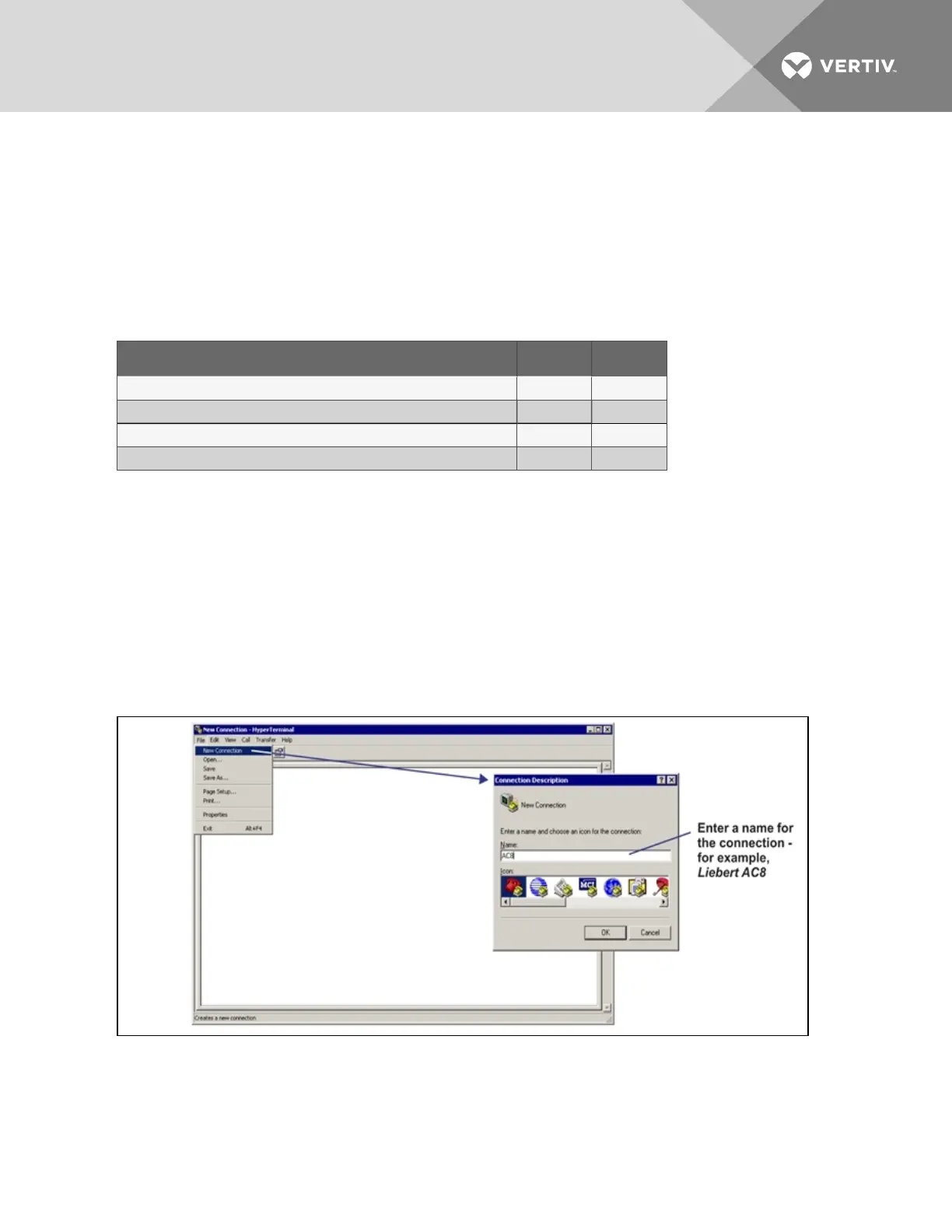
2. At the top of the HyperTerminal window, click on File, then on New Connection, as shown below
left.
3. In the Connection Description window, shown above right, enter a name for the connection—
for example, AC8. This becomes the file name (with the extension “.ht”).
4. Click OK to close the window.
Vertiv | Liebert® AC8 User Manual | 112



 To Next Page