100
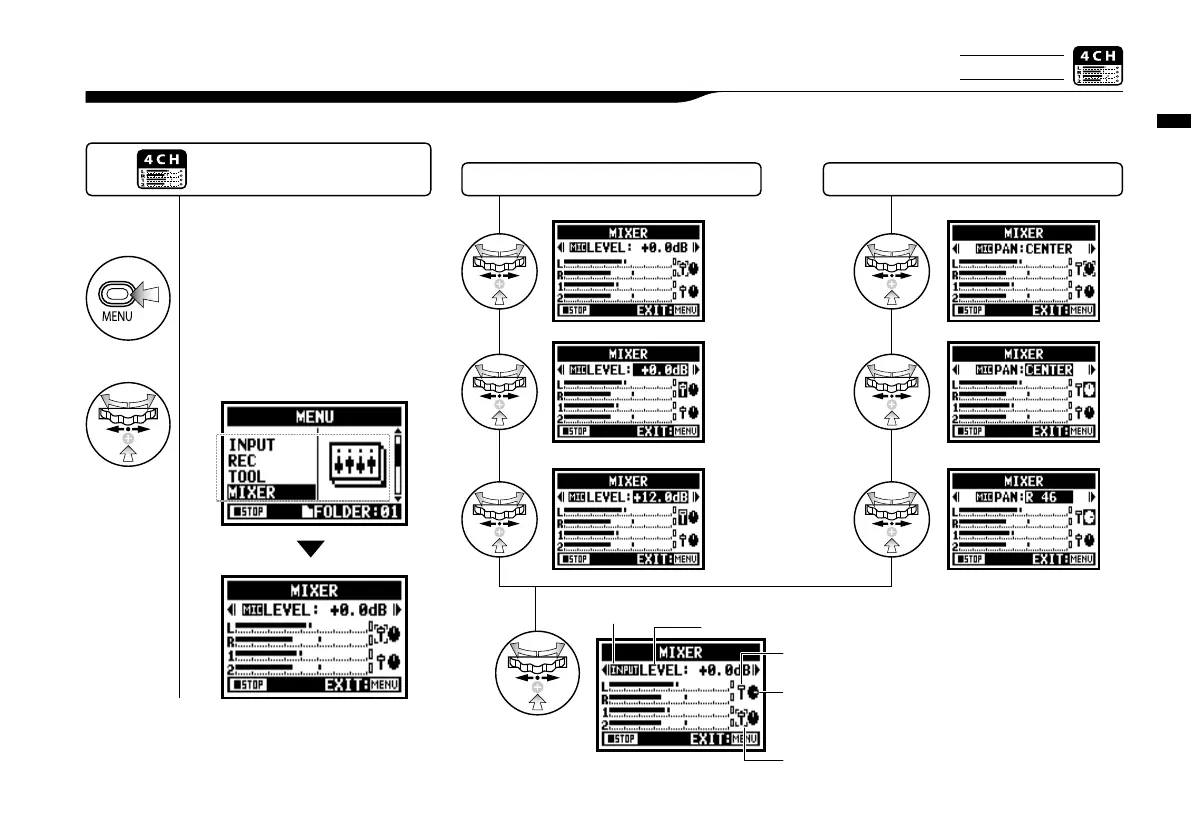
In 4CH mode you can use the mixer to adjust the playback LEVEL and PAN settings of two stereo files.
4-06 Playback : <MIXER>
Playback : <MIXER>
2
Select <MIXER> and
press.
1
Press.
<LEVEL> setting <PAN> setting
fader Icon
L 100 _ C _ R 100
Default; Center
MUTE
48.0dB_+12.0dB
Default; -0.0dB
after setting, confirm
with the icons
Press the [MENU] button for more
than 2 seconds, and start operation
from the top screen.
the cursor setting the
parameter
Indicates if you are modifying
the MIC or Input tracks
name of parameter where the cursor
is positioned and its setting value
Only on 4CH MODE
pan pod Icon



 To Next Page