4
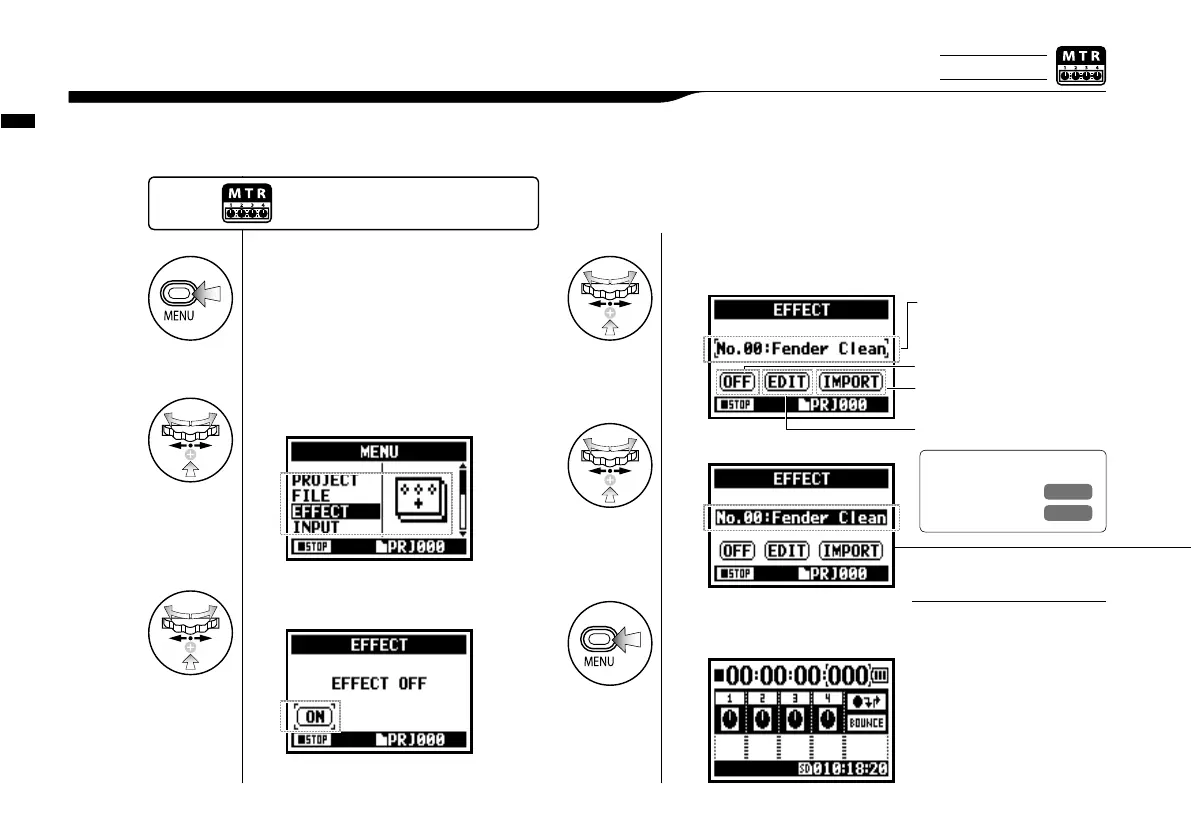
Select No. : PATCH NAME and press.
1
Press.
2
Press <EFFECT> and press.
3
Press <ON> and press.
Effect <EFFECT>
083
3-03-2 Effect <EFFECT>
PATCH
Effects module settings are
saved as a ‘patch’.
60 patches are available
and 50 of them have been
programmed.
NOTE:
Using the EFFECT made up of 2 modules in MTR mode, you can add various effects to the input signals.
Ref.
☞
P.146
patch list
P.145
6
Pressing [MENU] for more
than two seconds returns
you to the top screen.
When EFFECT is on, display
will show off.
IMPORT: Carry in a PATCH from
the other PROJECT
PATCH NUMBER: PATCH NAME.
EDIT: Create a new PATCH,
Edit a PATCH.
Press the [MENU] button for
more than 2 seconds, and start
operation from the top screen.
5
Select PATCH and press.
Only on MTR MODE



 To Next Page