A sing-along machine <KARAOKE> preparation
091
Create spontaneous music files and convert them into KARAOKE form, then record vocals or additional guitar sounds over those files.
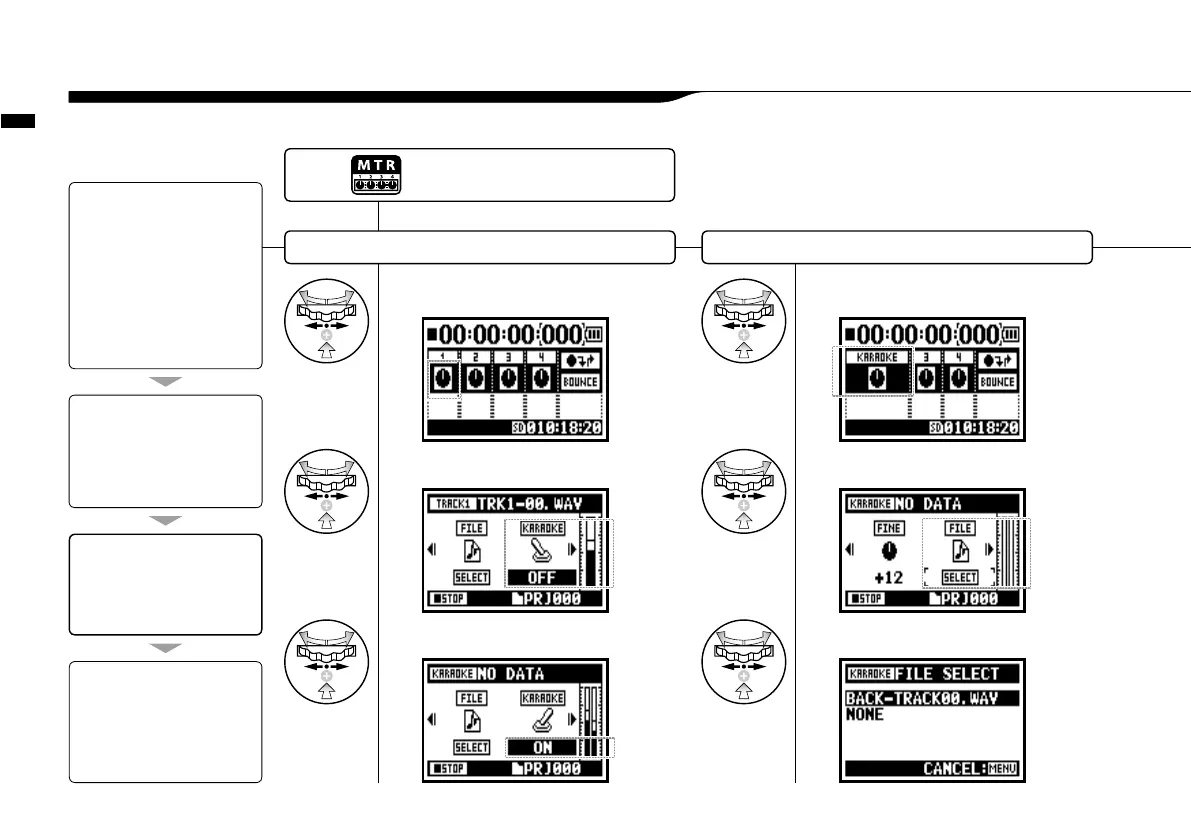
3-04-1 A sing-along machine <KARAOKE> preparation
KARAOKE track preparation Allocate an optional le on to KARAOKE track
1
Select TRACK MENU icon and press.
2
Select <KARAOKE> and press.
3
Select <ON> and press.
4
Select TRACK MENU icon and press.
5
Select <FILE> and press.
6
Select an optional file and press.
[Flow of the KARAOKE]
[KARAOKE OPERATION]
4. Connect the microphone
5. Make the setting for the
recording tracks
6. Make 'RECORDING' on.
• Playback
• Recording
[Setting KARAOKE]
(Prepare tracks for the Karaoke)
1. Select 'TRACK MENU ICON' and
open the 'TRACK MENU'
2. Make <KARAOKE> on.
3. Allocate files.
[Preparation]
Prepare the stereo files for the
background
Create a new project for
“Karaoke”
………P.118
Import the file to the project
• Copy the file to the project folder
……P.039
• Use <MOVE> function……P.117
[Adjustment of the Karaoke tracks]
• LEVEL
• CENTER CANCEL
• KEY
• FINE·FINE
Press the [MENU] button for
more than 2 seconds, and start
operation from the top screen.



 To Next Page