1
[RECORDING STANDBY]
press.
Setting / Recording: Recording in STEREO and STAMINA mode
049
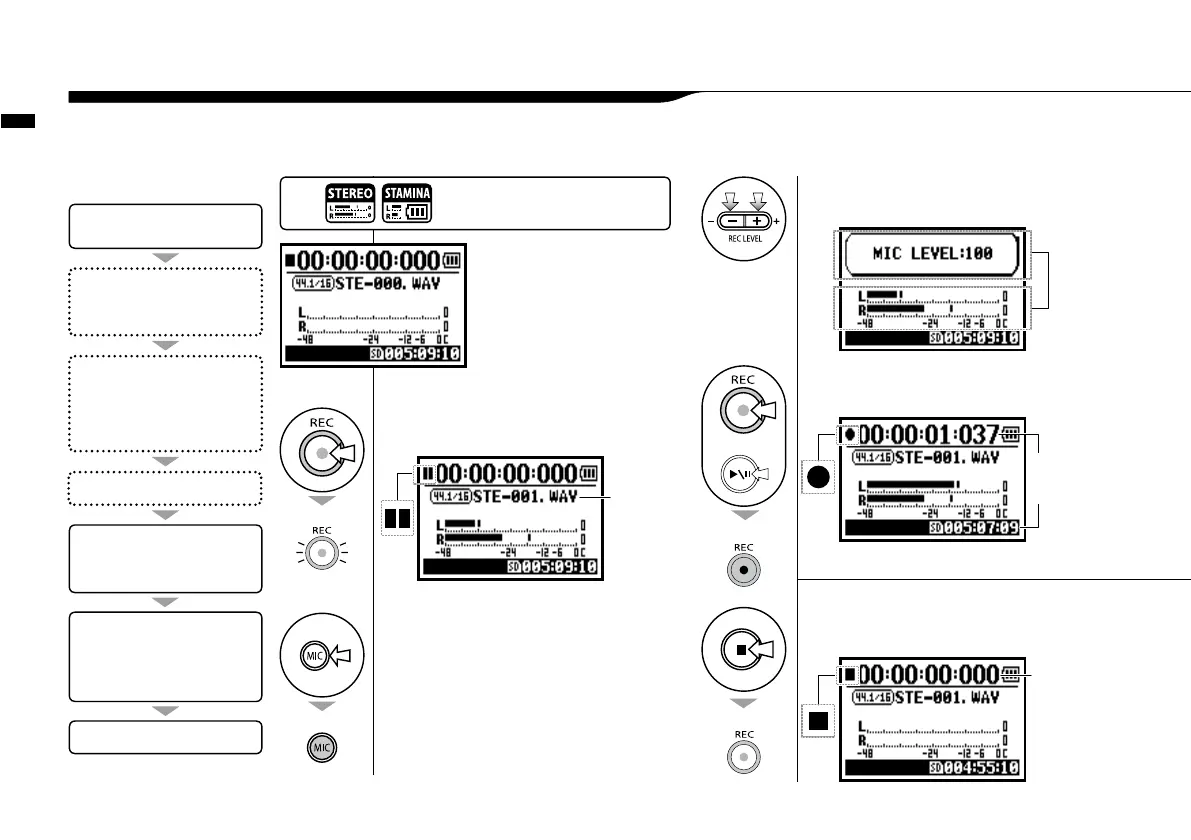
These are the steps to begin recording in STEREO or STAMINA mode.
1-02 Setting / Recording: Recording in STEREO and STAMINA mode
3
Adjust the recording
level of the input source.
4
[REC START]
press.
5
[REC FINISH]
press.
STEREO MODE TOP
2
Select an input
source and press.
light on
Using built-in microphones, press [MIC],
using external inputs press INPUT [1] and
INPUT [2].
light blinks
a new file
name here
light off
light on
[RECORDING DIRECTION]
5. Recording completes
1. Recording standby
2. Select the input source
3. Adjust the recording level of
the source
* Change the FILE setting.
• REC FORMAT,
• FILE NAME TYPE
* Use the recording functions.
AUTO REC/STOP, PRE REC,
REC LEVEL AUTO
*marks mean you can record without
those settings.
Confirmation of the mode.
(Stereo mode)
Recording
4. Start recording: Temporary
stop, Start recording again,
Put a mark
blinks
* Use METRONOME
The number
figures rotate.
The counter
returns back
to 0.
Press the [MENU] button for
more than 2 seconds, and start
operation from the top screen.



 To Next Page