Metronome <METRONOME>
079
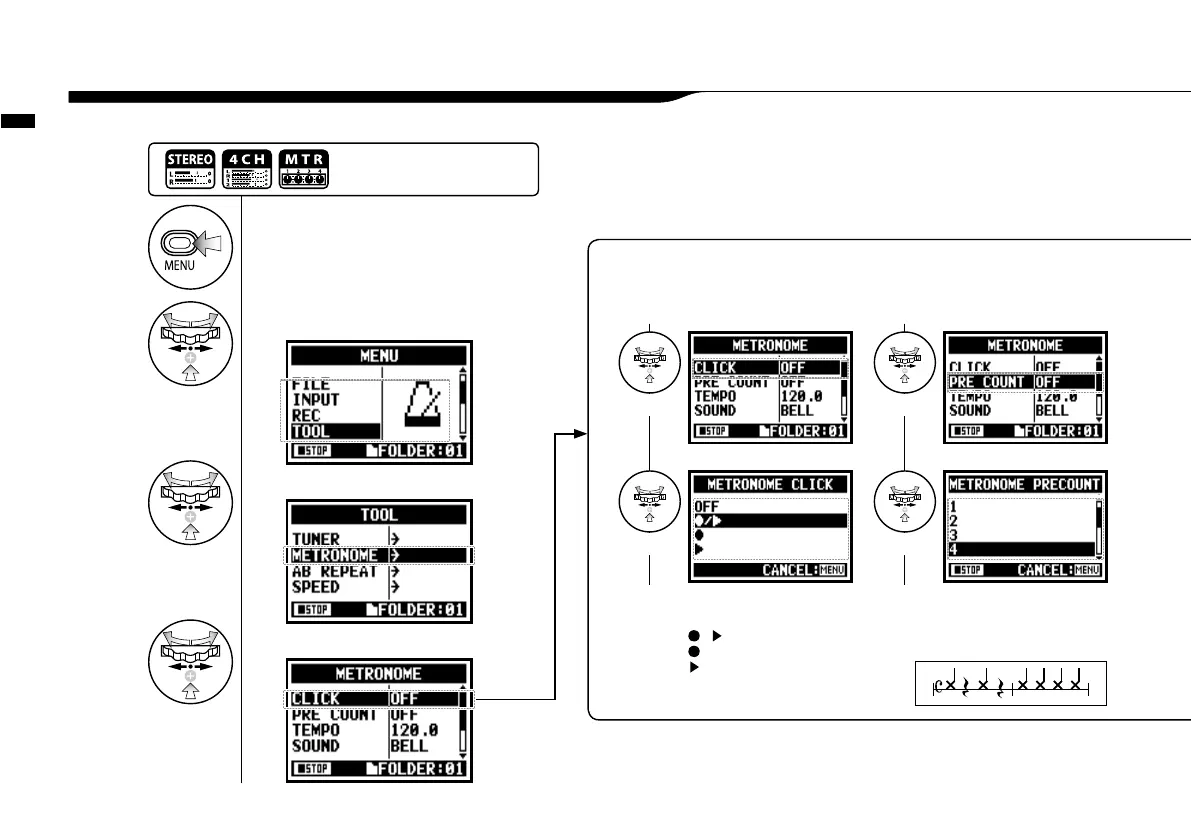
The metronome has other convenient functions such as click, pre-count, tempo, sound, etc.
3-02 Metronome <METRONOME>
<CLICK>
This setting turns the metronome on or off dur-
ing recording, playback or both. This setting
must be made before recording or playback.
<PRE COUNT>
Set the count number just before the
beginning of recording. Setting is impossible
when <PRE REC> and <AUTO REC> is ON.
Select
SelectSelect
Select
Select beat.
Select among OFF,1-8 beat
and SPECIAL.
Count of <SPECIAL>
OFF
/
--Recording / Playback
---Only during recording
---Only during playback
1
Press.
2
Select <TOOL> and press.
3
Select <METRONOME>and press.
4
Make each setting selection.
Select conditions
Press the [MENU] button for
more than 2 seconds, and start
operation from the top screen.



 To Next Page