Setting / Recording: Recording in MTR mode
055
Using multiple tracks, you can combine mono and stereo recordings.
1-06-1 Setting / Recording: Recording in MTR mode
[RECORDING DIRECTION]
* This means you can record without this setting.
Change to MTR mode
Create a new PROJECT.
Record the second track
Complete recording
Recording Standby
Record the first track.
Select the [REC] mode
Start recording
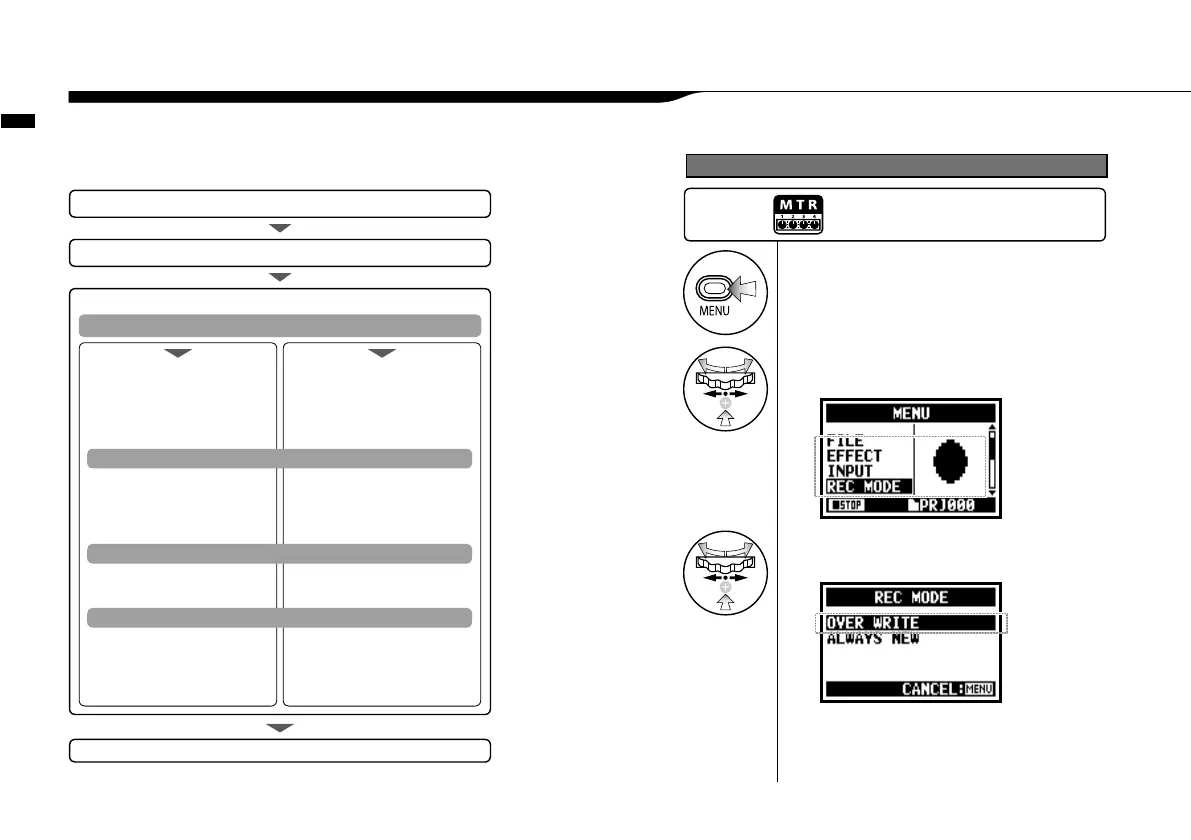
1
Press.
3
Select either <OVERWRITE> or
<ALWAYS NEW> and press.
2
Select <REC MODE>
and press.
Change to <REC MODE>, <OVERWRITE/ ALWAYS NEW>
Press the [MENU] button for
more than 2 seconds, and start
operation from the top screen.
Temporary Stop
Re-start
<OVERWRITE> and SAVE.
* Setting up PUNCH IN/OUT
* Use the METRONOME
* Set up the EFFECT
<ALWAYS NEW>.
* Use the METRONOME
* Set up the EFFECT
Make setting (mix)
• TRACK MENU setting
Adjust the track
• LEVEL • PAN
Make setting (mix)
• TRACK MENU setting
Adjust the track
• LEVEL • PAN
Select the track to record
• Select the input source
• Adjust the recording level of
the source
Select the track to record
• Select the input source
• Adjust the recording level of
the source



 To Next Page