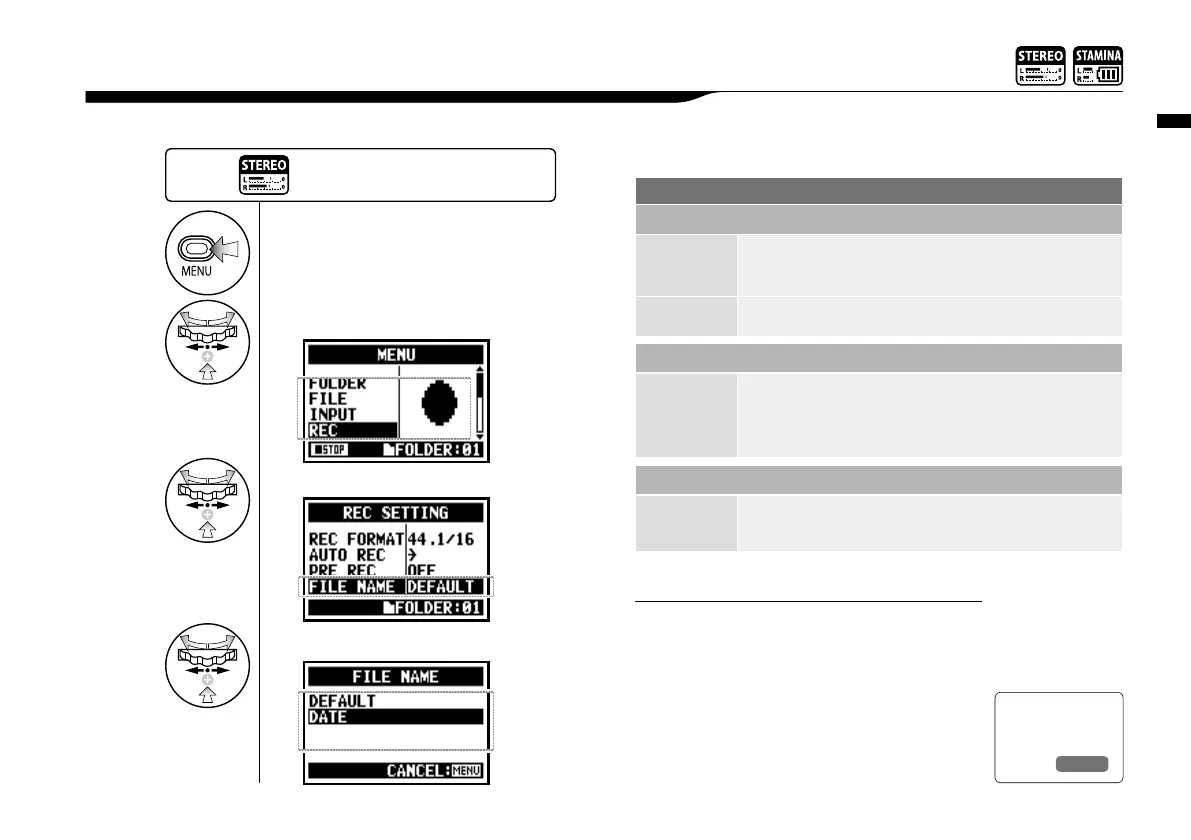
When recording, a file name is automatically assigned. To change that, take the following steps.
Setting / Recording: File name <FILE NAME>
052
1-04 Setting / Recording: File name <FILE NAME>
• You can set the DATE type only on STEREO
mode.
• You can use other file names on STEREO
and MTR mode. Those setting is operated on
<FILE RENAME>
NOTE:
1
Press.
3
Select <FILE NAME> and press.
2
Select <REC> and press.
The initial notation
is <DEFAULT>
4
Select and press.
File Name
STEREO mode:
<DEFAULT>
STE-×××.wav (mp3) : 'STE-'3 figures, extension
* <MONO MIX> setting
MONO-×××.wav(mp3) : 'MONO' 3 figures, extension
<DATE> 090531-×××.wav(mp3) : year, date yymmdd-3 figures, extension
4CH mode:
No change
4CH-×××M.wav
Record file of the built-in microphones: '4CH-' 3 figures 'M' extension
4CH-×××I.wav
Record file of the external input: '4CH-' 3 figures 'I' extension
MTR mode:
STEREO FILE
MONO FILE
TRK1-××.wav : 'TRK' track number- 2 figures, extension
* On stereo tracks put the track number like [1] [2] using L and R.
Ref.
☞
<FILE RENAME>
P.109
Press the [MENU] button for
more than 2 seconds, and start
operation from the top screen.



 To Next Page