Edit / Output : <DIVIDE>
116
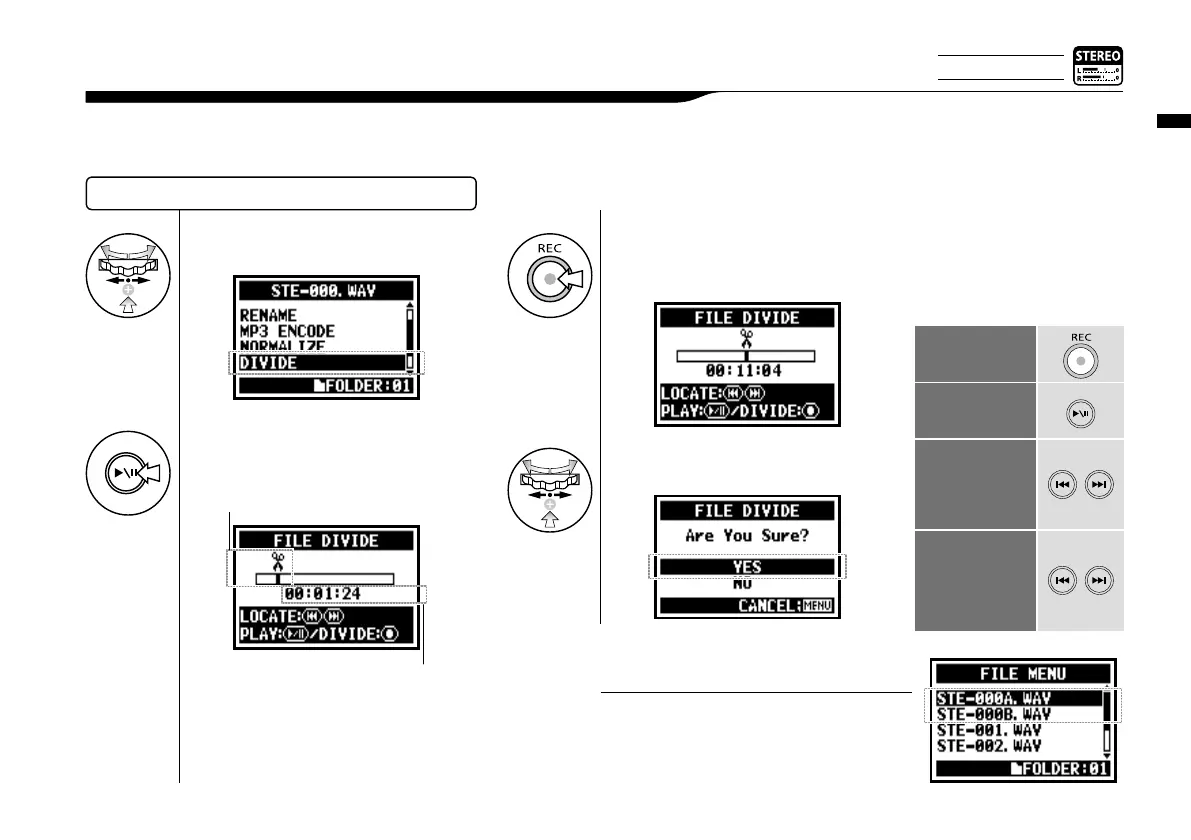
On STEREO MODE, you can divide files at any desired position.
5-12 Edit / Output : <DIVIDE>
SELECTING THE FILES…P.104 <FILE SELECT>
• After the <DIVIDE> operation, there will be
2 files: the first portion will get [A] and the
second one will get [B] at the end of the file
name.
HINT:
4
Select <DIVIDE> and press.
6
[DIVIDE POSITION]
You should press at the
desirable dividing spot.
Operation of button on
<DIVIDE>
DIVIDE
PLAYBACK
or TEMPORARY
STOP of the file
Holding the button
for more than one
second ‘HOLD’.
WIND-FORWARD
and REWIND
Moves for
one second.
The marked file
moves to the
'MARK'.
(Just press)
5
[START PLAYBACK]
Press.
Up: the current position in the file.
Below: the current time in the file.
7
Select <Yes> and press.
Only on STEREO MODE



 To Next Page