Recording function <AUTO REC>
065
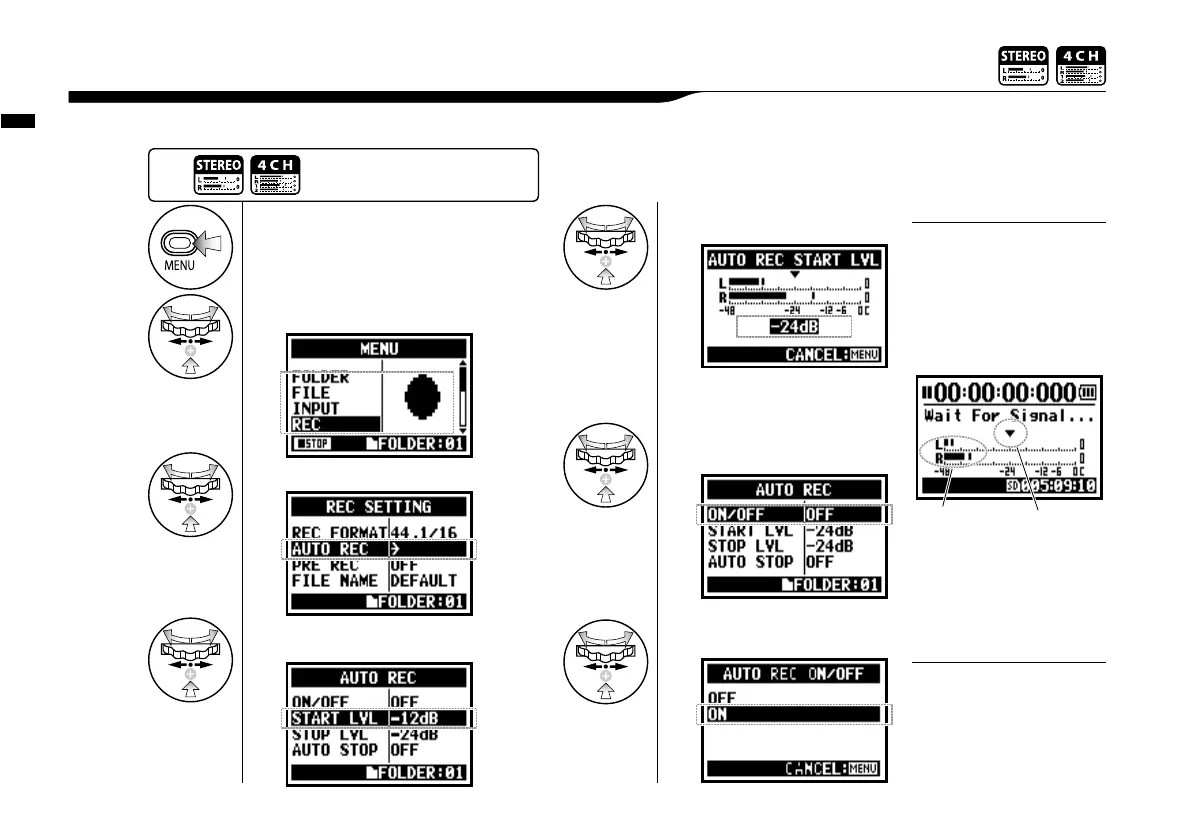
The H4n can detect when the input level surpasses your predetermined level, and can automatically start recording from the recording standby position.
2-01-1 Recording function <AUTO REC>
• You cannot use this setting
during recording and playback.
• You cannot use this function
together with <REC LEVEL
AUTO>, <PRE REC> and
<PRE COUNT>.
NOTE:
1
Press.
4
[START LEVEL SETTING]
Select <START LVL> and press.
3
Select <AUTO REC> and press.
2
Select <REC> and press.
While <AUTO REC> operation
is on, the display of “Wait for
Signal” appears during recording
standby. That watches whether
the present input level goes
over the recording start level.
Display of “Wait for Signal”
Start level
Present input level
Pressing the [MENU] button long
for two seconds, start to operate
from the top screen of the MODE.
6
Select<ON/OFF> and press.
7
Select<ON>and press.
5
Adjust the level.
Set the input level to start recording
automatically.
During “wait for signal” you can
also start recording manually by
pressing the REC button.
HINT:



 To Next Page