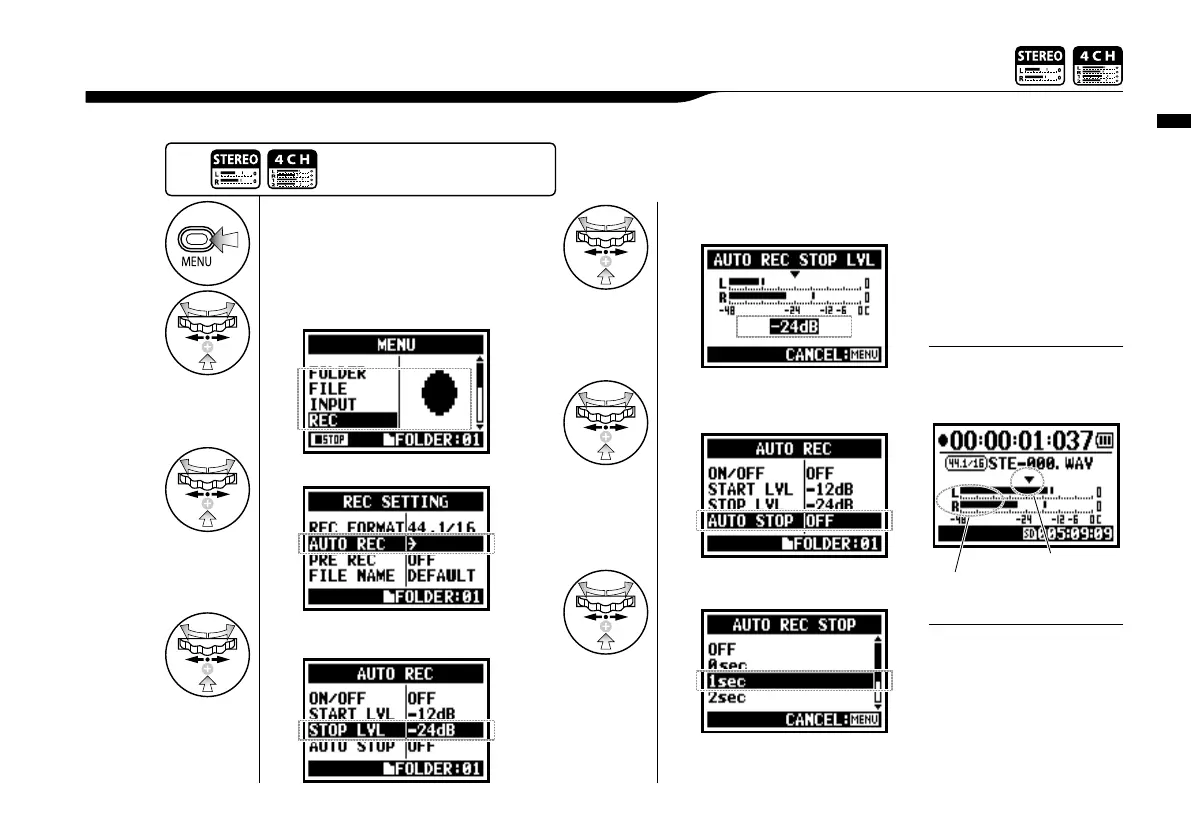
Recording function <AUTO REC STOP>
066
When <AUTO REC> is on and recording, the H4n will automatically stop recording when the input level goes below a predetermined level.
2-01-2 Recording function <AUTO REC STOP>
• You cannot use this
function during recording
and playback.
• When <AUTO REC STOP>
is on, you can finish
recording with pressing
[STOP] button.
NOTE:
1
Press.
2
Select <REC> and press.
3
Select <AUTO REC> and press.
4
[STOP LEVEL SETTING]
Select <STOP LVL> and Press.
5
Adjust the level.
6
Select <AUTO STOP> and press.
7
Select the time setting.
Select from 1-5 seconds to stop
recording after the signals have be-
come lower than the STOP LEVEL.
Press the [MENU] button for
more than 2 seconds, and start
operation from the top screen.
When<[AUTO REC STOP>
is on, ‘STOP LEVEL’ display
appears during recording.
Stop level
Present input level
Set the input level at which
recording will stop
HINT:



 To Next Page