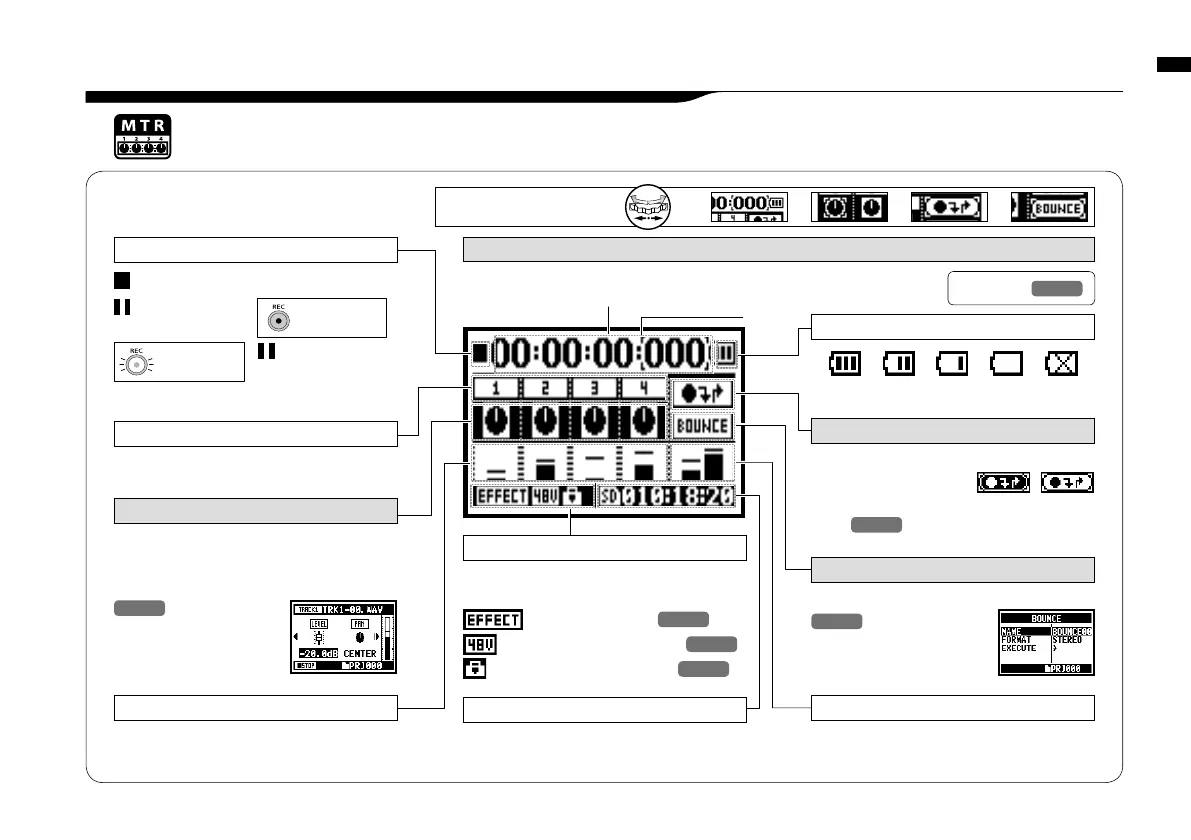
<MODE> screen: <MTR> mode
042
8-3 <MODE> screen: MTR mode
• Explanation of the top screen
Recording lapse and playback lapse:
Display: 00(time):00(minute):00(second):000(1/1000second)
➀
Counter
During recording standby operation the track or its
icon is highlighted.
TRACK NUMBER
Displays the master left and right output levels
L R LEVEL METER
This displays the recording and playback level
corresponding to each track 1-4..
LEVEL METER
➃
BOUNCE ICON
Selecting this icon brings up BOUNCE settings
.
P.123
Counter Function:
Appoint time
Ref.
☞
P.10 2
This is where track settings like ‘volume,’ ‘pan,’
‘stereo or mono’ are made. Selecting this icon
with the jog dial will access the track menu.
P.0 59
➁
TRACK MENU ICON
Selecting this icon brings up the PUNCH IN/
PUNCH OUT settings.
The icon only appears when recording in OVERWRITE
mode.
P.0 58
➂
AUTO PUNCH IN and AUTO PUNCH OUT ICONS
[DIAL] operations
on the top screen
➀ ➁ ➂ ➃
<EFFECT> function
<PHANTOM> power source
48V/24V
<PROTECT> function
P.125
P.032
P.0 81
When each optional function is ON, display
says following:
Indicator of option settings: ON or OFF
Cursor
STOP
REC
●
Recording Standby
blink
[REC] button
lights on
[REC] button
blinks
PLAY
▲
PAUSE
blink
Display of recorder’s condition
Remaining recording capacity time on SD card.
REMAINING RECORDING TIME
When the display of “Low Battery” is shown,
it is time to change battery.
REMAINING BATTERY LIFETIME during battery running
only when recording
[ALWAYS NEW] setting
only when recording
<ALWAYS NEW> setting



 To Next Page