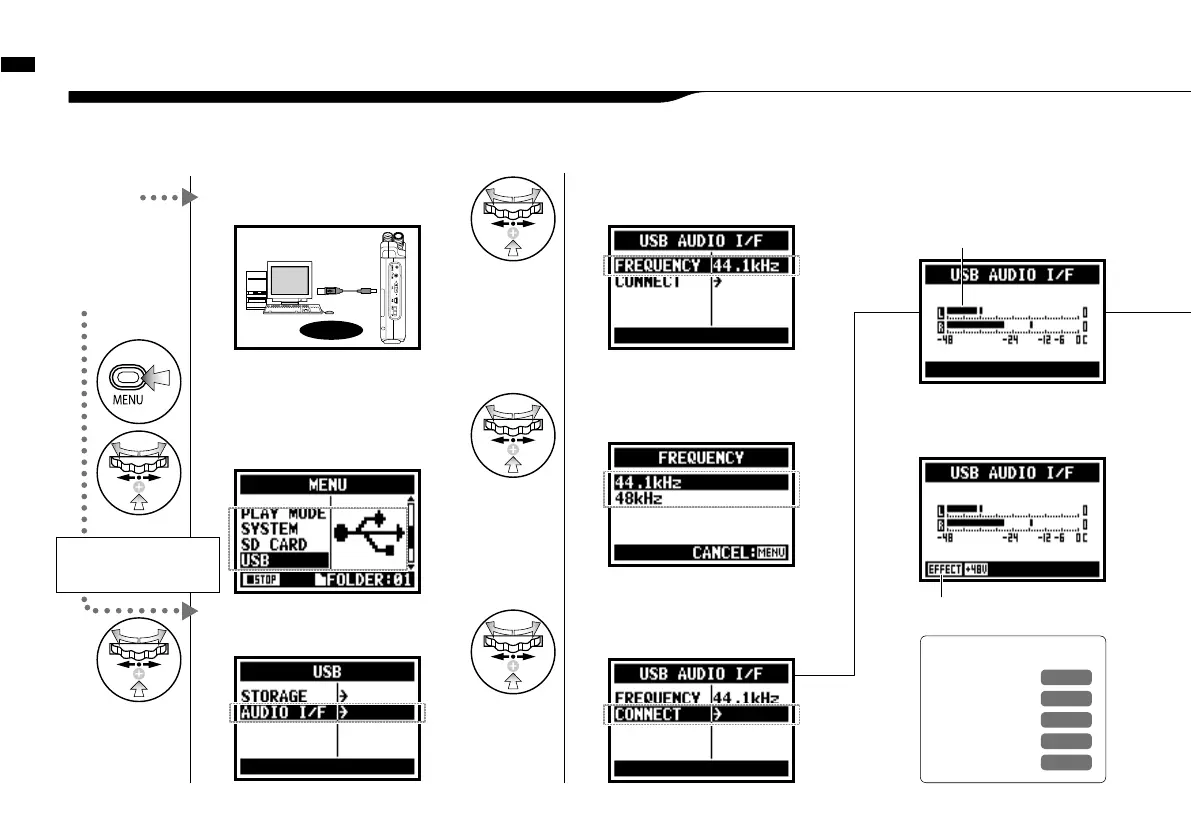
The H4n can be used as a two-in/two-out USB interface at 44.1kHz or 48kHz.
6-5 Setting up: USB connection, H4n used as an Audio Interface
2
Press on the top screen.
4
Select <AUDIO I/F> and press.
5
Select <FREQUENCY>
and press.
7
Select <CONNECT>
and press.
1
Connect H4n to
computer with USB cable.
USB
3
Select <USB> and press.
6
Select a sampling rate
and press.
From
power OFF
From
power ON
Using USB bus power,
H4n start booting-up
Display of USB setting screen
Connect H4n
to computer
with USB cable.
Setting up: USB connection, H4n used as an Audio Interface
033
Two channels can be sent and
received while it connects a
computer and by using of
44.1kHz or 48 kHz.
Ref.
☞
<TUNER>
P.075
<MONITOR>
P.071
<PHANTOM>
P.032
<PLUG-IN>
P.0 31
<EFFECT>
P.0 83
displayed a active function
displayed input or output level



 To Next Page