Built-in
microphones
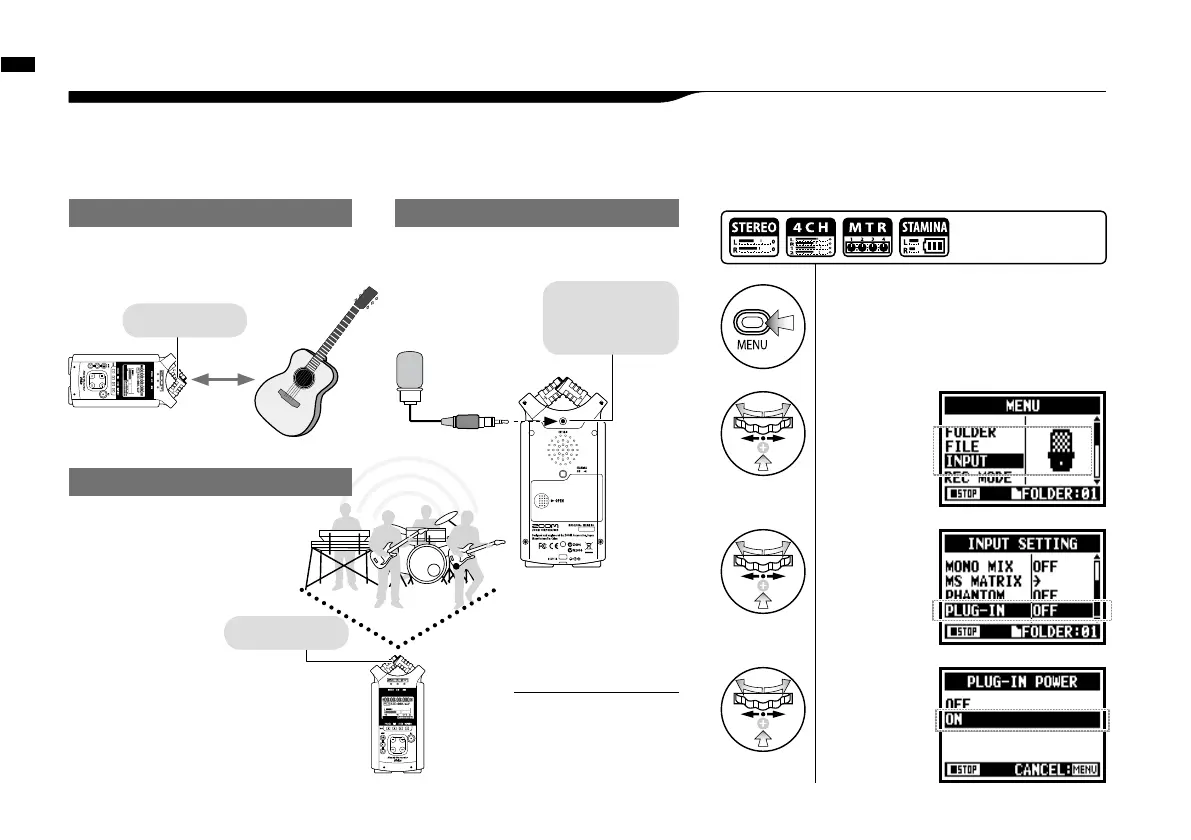
Setting up: Built-in microphones /outside microphones with plug-in power
The input jack for the external microphone is suitable for microphones that require <PLUG-IN> power.
6-3
Setting up: Built-in microphones /outside microphone with plug-in power
031
Sound source
30_50cm
Close microphone recording
Please put H4n 30 - 50 cm away from the
sound source.
1
Press.
3
Select
<PLUG-IN>
and press.
[How to make setting of <PLUG-IN> power]
Here you can
connect a
microphone.
INPUT
[MIC]
*You cannot use
both the built-in
and the external
microphone
together.
When you use the external microphone, be sure to
select the correct setting.
External microphone recording
2
Select
<INPUT>
and press.
4
Select<ON>
and press.
Press the [MENU] button for
more than 2 seconds, and start
operation from the top screen.
Built-in
microphones
The external
stereo microphone
input-jack for
plug-in power
Make sure the recording sound
sources are all located in the
range of T zone of the Built-in
microphones.
Off microphone recording
INPUT [MIC]
Plug-in and phantom
power can not be set
during recording and
playback.
NOTE:



 To Next Page