3
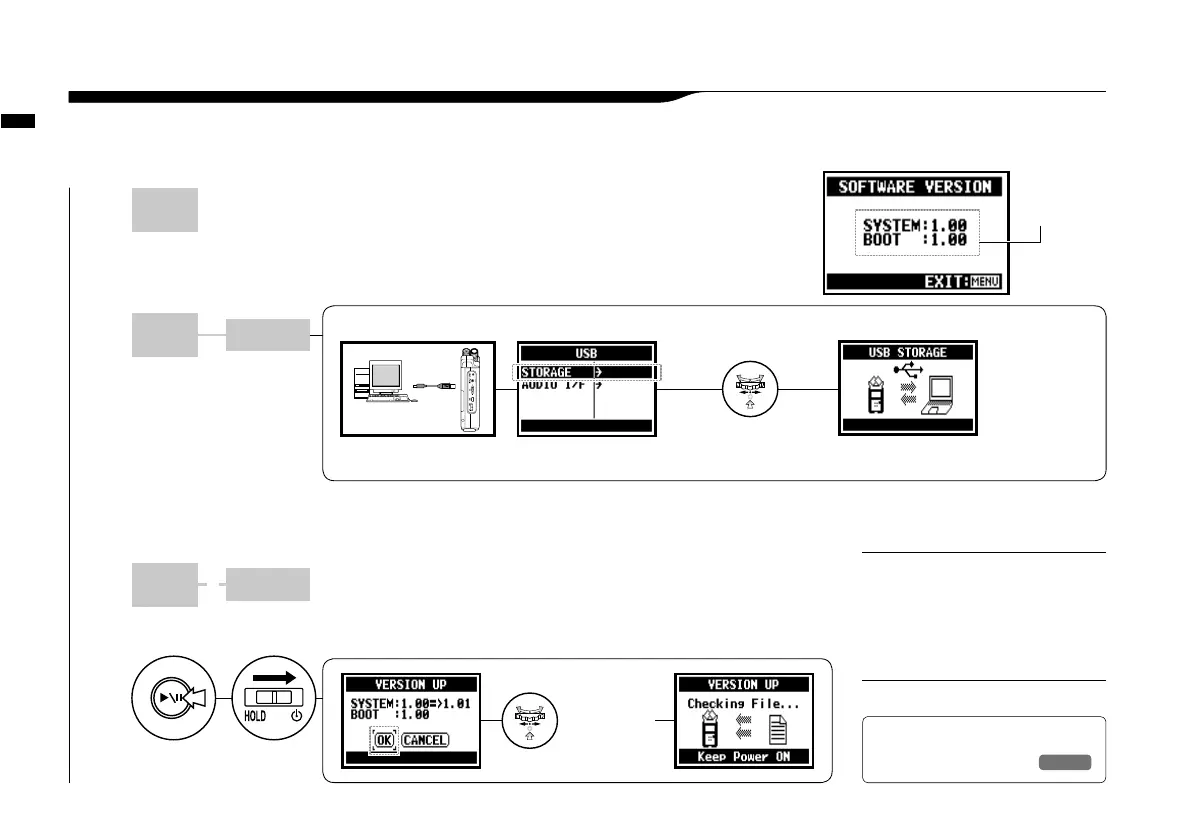
The downloaded system software is copied onto
the root directory of the SD card of H4n.
1
Open Web site of ZOOM on PC and download the most
recent system software. [http://www.zoom.co.jp]
2
Connect H4n to PC with
USB cable.
5
Switch on while holding
down PLAY/PAUSE button.
4
Cancel the connection of PC and H4n.
Please disconnect through PC.
NOTE:
Utility : <VERSION UP>
133
If H4n (and SD card) is connected to the computer (PC) that has access to the internet,
you can download H4n software upgrades.
6-08 Utility : <VERSION UP>
Connect to a PC and select
<STORAGE>. The H4n will be
recognized as a SD card reader
and you can make use of it.
HINT:
PC H4n
PC H4n
+
To set-up connection of H4n and PC, connect with USB cable.
Connect H4n to PC with
USB cable.
You can operate
SD card data in
H4n through PC.
Select <STORAGE>
and press.
PC
USB
Select
<OK> and
press.
You can verify H4n version
at <SYSTEM (VERSION)>.
The version of
the main body
system
Ref.
☞
<SYSTEM(VERSION)>
P.129
* PC = computer (Windows and Macintosh)



 To Next Page