Recording function <LO CUT>
068
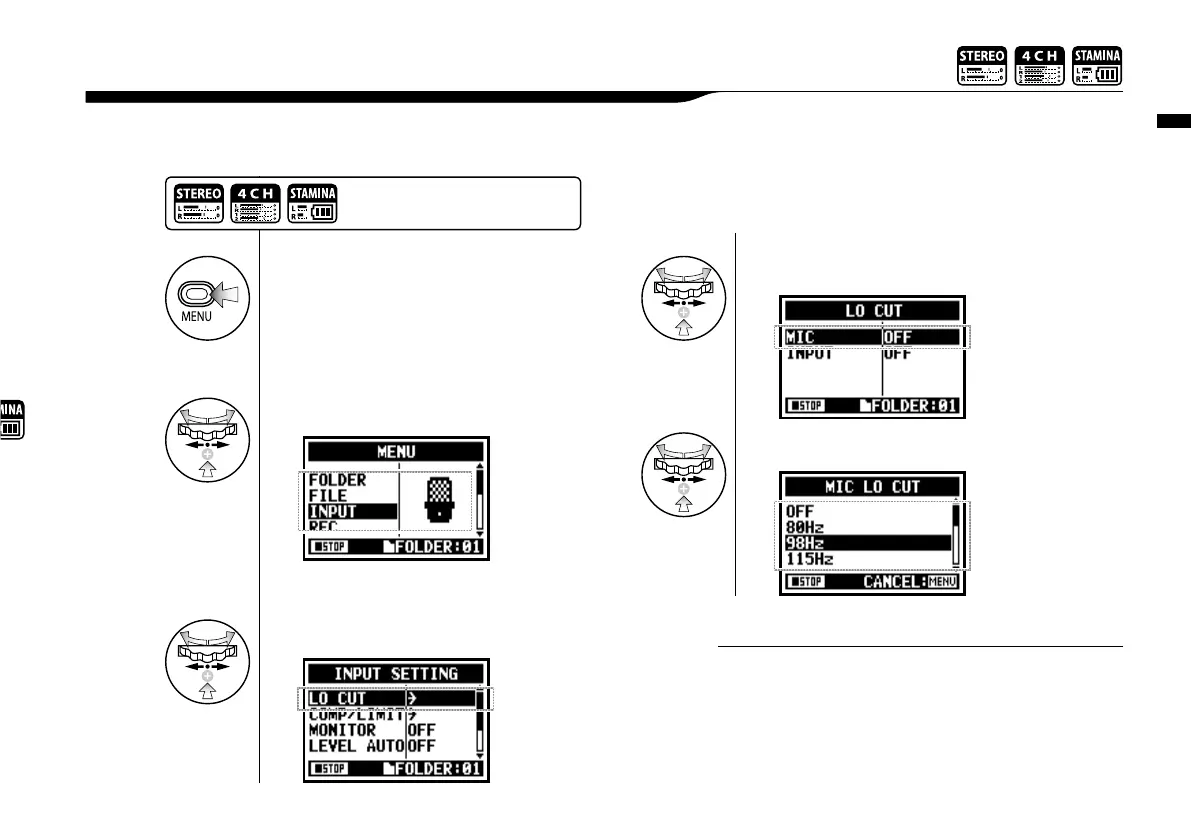
The <LO CUT> filter setting allows you to eliminate wind or blowing noises.
2-03 Recording function <LO CUT>
• You can Select the <LO CUT> filter among eleven
frequencies, such as OFF, 80, 98, 115, 133, 150, 168,
185, 203, 220, and 237 Hz. When selecting higher
numbers, you should verify the outcome before recording.
• The smaller the number, the lower the cut-off frequency.
.
HINT:
1
Press.
4
Select the setting input source.
2
Select <INPUT> and press.
Press the [MENU] button for
more than 2 seconds, and start
operation from the top screen.
3
Select <LO CUT>and Press.
5
Select the cutoff frequency.


 To Next Page