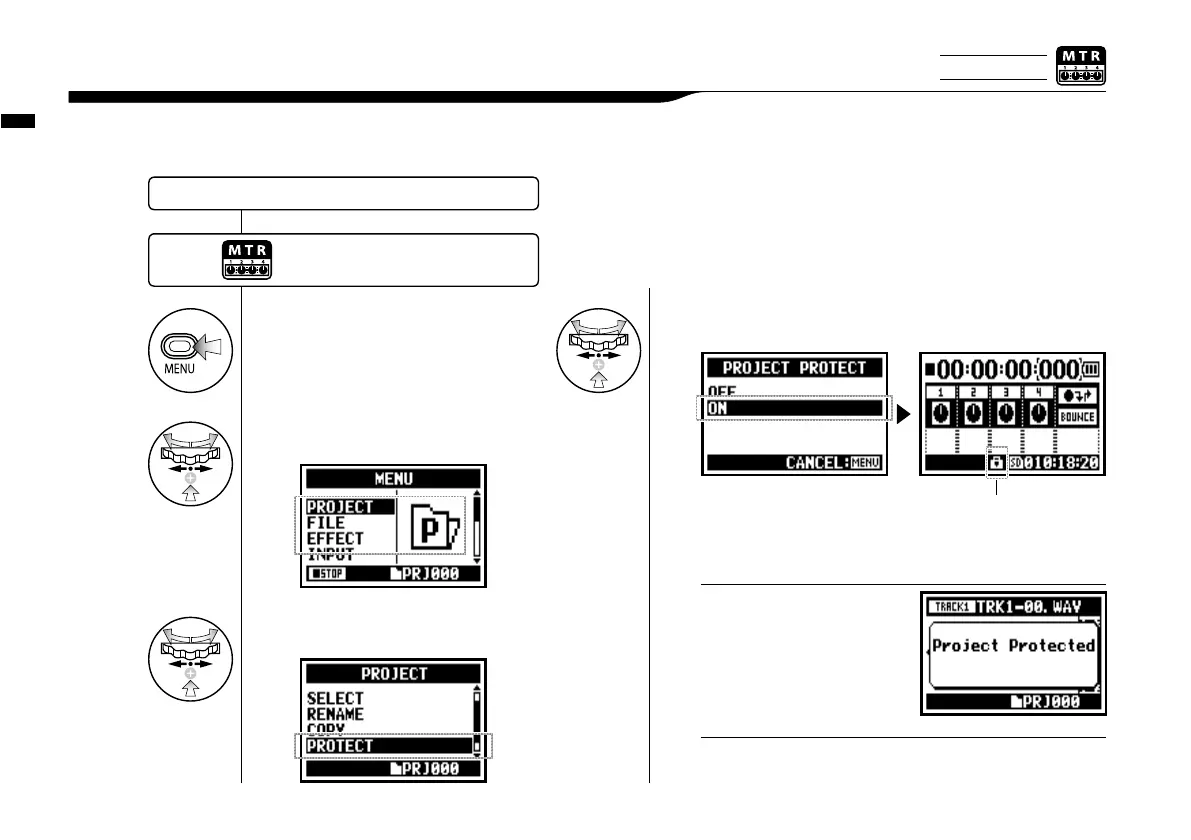
Edit / Output : <PROJECT (PROTECT) >
125
Using the PROTECT function on your project prohibits dividing of tracks and the change of files
in that project.
5-20 Edit / Output : <PROJECT (PROTECT) >
1
Press.
If you try to change a file allocated
in a track, the screen will say
"Project Protected".
NOTE:
3
Select <PROTECT> and press.
Select a target project and start operation.…P.119
2
Select <PROJECT> and press.
4
Select <ON> and press.
The mark shows the protected
projects.
Press the [MENU] button for
more than 2 seconds, and start
operation from the top screen.
<PROTECT> is useful protection against the case when the
setting of the completed music might be changed mistakenly.
HINT:
Only on MTR MODE



 To Next Page