Edit / Output : <MARK LIST>
115
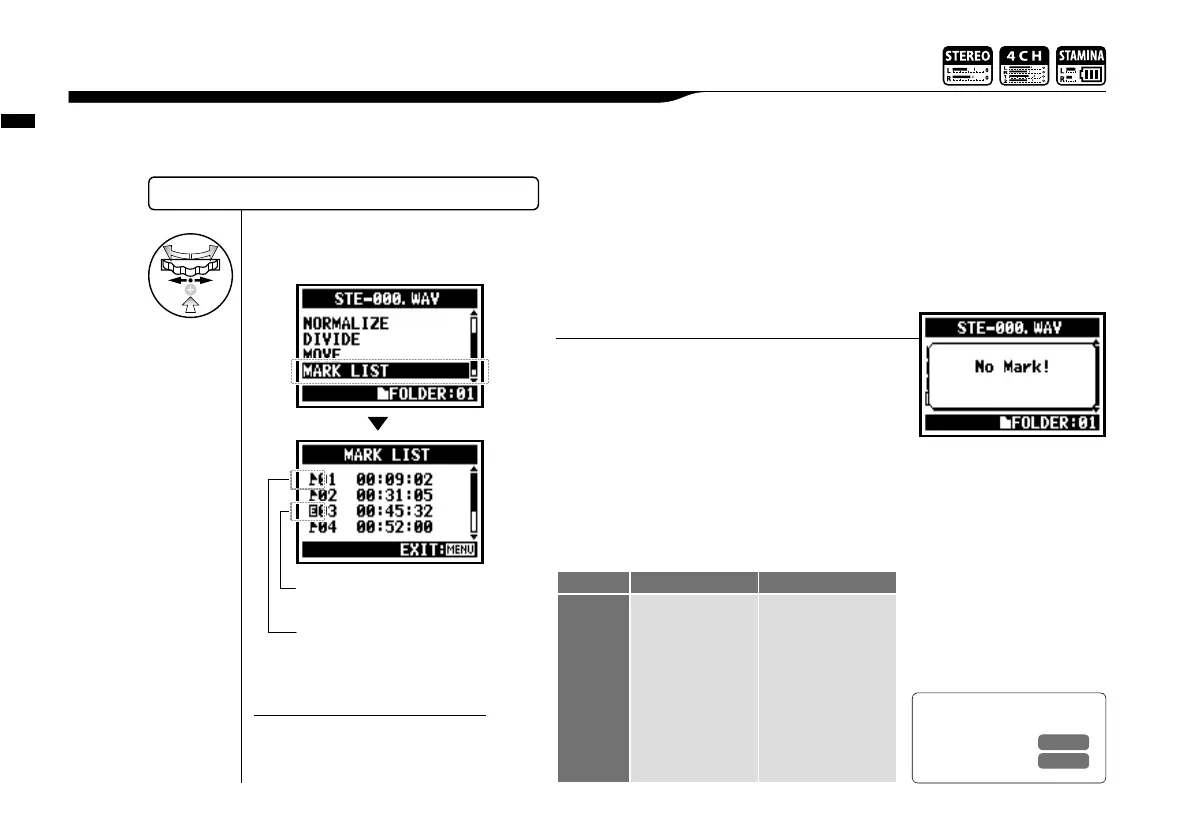
You can view the list of marks put in the WAV FILE.
5-11 Edit / Output : <MARK LIST>
SELECTING THE FILES…P.104 <FILE SELECT>
4
Select <MARK LIST> and
press.
This mark shows sounds
dropout happening.
The mark the user created.
When there are no marks on the required files, the
display will show "No Mark!".
HINT:
The H4n will place the mark on the
point automatically when sound
dropout happens during recording.
NOTE:
Setting the mark
P.096
When you transfer the recorded data to a SD card, sometimes the speed of
processing does not go in time and Sound dropout happens.
The speed of processing is different depend on mode, kind of <REC FORMAT>,
type of SD card, etc. If the processing work is light, Sound dropout hardly happens,
and when the work is heavy,
it often happens. In that case,
change <REC FORMAT> to
lighter.
Sound dropout (skipping) of a SD card
Ref.
☞
P.051
STEREO MODE 4CH MODE
Heavy
p
q
Light
WAV96kHz/24bit
WAV96kHz/16bit
WAV48kHz/24bit
WAV44.1kHz/24bit
WAV48kHz/16bit
WAV44.1kHz/16bit
MP3
WAV48kHz/24bit
WAV44.1kHz/24bit
WAV48kHz/16bit
WAV44.1kHz/16bit
<REC FORMAT>



 To Next Page