Playback : Playback files (stereo, 4ch and stamina modes)
094
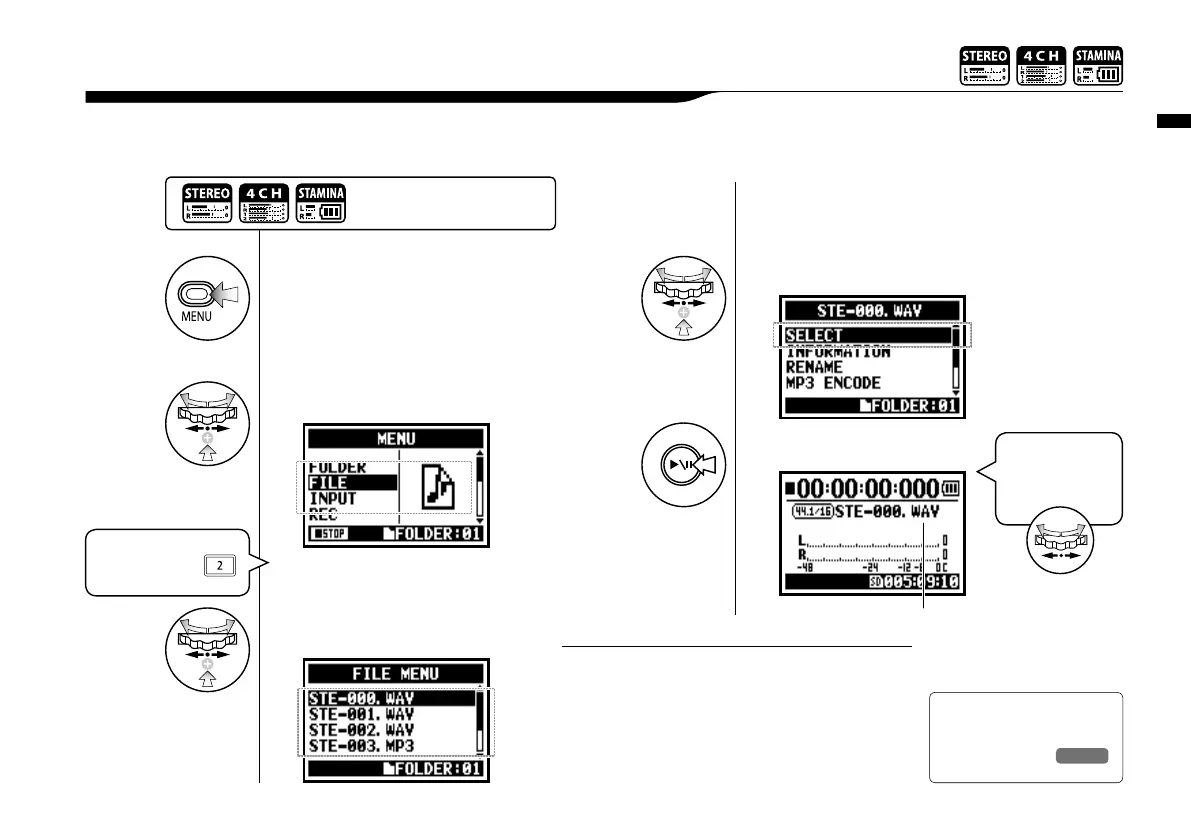
Immediately after recording, you can playback the file by pressing the [PLAY/PAUSE] button.
If you prefer to call up the files for later playback, take the following steps.
4-01 Playback : Playback files
(stereo, 4ch and stamina modes)
1
Press.
2
Select <FILE> and press.
3
Select the targeted file
and press.
4
Select <SELECT> and press.
You should confirm the file name.
5
[START PLAYBACK]
Press.
Press the [MENU] button for
more than 2 seconds, and start
operation from the top screen.
• On the top screen you can move directly to Step 3,
just press TRACK [2] button.
• If you press [PLAY/PAUSE] button after selecting
files, the selected file starts playback immediately.
• You can select files in the folder directly using [DIAL]
from the top screen.
HINT:
Ref.
☞
<FILE SELECT>
P.104
"Short cut"
Pressing TRACK
on the top screen.
“Short cut”
You can select the
file in the folders
on the top screen.



 To Next Page