1
Select INPUT
and press.
047
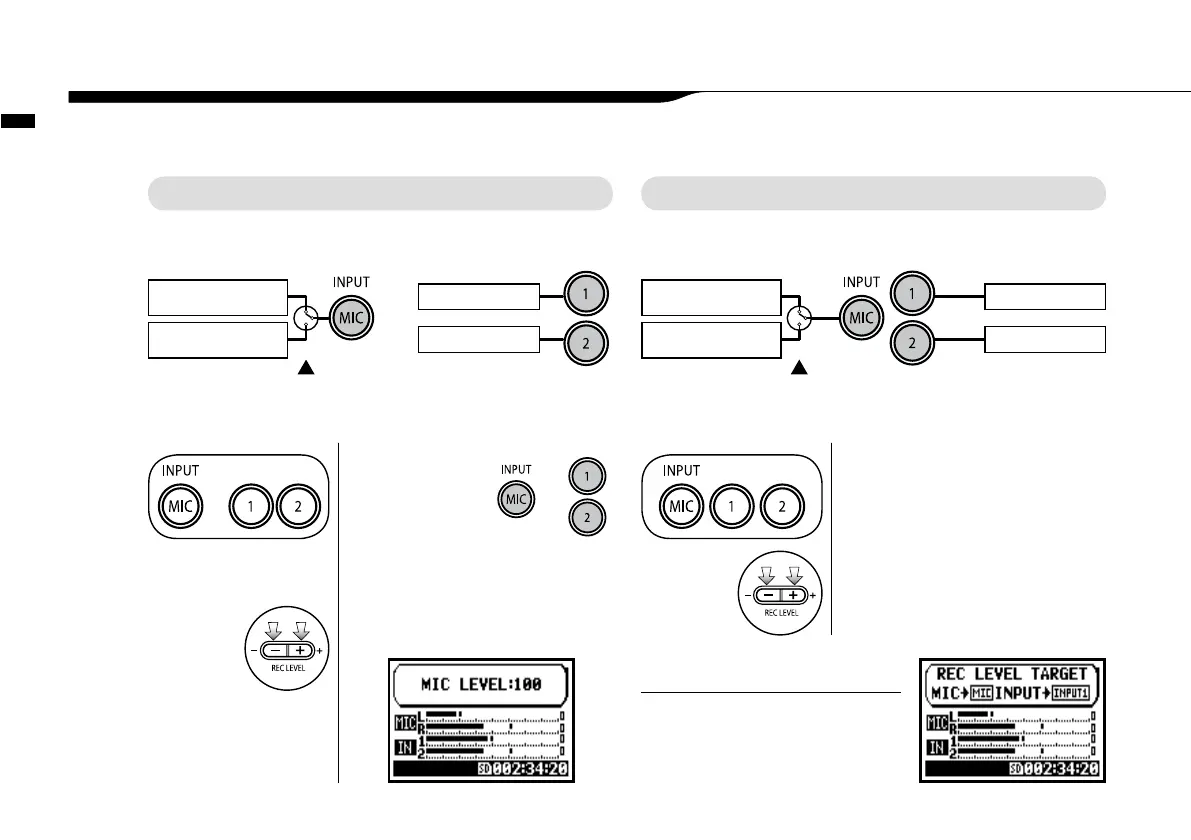
Control settings for the targets, built-in microphones or external input jacks.
1-01 Setting / Recording: Set input source and recording level
STEREO MODE 4CH MODE
Use the stereo input source of either [MIC] or INPUT [1] [2].
Use both [MIC] and INPUT [1] [2] stereo input.
or
Light on
Connecting the external
microphone sets input
automatically
Built-in microphones
(stereo)
External stereo
microphone
Both light
up at once
INPUT [1] jack
INPUT [2] jack
Connecting the external
microphone sets input
automatically
Built-in Microphones
(stereo)
External stereo
microphone
All lights on
INPUT [1] jack
INPUT [2] jack
* Selection is available at
any time during Stop,
Recording Standby or
Recording.
or
The selected
buttons light on.
or
2
Press REC LEVEL and
adjust the levels.
Setting / Recording: Set input source and recording level
1
Select INPUT and press.
2
Press REC LEVEL and
adjust the levels.
On the top screen of the 4CH mode,
press REC LEVEL button, and display
“REC LEVEL TARGET” appears. Select
the input and press.
HINT:
The recording level selected is
displayed



 To Next Page