Recording function <PRE REC>
067
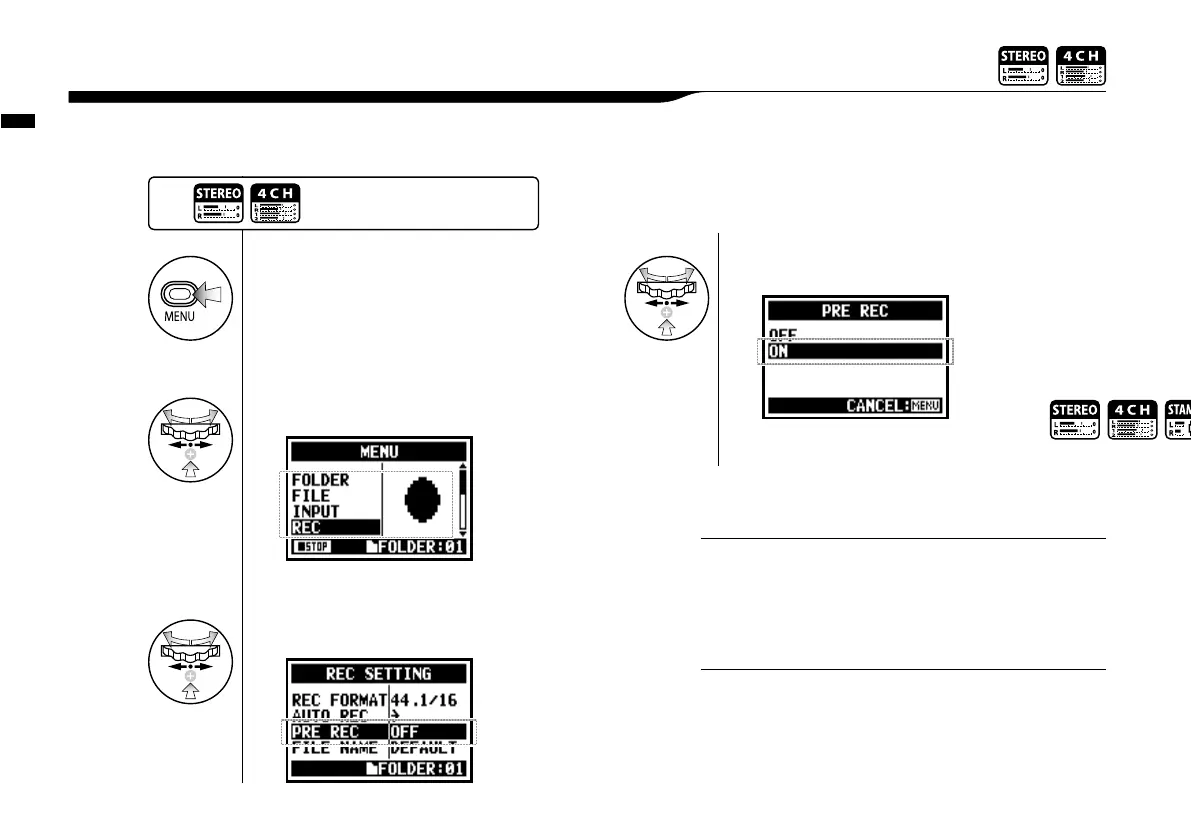
The <PRE REC> setting can be initialized by pressing the [REC] button, automatically adding the
previous 2 seconds to your recording.
2-02 Recording function <PRE REC>
• You cannot use this setting during recording and playback.
• When recording on 96 kHz, 4CH mode, the maximum
PRE REC time is one second.
• You cannot use this function together with AUTO REC and
PRE COUNT.
NOTE
1
Press.
4
Select <ON> and press.
2
Select <REC> and press.
3
Select <PRE REC> and press.
Press the [MENU] button for
more than 2 seconds, and start
operation from the top screen.
In PRE REC mode the H4n will pre-record audio two sec-
onds before the record button is pressed.
HINT



 To Next Page