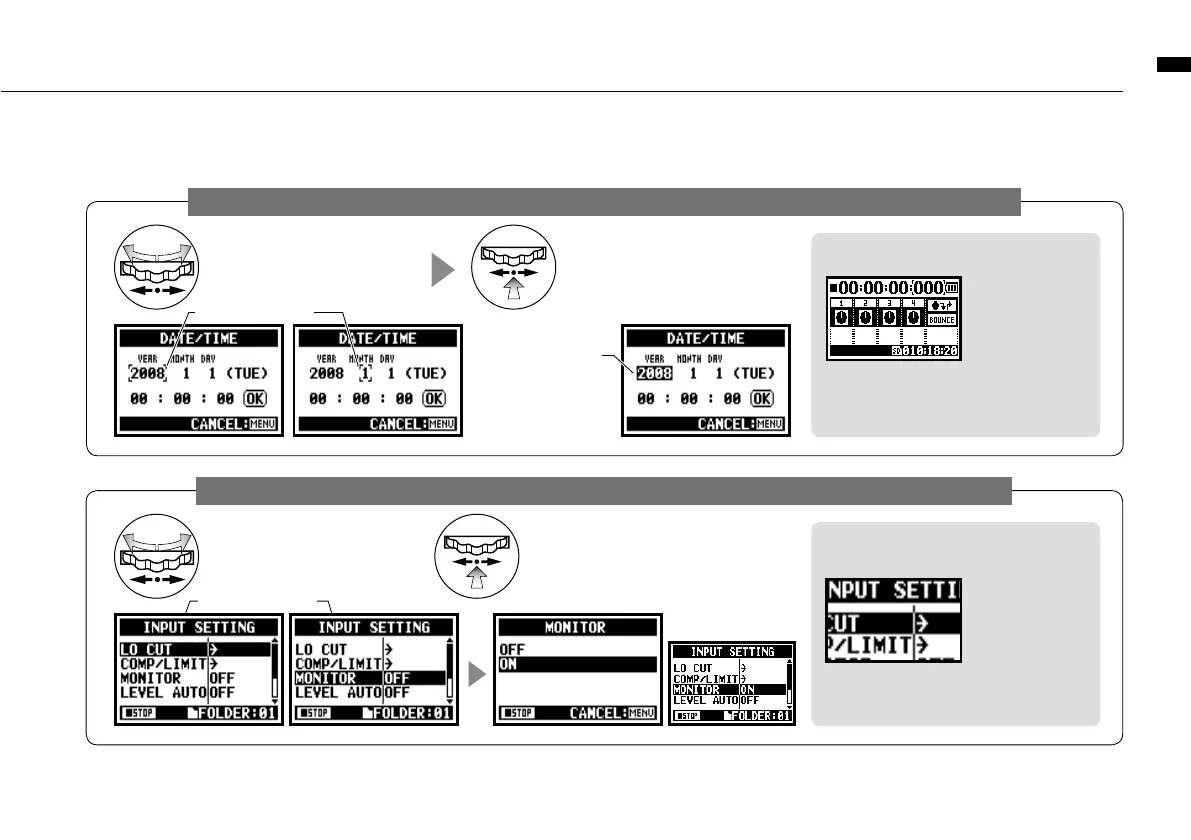
How to use [DIAL] and [MENU] buttons
026
The operation when [ ] cursor is on display (Date·Time Setting, Changing File Name Directory, etc)
The operation when the selections are listed on screen
About the ‘
⁄
’ on the selection lists
When you see
this display,
there are more
selections on the
next screen. Highlight arrow and press
[DIAL] in to move on to the next screen.
When you rotate the [DIAL],
[ ] moves accordingly.
[ ] move accordingly.
Pressing [DIAL] in, change
the numbers and letters.
The item letters or
numbers are reversed
→
Rotate [DIAL] to
change the numbers
and letters
→
Press
[DIAL] down to confirm
your selection.
[ ] move accordingly.
Push [DIAL] in, to confirm
your selection.
the screen returns back
to the previous one.
By rotating the [DIAL],
the selection lists will
move accordingly.
[DIAL] operation on the top screen
Moving [DIAL] on
the top screen,
'cursor' moves.
Pressing (highlight)
[ ] selects 'COUNTER' to enable ad-
justment or calls up the setting menu.
* Available only on MTR mode.



 To Next Page