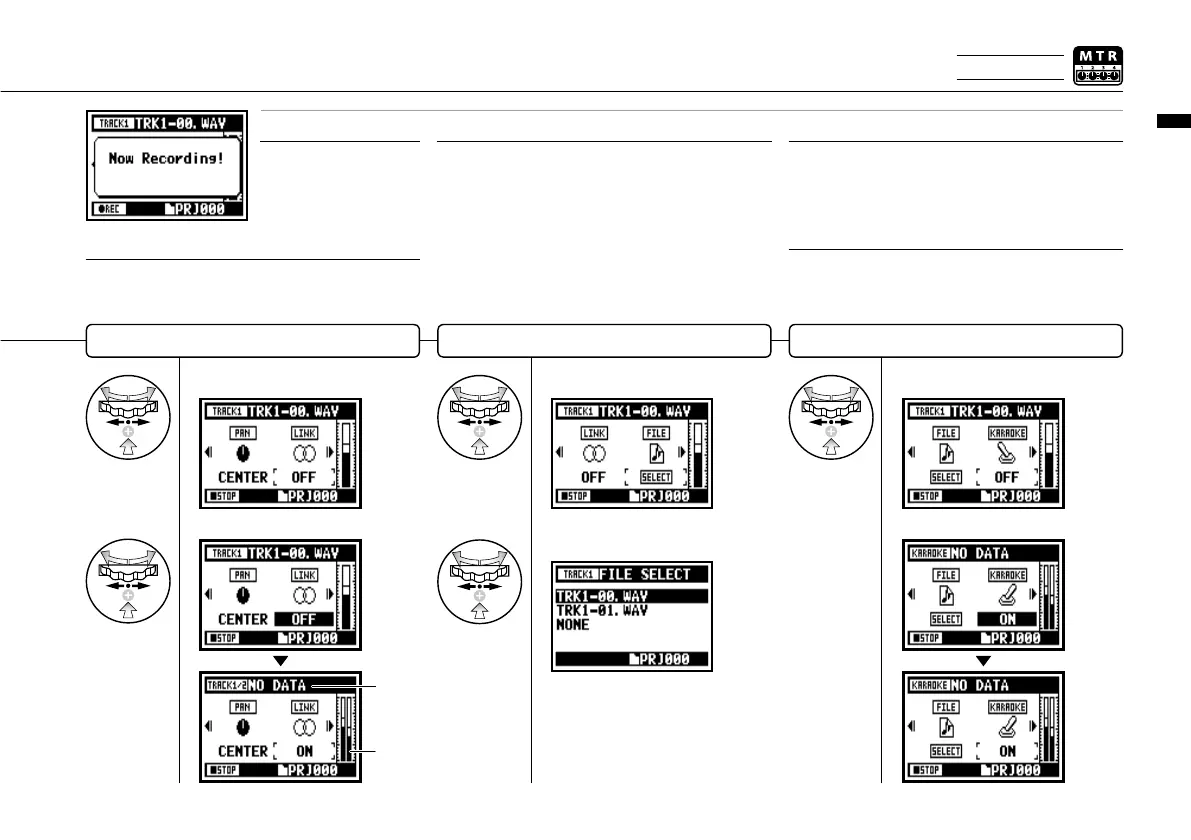
Setting / Recording: TRACK MENU in MTR mode
060
Select <KARAOKE> and press.
Setting <KARAOKE>
Set the value and press.
HINT:
Setting stereo link on creates a stereo track from tracks
1 and 2 or 3 and 4. Setting stereo link off creates a mono
track. Setting value: ON/OFF Default: OFF
STEREO LINK
Select <FILE> and press.
Allocate les to a track
Select the <FILE> to be
allocated and press.
Display for the file list available
to allocate with corresponding
file style.
• You can only playback a mono file on 'MONO TRACK' and
a stereo file on 'STEREO TRACK'.
• When <STEREO LINK> is turned on, no file will be
assigned to the track, and "NO DATA" will be displayed.
• When you change from 'ON' to 'OFF', the setting of <PAN>
returns to the previous one.
• When you change from 'OFF' to 'ON', the setting of
<LEVEL> and <PAN> return to 'DEFAULT'.
NOTE:
• You cannot record on the <KARAOKE> track.
• When the <STEREO LINK> turns on automatically with a
monaural track setting, it turns to "NO DATA" condition.
• When the <KARAOKE> track has been set, you cannot
make the other tracks <KARAOKE>.
NOTE:
Setting for <STEREO LINK>,
<FILE> and <KARAOKE> are
not available during recording,
playback and also when
tracks are armed.
NOTE:
HINT:
You can only use KARAOKE setting on one pair of stereo
tracks; either 1 and 2 or 3 and 4. In KARAOKE mode, you
can set KEY CONTROL and CENTER CANCEL operations.
Setting value: ON/OFF Default: OFF
Select <STEREO LINK> and press.
Setting <STEREO LINK>
Set the value and press.
The display of
'LEVEL METER'
changes 'STEREO'.
When change the
format, the display
says "NO DATA".
Only on MTR MODE



 To Next Page