37.21 (%)
37.31 (%)
37.35 (%)
37.25 (%)
OVERLOAD
UNDERLOAD
37.11 (rpm)
37.16 (Hz)
37.12
37.17
37.13
37.18
37.14
37.19
37.15
37.20
ALLOWED
OPERATION
Speed
Frequency
Monitored signal (37.02)
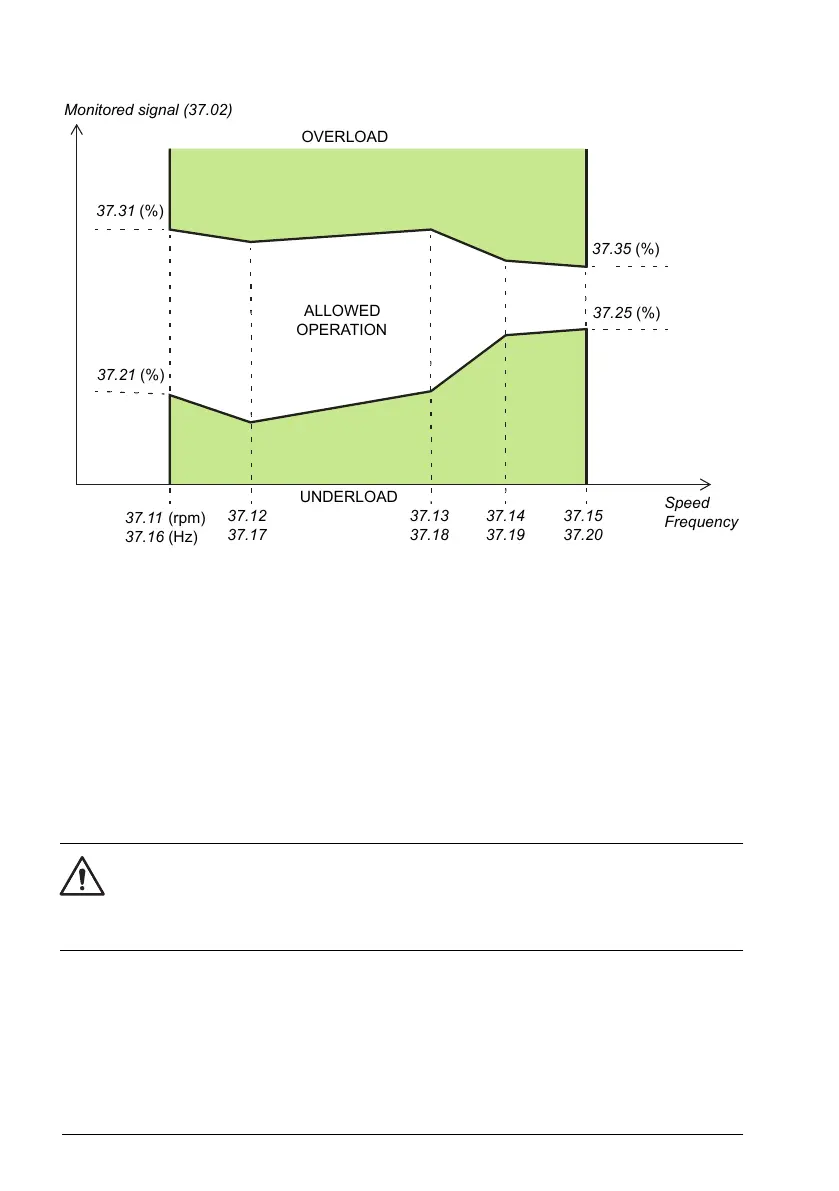
The action (none, warning or fault) taken when the signal exits the allowed operation
area can be selected separately for overload and underload conditions (parameters
37.3 and 37.4 respectively). Each condition also has an optional timer to delay the
selected action (37.41 and 37.42).
Settings and diagnostics
Parameter group: 37 User load curve (page 372).
Events: A6E6 ULC configuration (page 566), A8BE ULC overload (page 575), A8BF ULC
underload (page 575), 8001 ULC underload (page 557) and 8002 ULC overload (page 557).
■ Automatic fault resets
WARNING!
Before you activate the function, make sure that no dangerous situations can
occur. The function resets the drive automatically and continues operation after
a fault.
The drive can automatically reset itself after overcurrent, overvoltage, undervoltage and
external faults. The user can also specify a fault (excluding Safe torque off related faults)
to be reset automatically.
By default, automatic resets are off and must be specifically activated by the user.
96 Program features



 To Next Page