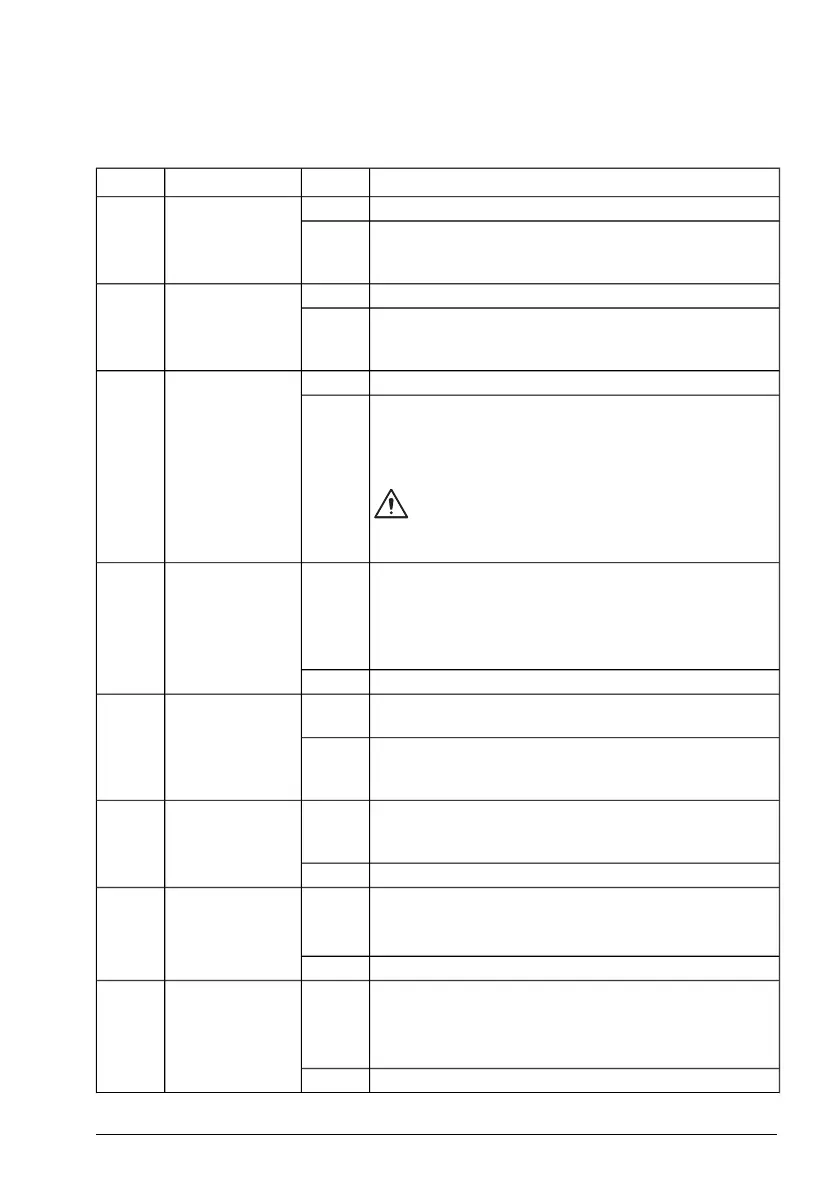
■ Contents of the fieldbus Control word (ABB Drives profile)
The upper case boldface text refers to the states shown in the state diagram (page 575).
STATE/DescriptionValueNameBit
Proceed to READY TO OPERATE.1Off1 control0
Stop along currently active deceleration ramp. Proceed to
OFF1 ACTIVE; proceed to READY TO SWITCH ON un-
less other interlocks (OFF2, OFF3) are active.
0
Continue operation (OFF2 inactive).1Off2 control1
Emergency OFF, coast to a stop.0
Proceed to OFF2 ACTIVE, proceed to SWITCH-ON IN-
HIBITED.
Continue operation (OFF3 inactive).1Off3 control2
Emergency stop, stop within time defined by drive para-
meter.
0
Proceed to OFF3 ACTIVE; proceed to SWITCH-ON IN-
HIBITED.
WARNING!
Ensure motor and driven machine can be stopped
using this stop mode.
Proceed to OPERATION ENABLED.1Run3
Note: Run enable signal must be active. If the drive is set
to receive the Run enable signal from the fieldbus, this bit
activates the signal. See also parameters 6.18 Start inhibit
status word and 6.25 Drive inhibit status word 2.
Inhibit operation. Proceed to OPERATION INHIBITED.0
Normal operation. Proceed to RAMP FUNCTION GENER-
ATOR: OUTPUT ENABLED.
1Ramp out zero4
Force Ramp function generator output to zero. The drive
will immediately decelerate to zero speed (observing the
torque limits).
0
Enable ramp function.1Ramp hold5
Proceed to RAMP FUNCTION GENERATOR: ACCELER-
ATOR ENABLED.
Halt ramping (Ramp Function Generator output held).0
Normal operation. Proceed to OPERATING.1Ramp in zero6
Note: This bit is effective only if the fieldbus interface is
set as the source for this signal by drive parameters.
Force Ramp function generator input to zero.0
Fault reset if an active fault exists. Proceed to SWITCH-
ON INHIBITED.
0=>1Reset7
Note: This bit is effective only if the fieldbus interface is
set as the source of the reset signal by drive parameters.
Continue normal operation.0
Fieldbus control through a fieldbus adapter 615



 To Next Page