NOTE: You can set dust filter maintenance reminder in the BIOS under Integrated Devices menu. By default, the Dust Filter
Maintenance is disabled. Select the interval from the list to enable the Dust Filter Maintenance option. For more information,
see Setting the Dust Filter Maintenance interval in the BIOS.
NOTE: To clean the fan filter, use the compressed air to remove the dust. Then, use a microfiber cloth to wipe away any
remaining surface dust.
About this task
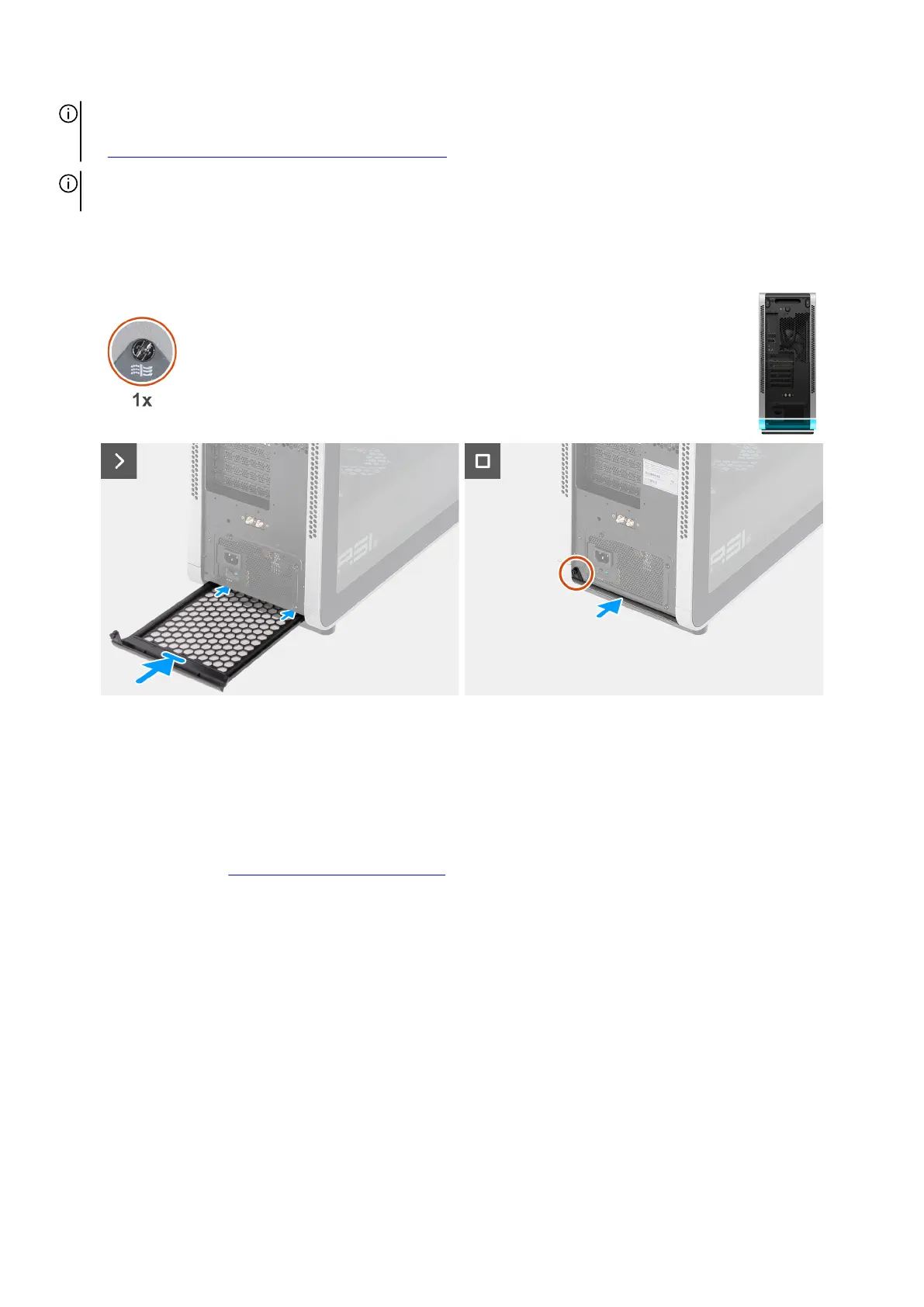
The following images indicate the location of the bottom fan filter and provide a visual representation of the installation procedure.
Figure 35. Installing the bottom fan filter
Steps
1. Insert the bottom fan filter into the slot at the bottom of the chassis.
2. Tighten the captive screw that secures the bottom fan filter to the chassis.
Next steps
1. Follow the procedure in After working inside your computer.
Front fan filter
QR code for fan filter maintenance video
The following image indicates the location of the QR code for fan filter maintenance video. Scan the QR code on the chassis to view
the top, bottom, or front fan filter maintenance video.
Removing and installing Customer Replaceable Units (CRUs) 53















 To Next Page