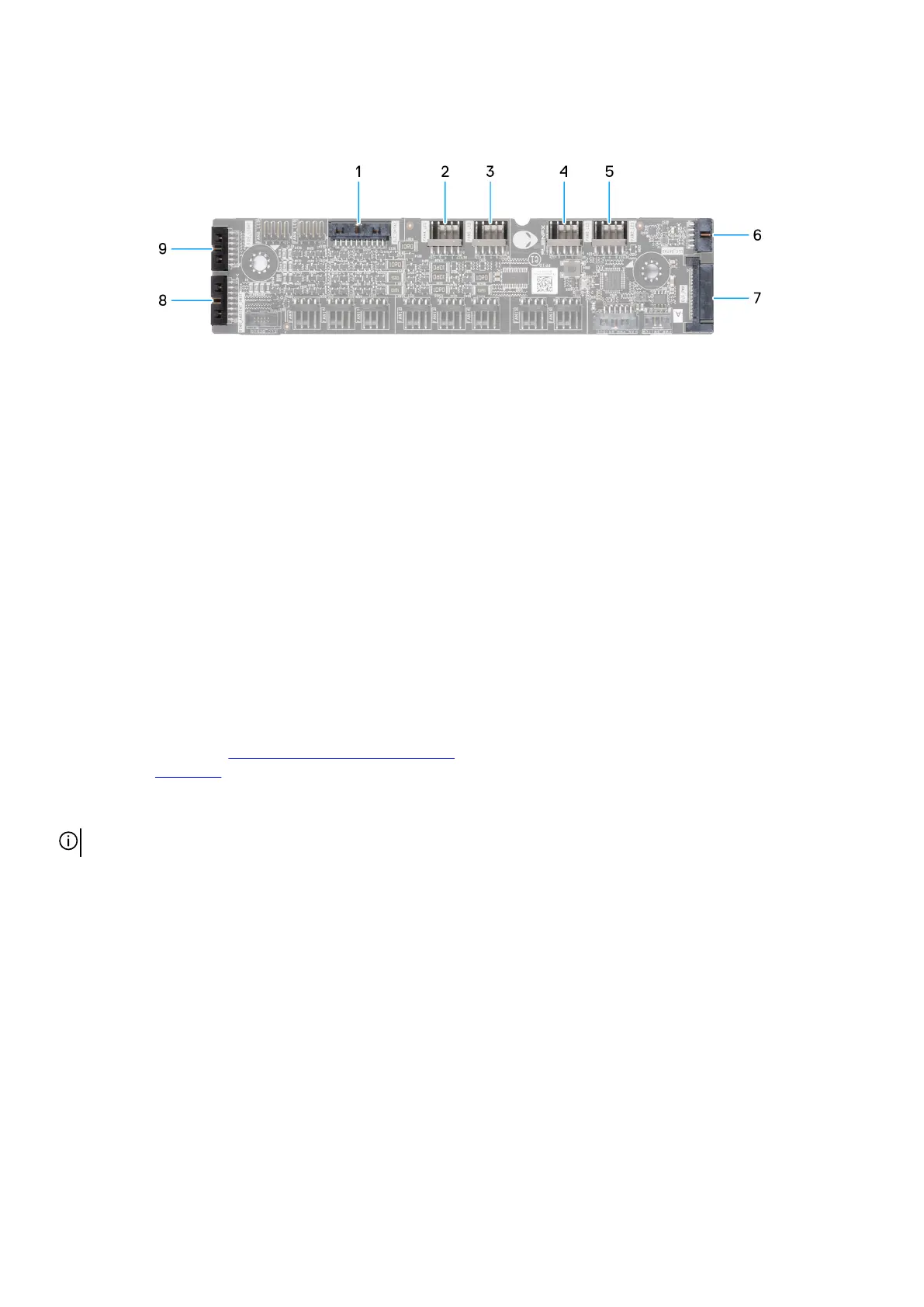
AlienFX-board connectors
Figure 80. AlienFX-board connectors
1. AlienFX data connector (ELC_DATA1)
2. Front fan LED connector (FAN4_LED)
3. Front fan LED connector (FAN5_LED)
4. Bottom fan LED connector (FAN6_LED)
5. Bottom fan LED connector (FAN7_LED)
6. AlienFX data connector (ELC_DATA2)
7. AlienFX power connector (ELC_PWR)
8. Alien head power button (RING_AMBIENT_PWBT)
9. Side-light connector (SIDE_LIGHT)
2.5-inch hard drive
Removing the 2.5-inch hard drive
Prerequisites
1. Follow the procedure in Before working inside your computer.
2. Remove the right cover.
About this task
NOTE: The 2.5-inch hard drive is sold separately.
The following images indicate the location of the 2.5-inch hard drive and provide a visual representation of the removal procedure.
Removing and installing Customer Replaceable Units (CRUs) 93















 To Next Page