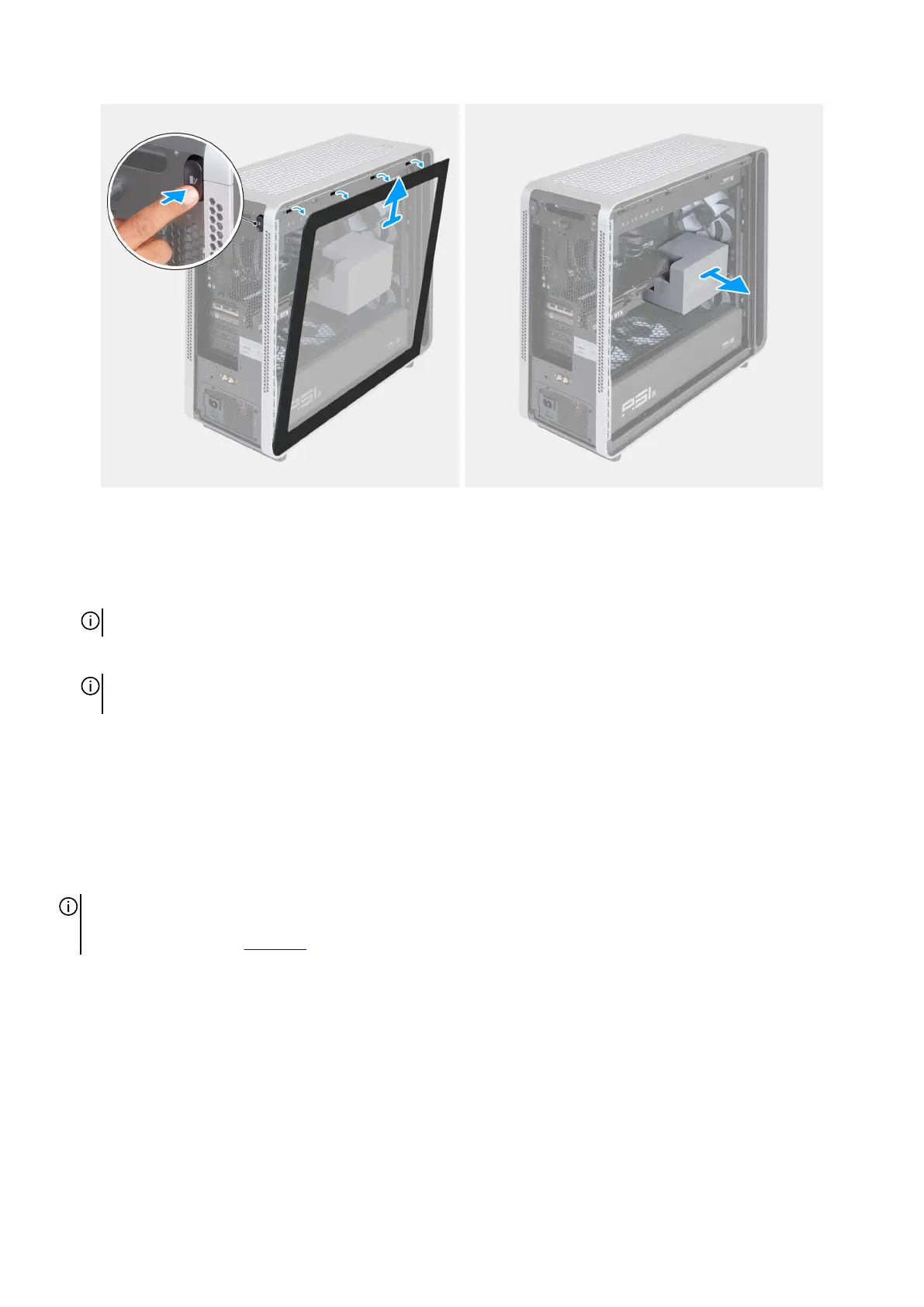
Figure 24. Removing the left cover and the midholder
Steps
1. Remove the safety screw and rotate the knob clockwise to unlock the knob.
2. Press the release button on the left side of the chassis and lift the left cover away from the chassis.
NOTE: Place the left cover in a safe place to avoid damage to the glass.
3. Remove the midholder away from the PCIe fan that secures the graphics card in place.
NOTE: Store your midholder safely. During transportation, including servicing or returning the computer, ensure that the
midholder is installed.
Installing the midholder
Prerequisites
If you are replacing a component, remove the existing component before performing the installation procedure.
About this task
NOTE: Your computer is shipped with a midholder to avoid damage to the graphics card and PCIe holder on the system board
during shipping. Remove the midholder from the computer before you turn on the computer. For more information about the
support of midholder, see midholder.
The following images indicate the location of the midholder and provide a visual representation of the installation procedure.
Removing and installing Customer Replaceable Units (CRUs) 45















 To Next Page