Set up your Alienware Area-51 AAT2250
About this task
NOTE: The images in this document may differ from your computer depending on the configuration you ordered.
NOTE: Your computer is shipped with a midholder, to avoid damage to the graphics card and PCIe holder on the system board
during shipping. Remove the midholder from the computer before you turn on the computer.
Steps
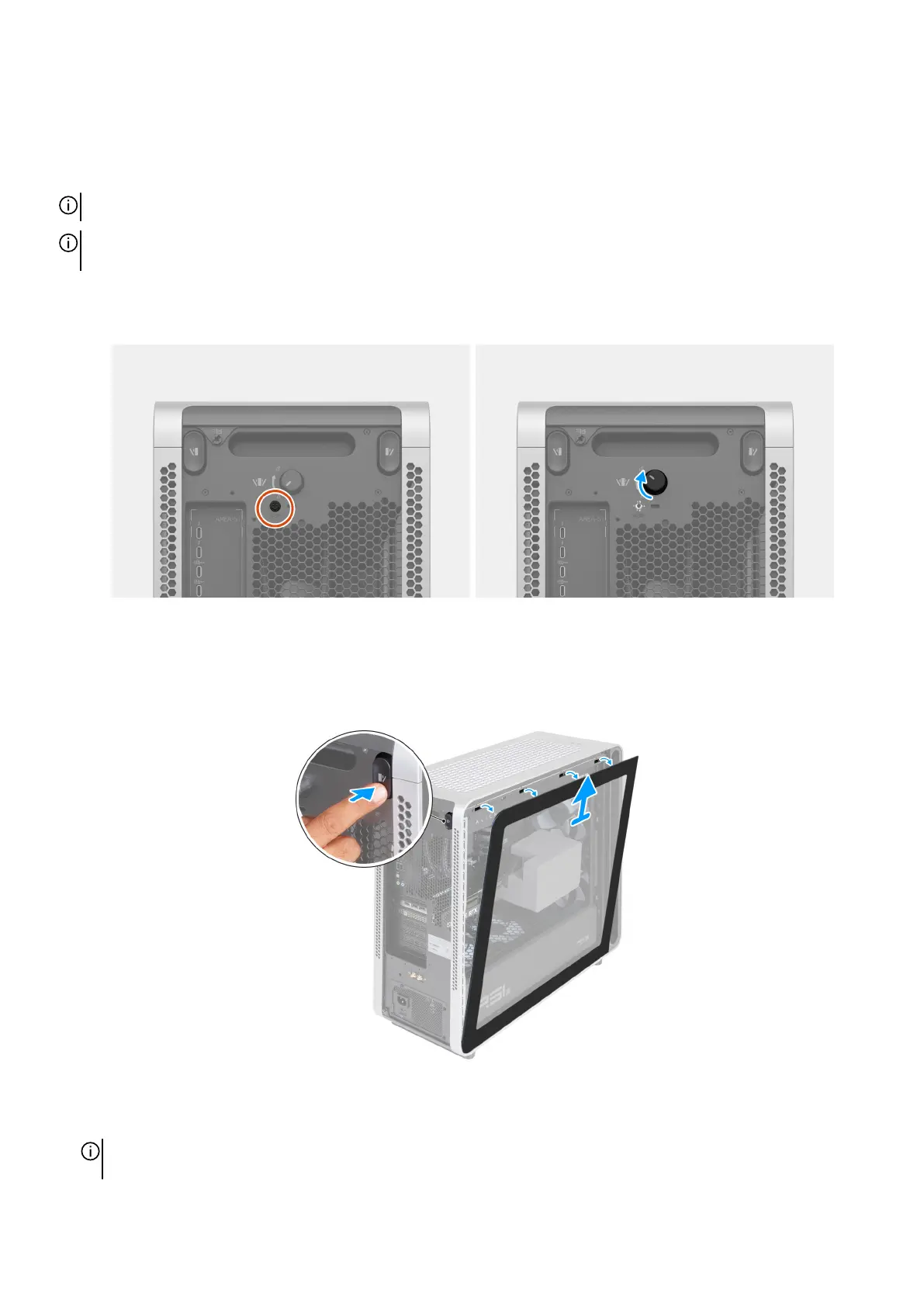
1. Remove the safety screw and rotate the knob clockwise to unlock the knob.
Figure 6. Removing the safety screw and rotating the knob
2. Press the release button on the left side of the chassis and lift the left cover away from the chassis. Place the left cover in a safe
place to avoid damage to the glass. Remove the midholder away from the PCIe fan that secures the graphics card in place.
Figure 7. Removing the left cover and the midholder
NOTE: Store your midholder safely. During transportation, including servicing or returning the computer, ensure that the
midholder is installed.
14 Set up your Alienware Area-51 AAT2250















 To Next Page