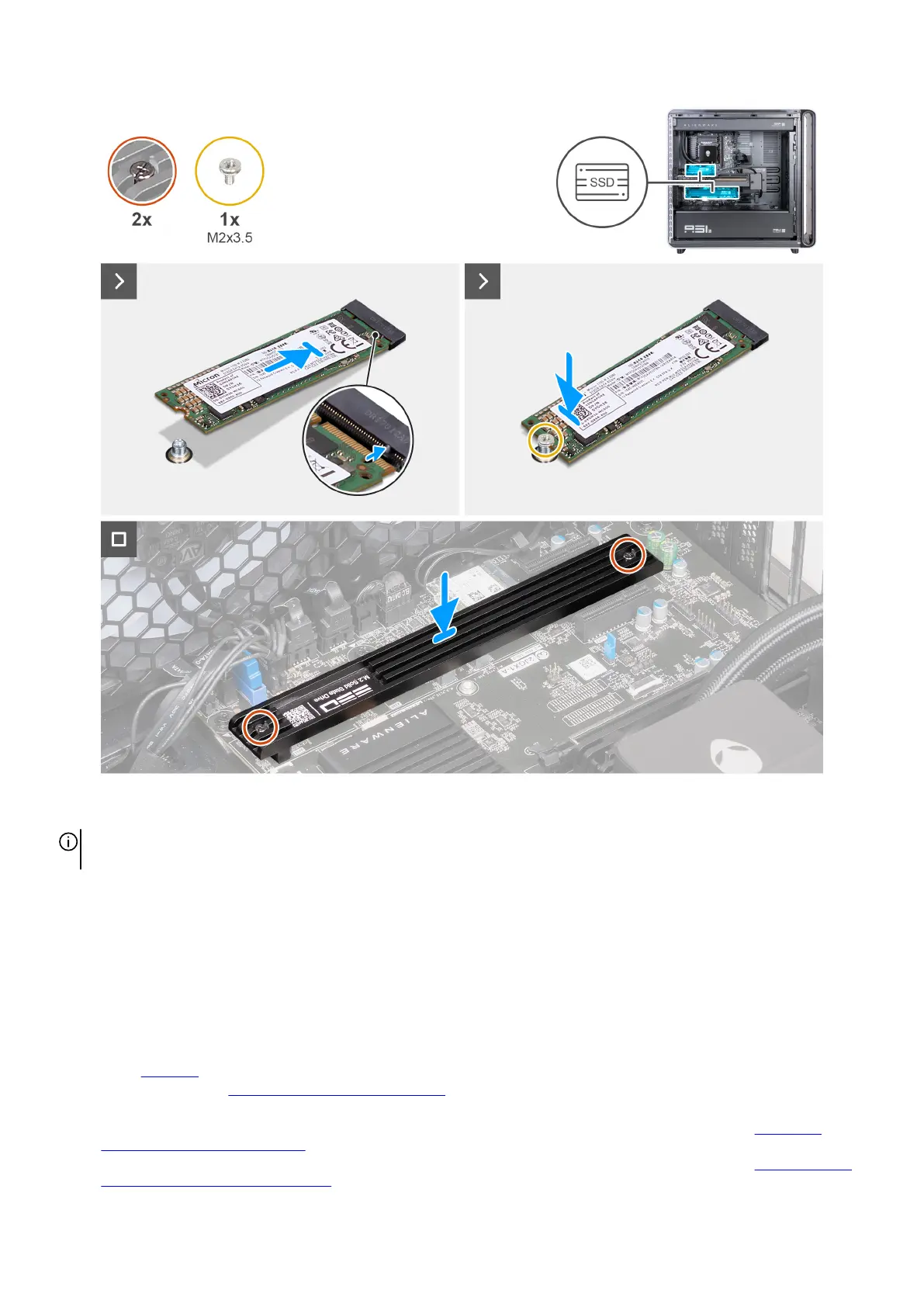
Figure 62. Installing the M.2 2280 SSD
NOTE: When replacing with a new SSD, ensure to remove the thermal pad from the old SSD and adhere the thermal pad to the
new SSD. If the thermal pad is damaged or worn out, ensure to replace it with a new thermal pad.
Steps
1. Align the notch on the M.2 2280 SSD with the tab on the SSD slot on the system board.
2. Insert the M.2 2280 SSD at a 45-degree angle into the SSD slot on the system board.
3. Press the other end of the M.2 2280 SSD down, and replace the screw (M2x3.5) that secures the M.2 2280 SSD to the system
board.
4. Tighten the two captive screws that secure the M.2 2280 SSD thermal shield to the system board.
Next steps
1. Install the left cover.
2. Follow the procedure in After working inside your computer.
3. Verify if the storage device is installed correctly (optional):
a. If you are replacing a storage device which does not have the operating system installed, follow the steps in Identifying
storage device in device manager.
b. If you are replacing a storage device which does not have the operating system installed, follow the steps in Identifying your
storage device in system setup (BIOS).
Removing and installing Customer Replaceable Units (CRUs) 77















 To Next Page