CPS100 SERIES OPERATION MANUAL
SECTION 6:
Front Panel Operation
Entire Contents Copyright 2018 by Adaptive Power Systems, Inc. (APS) • All Rights Reserved • No reproduction without written authorization from APS.
APS CPS100 Series Power Source Operation Manual Page 111 of 231
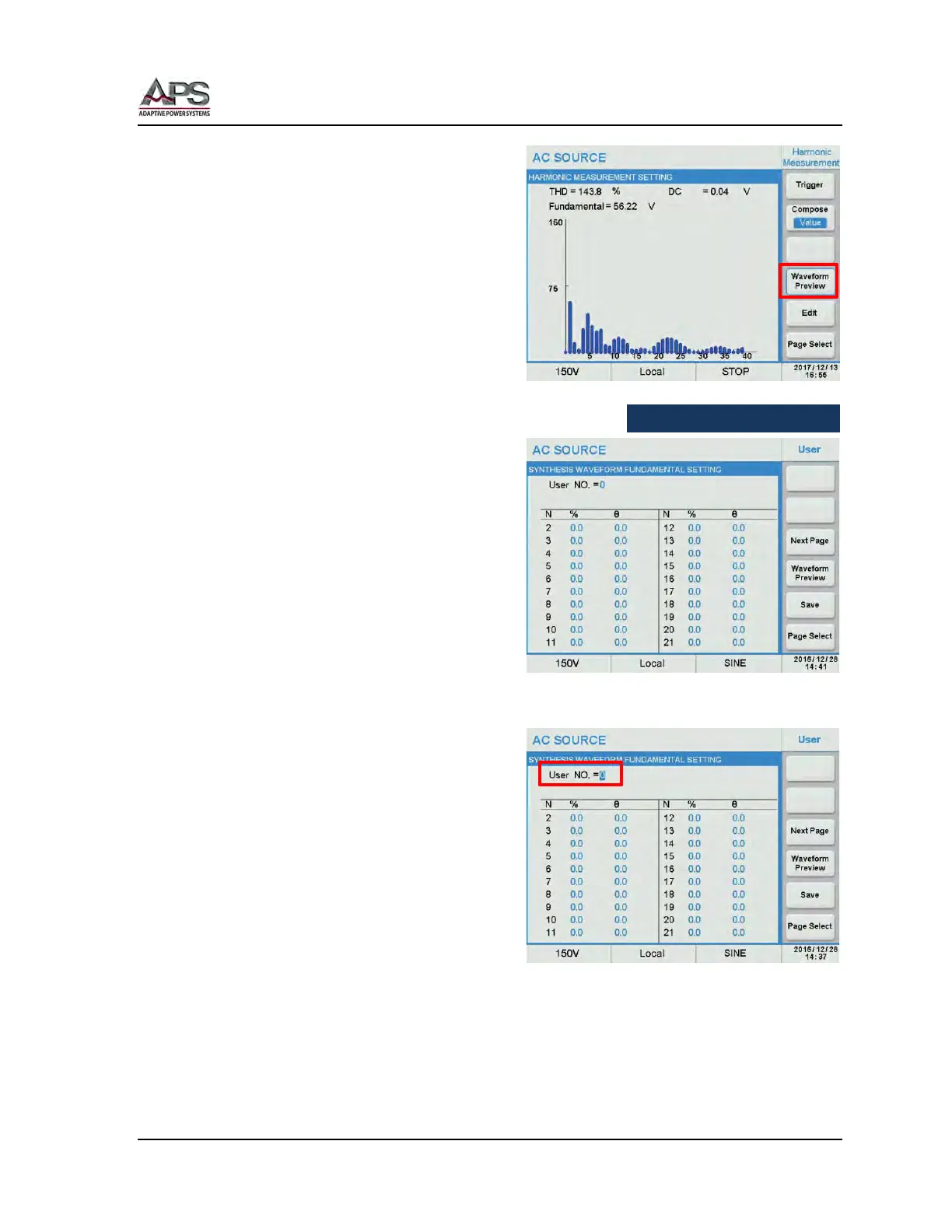
The Waveform Preview soft key displays a
graphical representation of the harmonic
measurements.
6.9.2.4 User Waveforms
The User function contains 6 sets of user
defined harmonic waveforms, USER NO. 0
through USER NO. 5. These waveforms are in
addition to the 30 harmonic waveforms
described in Section 12, ”Fixed Waveform
Library” on page 215.
Press the User soft key in the Harmonics
screen to select the User waveform settings.
Available soft keys in this screen are:
• Next Page
• Waveform Preview
• Save
The Next Page soft keys toggles between the
Harmonics 2~21 and 22~40.
To define a waveform, move the cursor to
the User NO. = field and press [Enter] to
confirm. Then select the number of the USER
waveform to create or edit.
In this example, we will create USER NO. = 1.
Use the cursor to move between harmonic
numbers and set amplitude and phase angle
as needed. Use the Next Page soft key to
edit any harmonics over 21
st
.



 To Next Page